What Is a TP-Link Deco Wi-Fi Mesh System and How Does It Work?
A mesh Wi-Fi system uses multiple nodes working together to provide a single, seamless network throughout the home. It’s different than a traditional single-router setup that broadcasts from one fixed point.
Deco is TP-Link's whole home mesh Wi-Fi system, and this guide explains what it is and how the technology behind it works. Learn about its seamless roaming, band steering, self-healing, AI-driven mesh, and Wi-Fi 7 Mesh. Learn how TP-Link Deco works in practice, and set up your Deco once you understand the system, or see how to set up Deco with an existing modem.
If you experience slow speeds after setup, visit the Deco internet speed troubleshooting guide.
Key Takeaways
- Deco is a whole-home mesh Wi-Fi system that uses multiple nodes to eliminate dead zones and provide seamless coverage on a single network name and password.
- Unlike traditional routers that broadcast from a single point, Deco uses multiple access points. One connects to the modem as the main hub, and the other nodes capture and rebroadcast the Wi-Fi signal.
- Deco supports seamless roaming, automatically connecting devices to the nearest and fastest node as users move through the home.
- Adaptive Path Selection (APS) automatically chooses the best transmission path between Deco nodes.
- Band Steering intelligently moves devices between available Wi-Fi bands based on traffic load to prevent congestion.
- Self-Healing means that if one Deco node goes offline, the system automatically reroutes data through the remaining nodes to keep devices connected.
What Is a Deco Whole-Home Wi-Fi System?
Mesh Wi-Fi is a whole-home Wi-Fi system built to eliminate dead zones and to provide uninterrupted Wi-Fi throughout your home. Mesh systems enable devices in your network to have faster speeds, greater coverage, and a more reliable connection. While traditional routers broadcast Wi-Fi from a single point, mesh Wi-Fi systems have multiple access points.
When one unit connects to the modem, it becomes the main hub. The other units — called nodes — capture and rebroadcast the Wi-Fi signal. The result is an efficient wireless network that provides a strong signal no matter where you are.
How Does a Deco Mesh Wi-Fi System Work?
Deco adopts TP-Link Mesh technology and provides the best wireless networking solution for home users.
True Seamless Roaming: Automatic Connection to the Nearest Node
Mesh devices share the same wireless network name and password, and support IEEE 802.11k/v to ensure a seamless roaming experience. Some mesh devices may also support IEEE 802.11r to further accelerate roaming. Your phone or tablet automatically connects to the fastest mesh device as you move through your home. Switching from one mesh device to another is so smooth that it’s unnoticeable, even during streaming.
AP Steering: Always Connect to the Strongest Signal
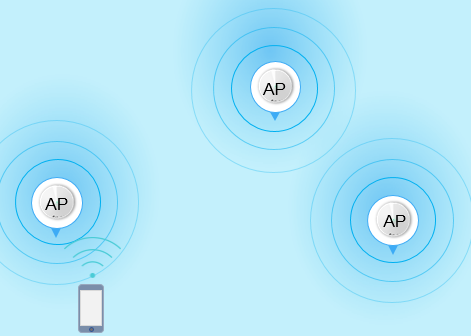
A client automatically roams to the access point (AP) with the strongest signal.
Adaptive Path Selection: Choosing the Fastest Data Route
In a network with multiple Deco nodes, APS selects the best path — 2.4 GHz, 5 GHz or 6GHz— to transmit data between units.
Ethernet Backhaul: If two Deco units are connected directly with an Ethernet cable (one of the Deco units works as an access point), then APS will prefer to transmit data with an Ethernet connection.
Powerline Backhaul: As for Deco P7, APS supports choosing the best path among the 2.4 GHz band, 5 GHz band, and Powerline, to transmit data between two Deco units.
Band Steering: Steer to Fastest Available Band
With multiple bands sharing a single Wi-Fi name, Band Steering intelligently directs dual-band or tri-band devices to the fastest, least congested available frequency. For instance, 5GHz or 6GHz-capable clients are steered to high-speed bands, while 2.4GHz-only devices seamlessly connect to the 2.4GHz band.
Self-Healing: Automatic Rerouting When a Node Goes Offline
If one Deco node goes offline, the system automatically reroutes data through the remaining nodes to keep you connected.
IoT Mesh: Whole-Home Smart Home Coverage
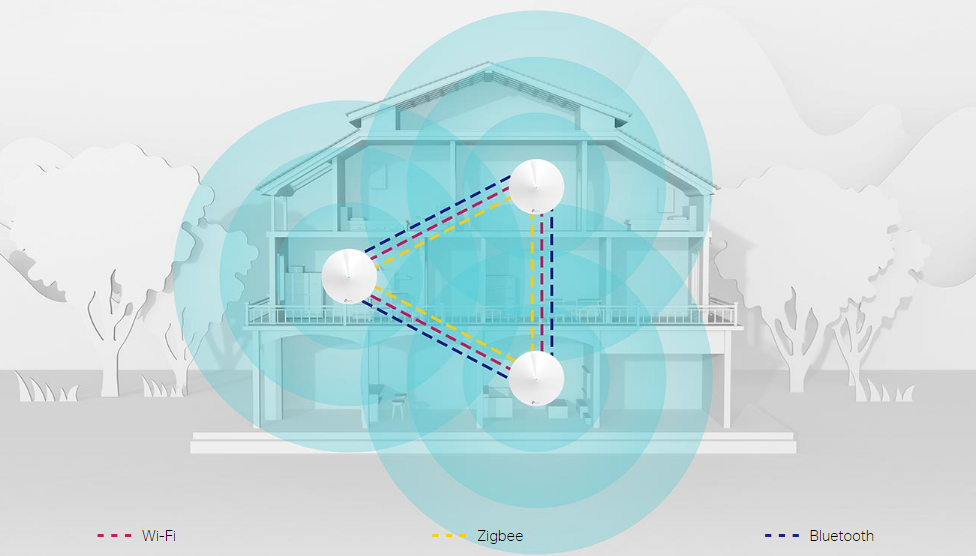
Unlike traditional smart hubs, TP-Link Mesh Technology provides whole-home IoT coverage with Wi-Fi, Bluetooth and Zigbee integrated into a single system. Enjoy the magic of your smart home in every room with TP-Link Mesh Technology. Say goodbye to countless hubs. (Only Deco M9Plus supports IoT). For further information, refer to IoT Compatibility List.
Wi-Fi 7 Mesh: Wi-Fi Like Never Before
The Deco 7 Wi-Fi series brings TP‑Link's advanced Wi-Fi 7 mesh router technology to every corner of your home. Built on the latest 802.11be standard, these mesh Wi-Fi systems deliver faster speeds, lower latency, and greater capacity than previous Wi-Fi generations. Choose the set‑up that works for your household, whether it's a small home or large multi‑story property, packed with streaming devices, gaming setups, and smart home hubs.
AI-Driven Mesh: A Network That Learns and Adapts
Armed with AI Mesh technology, Deco automatically learns and improves itself from experience. This provides the ideal mesh Wi-Fi unique to your home and network environment.
Walk through your home and enjoy seamless streaming at the fastest possible speeds.
Advanced Algorithms: Automatically adjusts channel settings and transmission power levels across neighboring APs to maximize coverage and minimize interference.
Self-Learning Capability: Intelligently learns the network environment, client quality, and user behaviors to custom-create the optimal Wi-Fi network.
Looking For More
Полезен ли беше този ЧЗВ?
Вашите отзиви помагат за подобряване на този сайт.

_EU_V1.0_01_normal_20220817025337r.jpg)


TP-Link Community
Still need help? Search for answers, ask questions, and get help from TP-Link experts and other users around the world.