How to Adjust Time Zones for Smart Device in the Kasa App
When you set up a schedule for a smart home device, it will take effect based on the time you set in the Kasa app. Sometimes the time may be inaccurate and needs adjustment. Incorrect time zone or location settings can cause schedules and timers to run at the wrong time and affect sunset- and sunrise-based automations. If your Kasa time is not synced with your current location, this guide covers the steps to set and sync it based on your location.
Key Takeaways
- Kasa device schedules and timers run based on the time zone set in the Kasa app, not the phone's system time.
- The time zone and location settings are found under Me > Settings > Location and Time in the Kasa app.
- If the time is still inaccurate after syncing, use the "Enter Location Manually" option as an alternative.
- Sunset and sunrise-based schedules depend on accurate location settings in the Kasa app.
Steps to Adjust Time Settings in the Kasa App
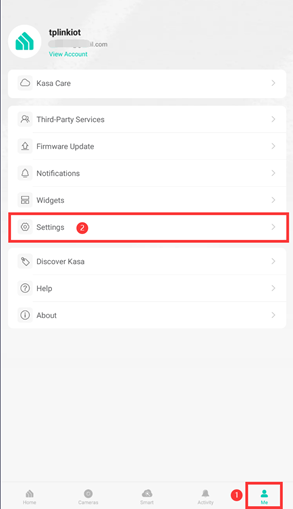
Step 1. Open the Kasa app, select the Me tab in the bottom right corner, then tap Settings.
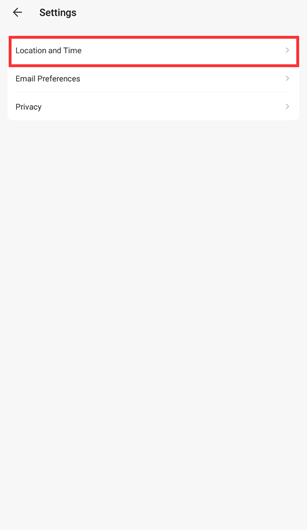
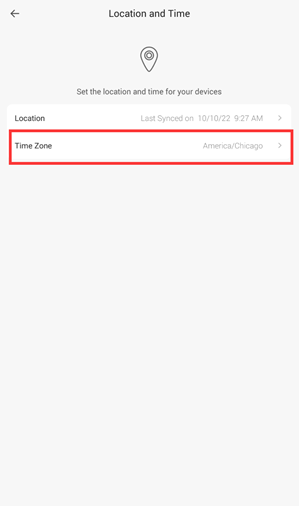
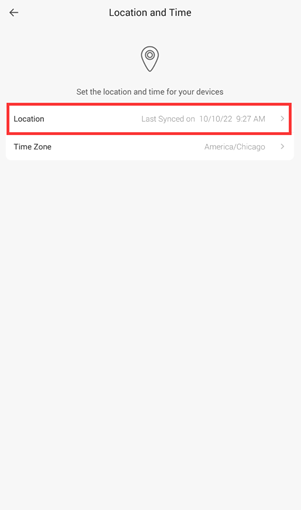
Step 2. Select Location and Time, then tap Time Zone.
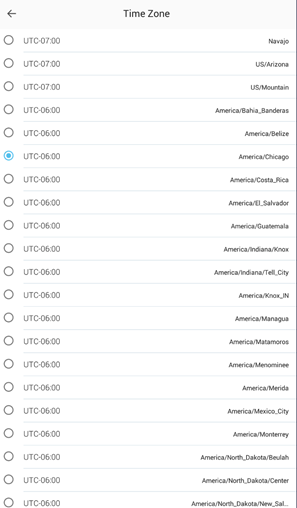
Step 3. Select your current Time Zone. Make sure to select the correct option for standard time or daylight saving time.
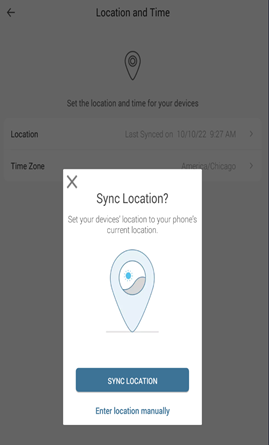
Step 4. Go back and select Location, then Tap Sync Location.
Step 5. Check that the time zone matches your local time. If it does, you can proceed to set your schedule. If the time is still incorrect, repeat the steps and select Enter Location Manually instead.
To learn more about each function and configuration, please visit the Download Center to download the manual for your product.
Looking For More
Полезен ли беше този ЧЗВ?
Вашите отзиви помагат за подобряване на този сайт.

.一级列表页_normal_1589945311674c.png)

TP-Link Community
Still need help? Search for answers, ask questions, and get help from TP-Link experts and other users around the world.