Do Kasa Cameras support Night Vision?
 60183
60183Introduction
Kasa Cam includes built‑in Night Vision, allowing you to see what’s happening up to 30 feet in darkness. Actual night‑vision range may vary by device model. Refer to this article for details: Difference between the Kasa Spot Cam and Kasa Cam.
Configuration
To configure the camera Night Vision setting:
Step 1. Open the Kasa app and tap your camera’s device card to enter the live view. Then tap the button in the top-right corner.
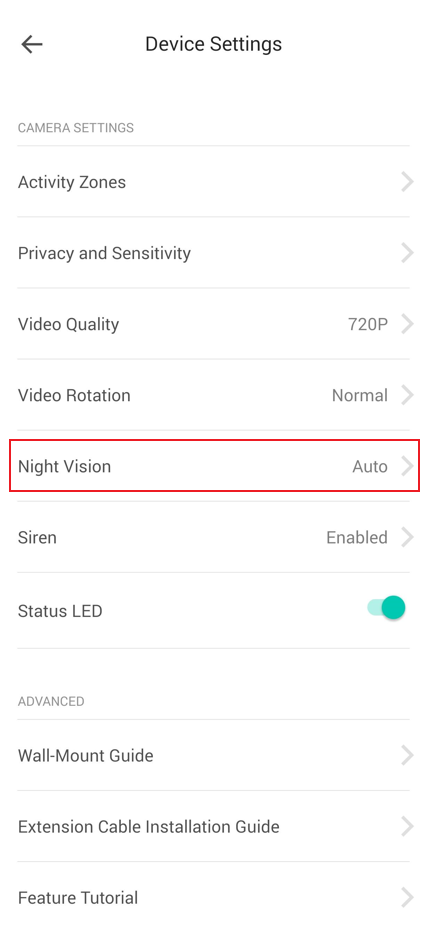
Step 2. In Device Settings page, select Night Vision.
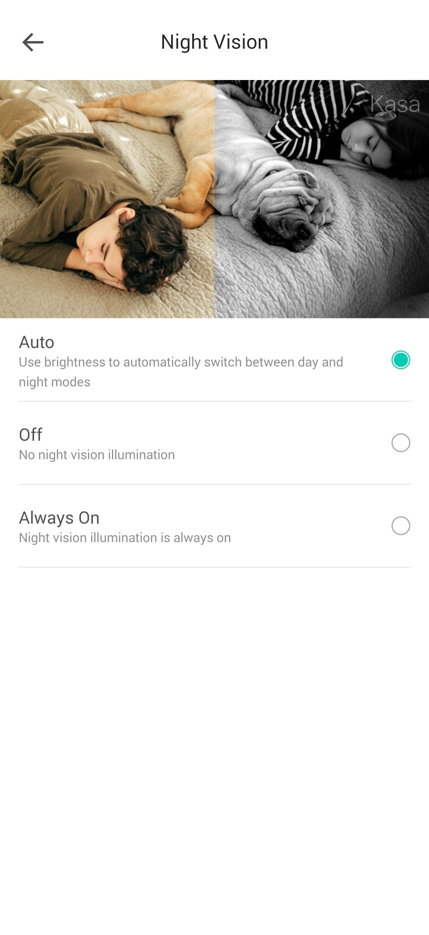
Step 3. Choose your preferred Night Vision mode.
- Auto: Use Brightness to switch between day and night modes automatically.
- Off: No night vision illumination.
- Always On: Night vision illumination is always on.
QA
Q1: Why do I see glare when my camera is placed in front of a window or near a wall edge?
A1: Glare can occur when the infrared LEDs used for night vision reflect off the window glass. Positioning the camera near a wall edge may also cause uneven infrared reflection, which can affect night‑vision image quality.
Get to know more details of each function and configuration, please go to Download Center to download the manual of your product.
Полезен ли беше този ЧЗВ?
Вашите отзиви помагат за подобряване на този сайт.