How to Install External Antennas on a TP-Link 4/5G Deco to Boost Cellular Signal
A Deco external antenna boosts 4G/5G cellular signal on compatible TP-Link Deco devices. It is separate from the Deco's built-in Wi-Fi antenna and is not included in the product package. An external antenna is only recommended when the Deco cannot achieve a strong enough cellular signal on its own. Before installing, your Deco must be set to 4G/5G Router Mode. This page covers compatibility requirements and a three-step installation process completed through the Deco app.
Key Takeaways
- External antennas on 4/5G Deco devices improve cellular signal strength. They are separate from Wi-Fi antennas and are only recommended when the Deco cannot achieve a strong enough signal on its own.
- Before installing, verify that the antenna supports the correct working frequency and band for your specific Deco model.
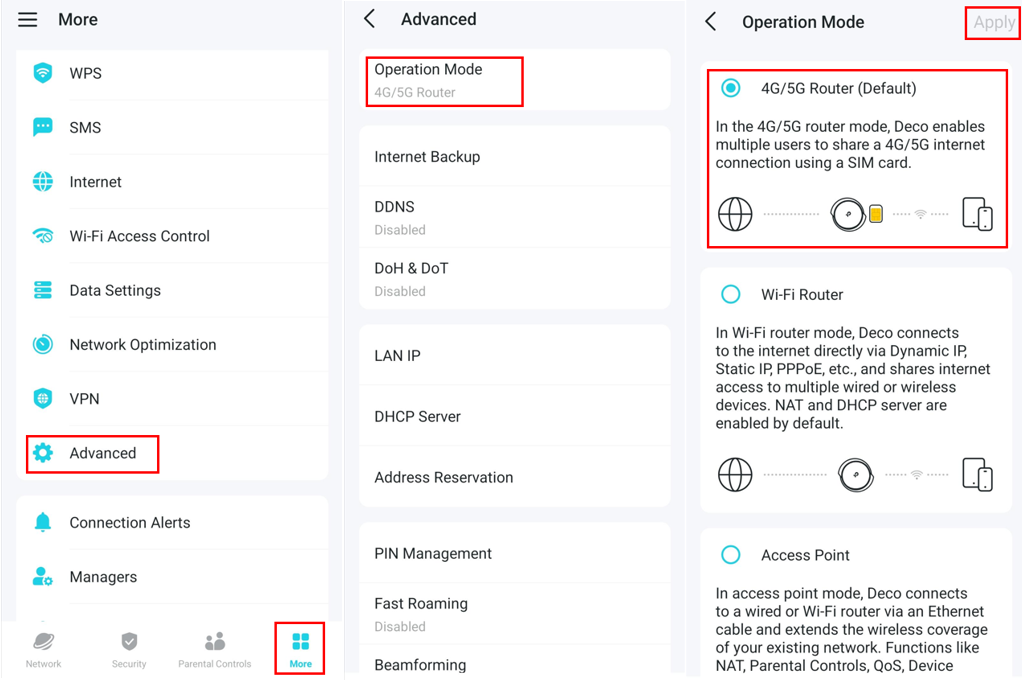
- The Deco must be set to 4G/5G Router Mode before an external antenna can be used. Confirm or change this in the Deco app under More > Advanced > Operation Mode.
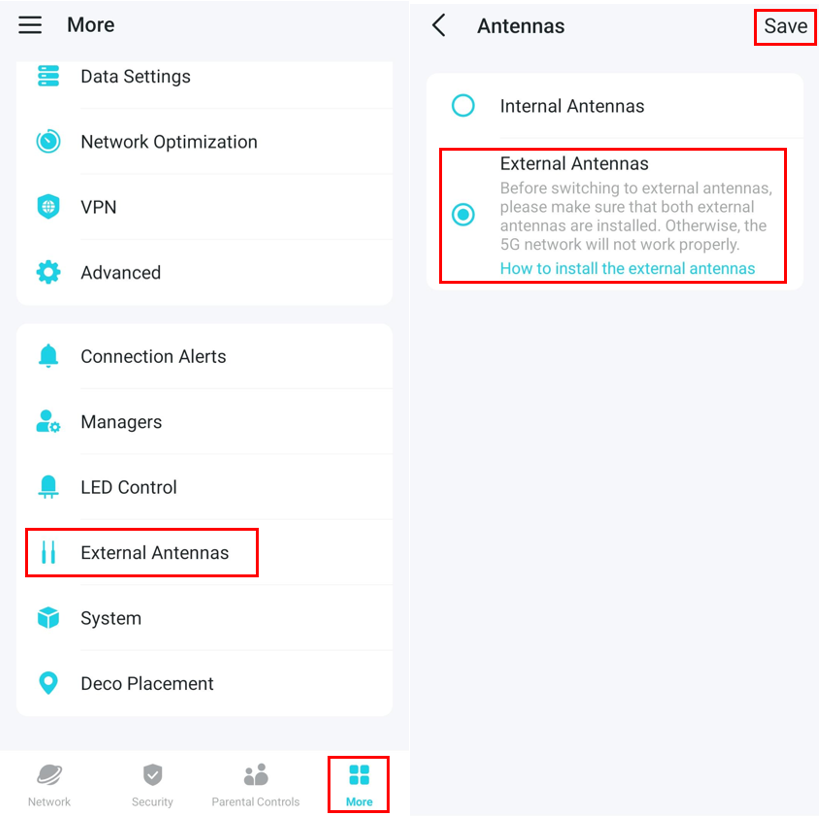
- After physical installation, the external antenna must be enabled in the Deco app under More > External Antennas.
- The external antenna switch does not support remote management. Connect to the Deco's Wi-Fi to enable it.
Before You Begin
- Make sure your antennas support the working frequency and band.
|
|
Supported band |
|
Deco X80-5G V1 |
5G: N41/N77/N78/N79 4G FDD-LTE: B1/B3/B5/B7/B8/B20/B28 |
|
Deco X50-5G V1/V2 |
5G: N1/N3/N5/N7/N8/N20/N28/N38/N40/N41/N77/N78 |
|
Deco BE65-5G V1 |
5G:N1/N3/N5/N7/N8/N20/N28/N38/N40/N41/N75/N76/N77/N78 4G TDD-LTE: B38/B40/B41/B42 |
|
Deco X10-5G V1 Deco X1500-5G V1 |
5G: N1/N3/N5/N7/N8/N20/N28/N38/N40/N41/N77/N78 |
|
Deco X50-4G V1 |
4G FDD-LTE: B1/B3/B5/B7/B8/B20/B28 4G TDD-LTE: B38/B40/B41 |
|
Deco X20-4G V1 |
4G FDD-LTE: B1/B3/B5/B7/B8/B20/B28 4G TDD-LTE: B38/B40/B41 |
|
Deco X10-4G V1 |
4G FDD-LTE: B1/B3/B5/B7/B8/B20/B28 4G TDD-LTE: B38/B40/B41 |
- Make sure your antenna's connector type is correct. (You may refer to the product’s Specifications page for details.)
- Make sure your Deco is working in 4G/5G Router Mode. If not, open the Deco app and go to More > Advanced > Operation Mode to switch the mode.
How to Install External Antennas on a Deco
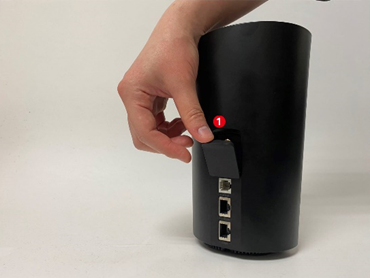
Step 1. Remove the antenna cover on the back of your Deco.
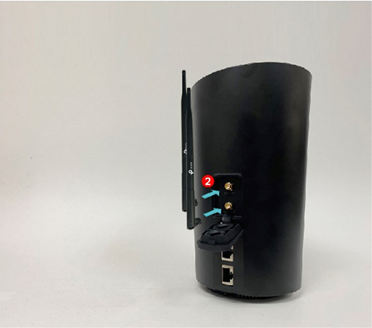
Step 2. Connect both of your 4/5G external antennas to the antenna ports.
Note: The antenna picture is for reference only. You'll usually want to use an outdoor antenna. Indoor antennas are often similar to the Deco's internal antenna. We cannot guarantee the performance while using any third-party 4/5G external antennas.
Step 3 Open the Deco app, go to More > External Antennas, and enable External Antennas. When enabled, the external antennas will replace part of the internal antennas.
Note: The external antenna switch does not support remote management. Connect to the Deco's Wi-Fi to enable it.
External Antenna Troubleshooting
When do I need to use an external antenna?
If you are in a remote area, far from the base station, and the router cannot get a good signal, consider using an external antenna.
What are the possible reasons when the external antenna has no apparent effect?
You can try swapping the antenna connectors. Check the antenna's orientation. Make sure the antenna supports the same frequency band as your current dialing frequency. Indoor antennas generally don't work well.
Why can't I enable the external antenna on the Deco app?
The external antenna cannot be turned on or off remotely. To enable it, connect to the Deco's Wi-Fi first.
Learn more details about each function and configuration. Please go to the Download Center to download the manual for your product.
Looking For More
Полезен ли беше този ЧЗВ?
Вашите отзиви помагат за подобряване на този сайт.



TP-Link Community
Still need help? Search for answers, ask questions, and get help from TP-Link experts and other users around the world.