How to Clean the Side Brush of Tapo Robot Vacuum
You may refer to either this video or the steps below:
Clean once a month and replace every 3-6 months.
Step 1. Press and hold the side brush, use a screwdriver to unscrew the side brush clockwise, remove debris, and wipe with a damp cloth if necessary.
Step 2. Turn the side brush anticlockwise to secure it tightly and ensure it is properly installed.
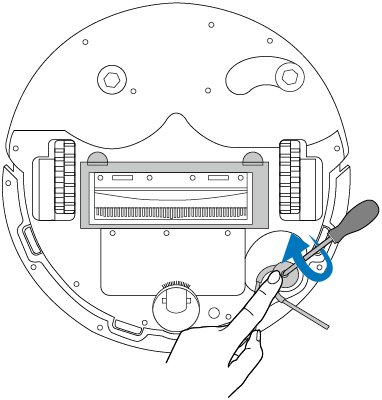
Clean once a month and replace every 3-6 months.
Step 1. Press and hold the side brush, use a screwdriver to unscrew the side brush clockwise, remove debris, and wipe with a damp cloth if necessary.
Step 2. Turn the side brush anticlockwise to secure it tightly and ensure it is properly installed.
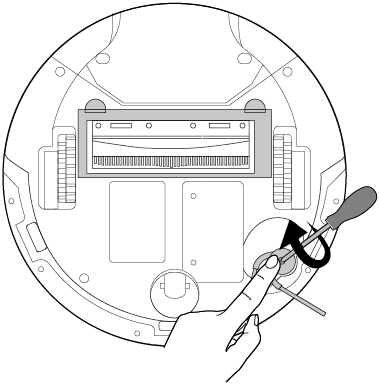
Clean once a month and replace every 3-6 months.
Step 1. Use a screwdriver to unscrew the side brush clockwise, remove debris, and wipe with a damp cloth if necessary.
Step 2. Turn the new side brush anticlockwise to secure it tightly and ensure it's properly installed.

Clean once a month and replace every 3-6 months.
Step 1. Pull firmly to remove the side brush and remove any entangled debris. Wipe with a damp cloth if needed.
Step 2. Re-install the side brush and press it tightly to ensure it is installed in place.

Clean once a month and replace every 3-6 months.
Step 1. Pull firmly to remove the side brushes and remove any entangled debris. Wipe with a damp cloth if needed.
Step 2. Identify the colors on the side brushes and the slots of the robot vacuum (black-black; white-white.)
Step 3. Re-install the new side brushes according to the colors and press them tightly to ensure they are installed in place.

Clean once a month and replace every 3-6 months.
Step 1. Pull firmly to remove the side brush and remove any entangled debris. Wipe with a damp cloth if needed.
Step 2. Re-install the side brush and press it tightly to ensure it is installed in place.

Looking For More
Полезен ли беше този ЧЗВ?
Вашите отзиви помагат за подобряване на този сайт.



TP-Link Community
Still need help? Search for answers, ask questions, and get help from TP-Link experts and other users around the world.