PTZ Cameras: Zoom, Auto-Tracking, and Best Uses Explained
Published: August 10, 2026 | Last Updated: August 10, 2026
Quick Answer
- Pan tilt and PTZ are not the same thing. A VIGI C540 pans and tilts with a fixed 4 mm lens and no zoom, and a C540V adds 3x through dual-lens switching. Real optical zoom, 25x, belongs to the InSight speed dome line, which is not listed on the Philippine site.
- Presets, patrol routes, and pattern scans are what turn movement into coverage, with VIGI pan tilt models supporting up to eight points per patrol route.
- Auto-tracking has two documented modes for a reason. Continuous tracking suits open, simple scenes, while event-based tracking exists because busy ones defeat it.
A PTZ camera moves. Motors rotate it horizontally and vertically, and on a true PTZ, an optical zoom lens magnifies what it is pointed at, which is why one unit can cover ground that would otherwise take several fixed cameras. The catch is in that word "true": a great many cameras are sold as PTZ pan and tilt but barely zoom, or do not zoom at all, and the zoom is the half that decides whether you can identify anyone at the far end of a yard. That distinction, and the fact that a moving camera is only ever pointed at one place at a time, are what this article is about.
Table of Contents
What Does a PTZ Camera Actually Do?
Is a Pan Tilt Camera the Same as a PTZ Camera?
How Do Presets and Patrol Routes Work?
Does Auto-Tracking Actually Work?
What Happens to Detection Zones When the Camera Moves?
Can You Stop a PTZ Camera Pointing Where It Should Not?
What Does a PTZ Camera Actually Do?
It physically moves, and on a full PTZ it optically magnifies. Those are two separate capabilities, and they are worth separating, because plenty of cameras have the first without much of the second.
PTZ stands for pan, tilt, zoom. Pan is horizontal rotation, driven by a motor inside the housing. Tilt is vertical movement, driven the same way. Zoom is magnification, and this is where the important distinction sits. Optical zoom physically moves lens elements to magnify the scene, so the image keeps its detail as it closes in. Digital zoom crops into the picture the sensor already captured and enlarges the crop, which means detail does not increase; it just gets bigger and softer. A camera advertising a large zoom figure that turns out to be digital gives you a bigger view of the same limited information.
Movement ranges differ substantially between models, so read pan and tilt travel off the specification tab of the model you are considering rather than assuming a figure. The same goes for zoom: what matters is the optical figure, and whether there is one at all.
What it means for you: when comparing PTZ models, find the optical zoom figure first. If the listing quotes only a total or digital zoom number, that is the answer to a different question from the one you are asking.
Is a Pan Tilt Camera the Same as a PTZ Camera?
No, and this is the most expensive misunderstanding in the category. A pan tilt camera moves. Whether it zooms, and how much, varies from a great deal to not at all.
VIGI's own range makes the point cleanly. The C540 is a pan-tilt camera with a fixed 4 mm lens, so it can look anywhere within its travel and cannot magnify anything it finds. The C540V is a dual-lens varifocal pan tilt model offering 3x zoom, achieved by switching between a short and a long lens at a set magnification threshold rather than by a continuously moving zoom block. The InSight PTZ5425 is a speed dome carrying 25x optical zoom, which is a PTZ in the conventional sense of the term.
Those are three different products for three different jobs, and the gap between the first and the third is not incremental.
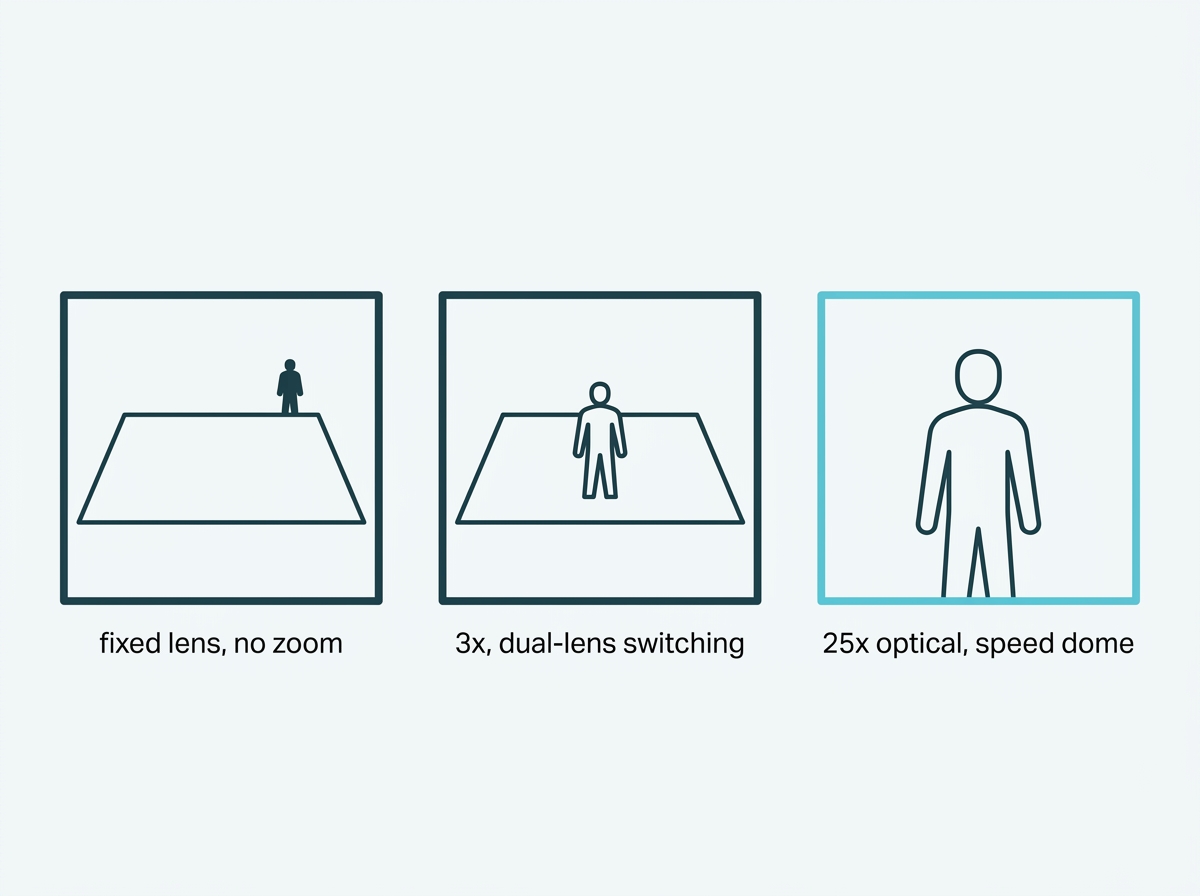
What it means for you: decide first whether you need to recognize someone at distance or only to see that something is happening across a wide area. The second is a pan tilt job. The first needs real optical zoom, and only a speed dome class camera delivers it.
How Do Presets and Patrol Routes Work?
A preset saves a position so the camera can return to it instantly. A patrol strings presets into a route it runs by itself. Together they are what turns a movable camera into automated coverage rather than something a person has to steer.
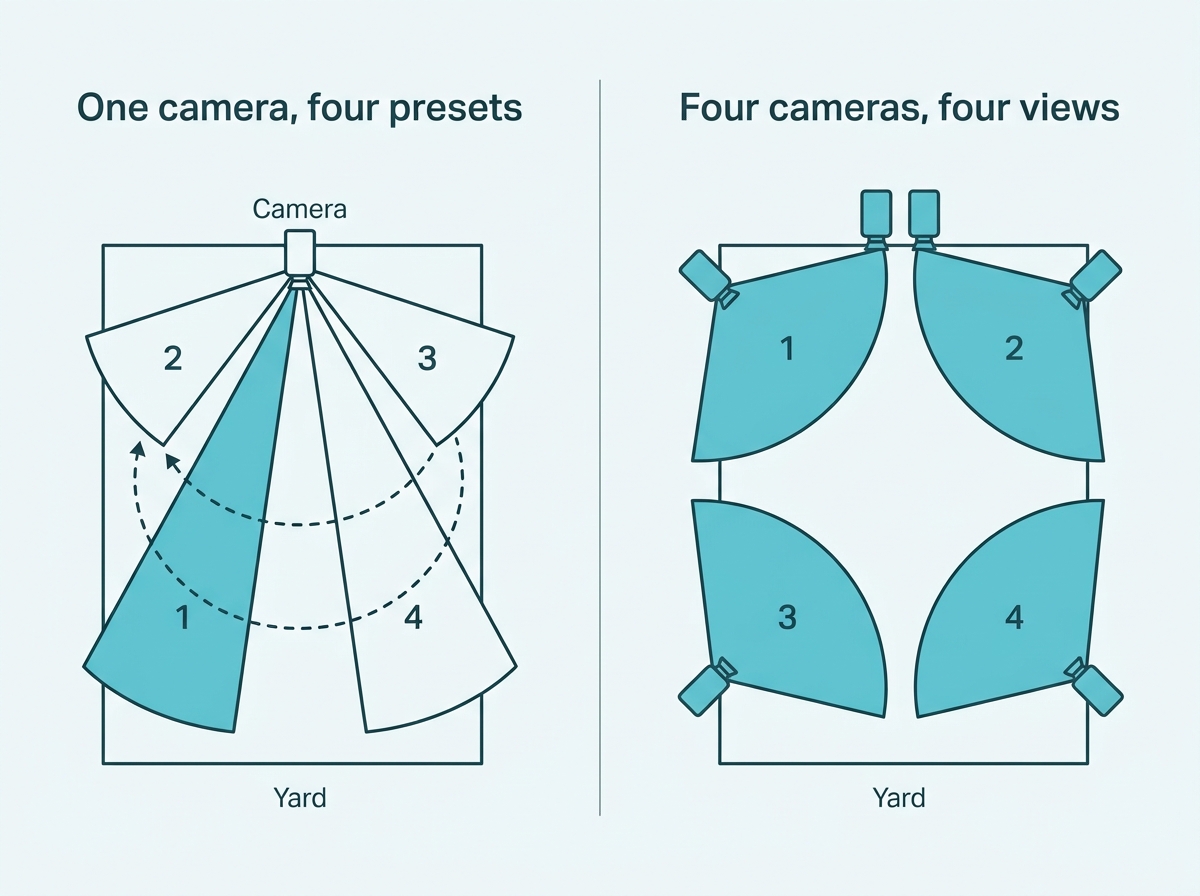
A preset stores the pan angle, the tilt angle, and the zoom level as one saved state, which is why calling a preset both aims and magnifies in a single action. On VIGI pan tilt cameras, patrol routes support up to eight points each, so one camera can cycle a gate, a loading bay, a yard entrance, and a perimeter corner without anyone touching it.
Speed dome models, where available, add a third mode. Alongside Preset and Patrol, they support Pattern Scan, which records and replays a continuous movement rather than a series of fixed points, and the three together cover most unattended arrangements. There is also a Park function, which returns the camera to a chosen preset, path, or pattern automatically when nobody has operated it for a set time. That is worth configuring deliberately, because it decides where the camera sits by default, which is to say where it is pointed during the majority of hours when nothing is happening.
Manual control remains available at any time through the pan, tilt, and zoom controls in the web interface, the app, or the recorder, including a 3D positioning mode where clicking or dragging on the live image re-centers and magnifies the selected area. There is also a home position button that returns the view to a configured default in one press.
What it means for you: map the route before you mount the camera. Write down each position you need it to visit, and if that list runs past eight points on a pan-tilt model, you are describing a job for more than one camera.
Does Auto-Tracking Actually Work?
Yes, in the conditions it was designed for, and the vendor's own documentation is unusually straight about what those are.
VIGI's Smart Tracking documentation describes two distinct modes, and the split tells you everything about the limitation. Auto Tracking is described as suitable for open and relatively simple environments where moving targets need to be followed continuously. Event-Based Smart Tracking is described as intended for more complex scenarios, where tracking is triggered only by events you have configured, and it is the mode enabled by default. Tracking duration can be set to continue until the target leaves the view, or to a custom limit.
The manufacturer ships the more conservative mode as the default and reserves continuous tracking for quiet scenes. VIGI's own product material says the same thing in gentler words, noting that tracking follows a path efficiently where there should be little movement in the area, with a footnote that the figures come from laboratory conditions.
The practical consequence in a busy space is that a camera trying to follow everything follows nothing usefully, and drifts away from the position you actually wanted covered. Event-based tracking addresses that by only breaking away from the patrol when a rule you set is broken, such as a line crossing at an entrance. And when tracking ends, the Park setting decides what happens next, which is why leaving Park unconfigured tends to produce a camera pointed at wherever the last piece of movement happened to lead it.
What it means for you: in an open yard or a quiet driveway, continuous tracking is worth switching on. On a shop floor, a lobby, or anywhere with steady foot traffic, use event-based tracking and set Park deliberately, or the camera will spend its day chasing customers instead of watching the door.
What Happens to Detection Zones When the Camera Moves?
They stop matching the scene, unless the camera is built to handle it. This is the problem unique to moving cameras, and it is easy to miss until the alerts stop making sense.
A detection zone, an intrusion area, or a line-crossing boundary is drawn on the live image. On a fixed camera, the image never changes, so the line stays over the doorway forever. On a PTZ, the moment the camera pans to its next preset, that line is still sitting in the same place on the frame while the frame is now showing somewhere else entirely. The line that guarded a gate is now drawn across an empty wall.
Manufacturers solve this in different ways. On the InSight PTZ5425, TP-Link states that its 3D Detection Regions keep detection areas aligned with actual targets during PTZ movement, which is the capability that makes smart detection meaningful on a camera that does not hold still. Setting the rules themselves works much as it does on a fixed camera, with detection on a speed dome offering a sensitivity value from 1 to 100 and a confidence level of low, medium, or high, adjusted per rule.
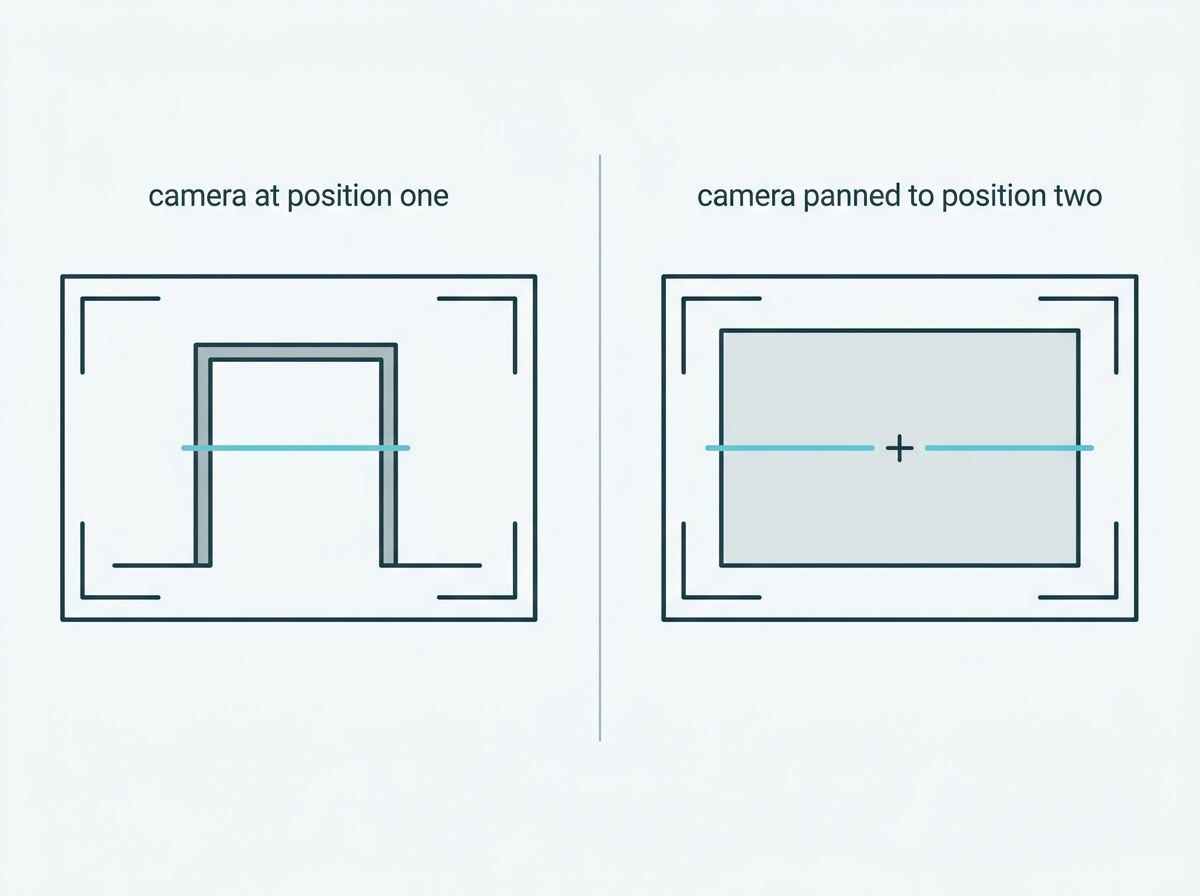
What it means for you: if you intend to run smart detection and patrol routes at the same time, confirm the model handles detection regions across movement. If it does not, your realistic options are to run detection only at a single fixed position, or to accept alerts that mean nothing once the camera has moved on.
Can You Stop a PTZ Camera Pointing Where It Should Not?
Yes, with a movement limit set in the camera itself, and for a Philippine business this is not an optional refinement.
VIGI cameras support a PTZ limit, which sets boundaries on pan, tilt, and zoom travel so the camera physically cannot move past a chosen point. TP-Link's documentation states the purpose directly: where cameras are installed in privacy areas or near walls, the movement range can be specified to ensure privacy. Both limits in a direction have to be set for the setting to save, left and right together, or up and down together. Maximum zoom ratio can be capped at a specific value between 1 and 24, or left unrestricted, in which case the device maximum applies.
That matters because a moving camera is the one type that can end up pointed somewhere nobody intended. NPC Circular 2024-02 requires that where a camera can pan, tilt, or zoom, those functions must not result in surveillance of private spaces such as a neighboring backyard or the interior of a private residence. A fixed camera satisfies that at installation, by being aimed correctly once. A PTZ satisfies it only if its travel is bounded, because an operator, a patrol route, or a tracking event can otherwise take it somewhere the Circular does not permit.
Privacy masking covers the same ground from the other direction, blocking out parts of the view so they are never recorded. On a camera that moves, the limit is the more reliable of the two, because it prevents the camera reaching the position at all rather than obscuring it after the fact.
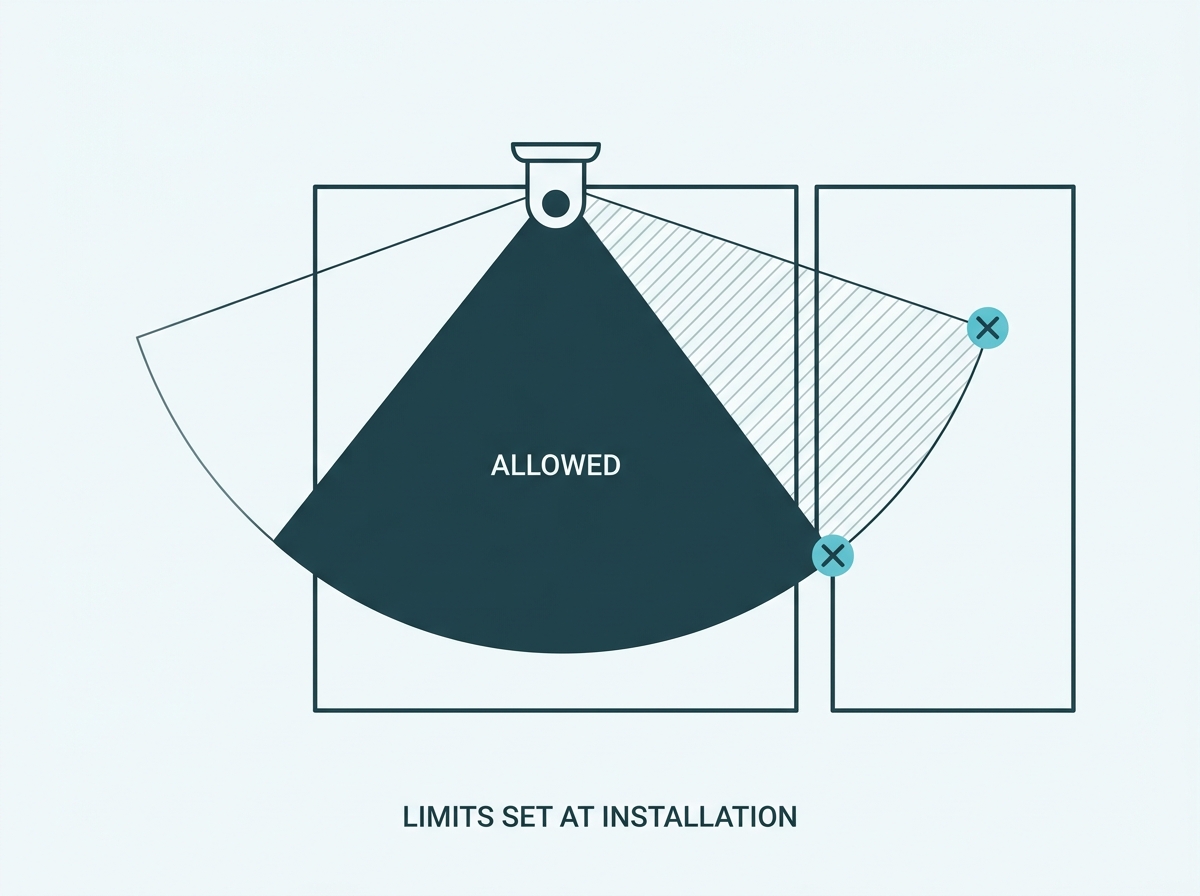
What it means for you: set the pan, tilt, and zoom limits during installation, not later, and set them by walking the boundary of what the camera is allowed to see. If a neighbor's window falls inside the camera's travel, that is a configuration task with a legal obligation attached rather than a preference.
PTZ or Several Fixed Cameras?
It depends on whether you need reach or continuity, and the honest answer for most large sites is both.
A PTZ reaches. One unit covers a wide area and can close in on detail anywhere within it, which no fixed camera can do outside its own frame. But a moving camera is pointed at exactly one place at any given moment, so everywhere else in its patrol is unwatched until it comes back around. A fixed camera cannot reach, and it never looks away.
Feature-to-Benefit: Where a PTZ Earns Its Cost
|
Setting |
Why a PTZ fits |
What still needs a fixed camera |
|
Large car parks |
Wide coverage with the reach to close in on a specific bay or vehicle |
The entry and exit lanes, which need continuous coverage |
|
Warehouse and industrial yards |
One camera patrols several zones on a route instead of several cameras each watching one |
The loading dock in use, where nothing can be missed |
|
Building perimeters |
Broad rotation covers a long boundary from a single mounting point |
Doors and gates, which are the points that actually get used |
|
Large retail floors and lobbies |
Patrol covers a wide space and an operator can take manual control during an incident |
Tills and stockroom doors, which need uninterrupted view |
|
Sites with someone watching live |
Manual override and 3D positioning let a person follow an event as it happens |
Anything that must be reviewable afterwards regardless of where the PTZ was pointed |
A PTZ suits large open areas where you occasionally need detail from anywhere within them, and it suits sites with someone available to take manual control. Fixed cameras suit the specific points that must never go unwatched, which in almost every setting means the doors, the tills, and the loading bays. Most sites that buy a PTZ end up using it for the open ground and keeping fixed cameras on the pinch points, and that combination is usually cheaper than covering the open ground with fixed units alone.
One more consideration for a small site: if the area is small enough that two or three fixed cameras cover it completely, a PTZ adds cost and a moving part without adding coverage. The trade-off only starts paying above a certain size.
Where a moving camera fits alongside everything else you are specifying is covered in the CCTV & Security Camera Buying Guide Philippines.
What it means for you: list the places that must be watched continuously and the places you only need to reach occasionally. The first list is your fixed camera count. If the second list is long and spread out, that is where the PTZ goes.
To compare pan tilt and speed dome models by zoom, tracking, and detection features, browse VIGI cameras, or see VIGI's PTZ camera lineup. For choosing between camera types more broadly, see our guide to choosing the right camera for the space.
Frequently Asked Questions
What does PTZ stand for in security cameras?
Pan, tilt, and zoom. Pan is horizontal rotation, and tilt is vertical movement, both driven by motors inside the housing, while zoom is magnification. On a full PTZ, that zoom is optical, meaning lens elements physically move so detail is preserved as the view closes in.
Is a pan tilt camera the same as a PTZ camera?
Not necessarily, and the difference is zoom. A pan tilt camera moves but may have a fixed lens with no zoom at all, as the VIGI C540 does, or a modest 3x through dual-lens switching, as the C540V does. A speed dome such as the InSight PTZ5425 carries 25x optical zoom, which is what most people picture when they read PTZ, though that model is not currently listed on the Philippine site.
Is optical zoom better than digital zoom?
For identifying anything, yes. Optical zoom physically moves lens elements so the magnified image keeps its detail, while digital zoom crops into the picture already captured and enlarges the crop, which makes the subject bigger without making it clearer. Compare models on their optical figure and treat digital zoom as a convenience.
Does auto-tracking work well in crowded areas?
Not reliably, and the manufacturer's own documentation reflects that. VIGI offers continuous Auto Tracking for open and relatively simple environments, and Event-Based Smart Tracking, the default mode, for more complex scenes where tracking fires only on rules you have configured. In busy spaces, the event-based mode is the one to use.
How many preset points can a patrol route hold?
On VIGI pan tilt cameras, patrol routes support up to eight points each, with a preset storing the pan angle, tilt angle, and zoom level as a single saved position. Speed dome models also offer Pattern Scan, which replays a recorded continuous movement rather than a set of fixed points.
Can a PTZ camera be stopped from pointing at a neighbor's property?
Yes, using a PTZ limit, which bounds pan, tilt, and zoom travel so the camera physically cannot reach a given position, and TP-Link documents it as a privacy measure for cameras installed near walls or private areas. This matters in the Philippines because NPC Circular 2024-02 requires that pan, tilt, and zoom functions not result in surveillance of private spaces.
Should I choose a PTZ camera or several fixed cameras?
It depends on whether the priority is reach or continuity. A PTZ covers a wide area and can close in on detail anywhere within it, but is only pointed at one place at a time, while a fixed camera cannot reach beyond its frame but never looks away. Most larger sites use a PTZ for open ground and fixed cameras on doors, tills, and loading bays.
Final Thoughts
Two things decide whether a PTZ is the right purchase, and neither appears in the product name. The first is whether it actually zooms optically, because pan and tilt without magnification buys you a camera that can look anywhere and resolve nothing at distance, and a good part of what is sold as PTZ falls into that category. The second is that a moving camera is only ever watching one place, so every position on its patrol route is a place it is not looking at for most of the day.
Neither is a reason to avoid PTZ. They are the reasons the sensible arrangement on most sites is a PTZ for the open ground and fixed cameras on the handful of points that must never go unwatched. And on any site in the Philippines, the movement limits are part of the installation rather than an optional refinement, because a camera that can travel is a camera that can travel somewhere it should not.
If you want that worked out before you buy, bring three things to a VIGI specialist: a rough plan of the area with the positions you need reached marked on it, the farthest distance at which you need to recognize a person or a vehicle, and a note of any neighboring property that falls within a camera's possible travel. You will get back an answer on whether the job needs a pan-tilt camera or a speed dome, how many fixed cameras still belong on the pinch points, and where the pan, tilt, and zoom limits should be set before the system goes live.