Security Camera Maintenance Checklist: Weekly to Annual
Published: August 11, 2026 | Last Updated: August 11, 2026
Quick Answer
- Split the work by cadence. Weekly for what a machine cannot see, such as obstruction and misalignment. Monthly for cleaning. Quarterly for physical inspection, storage, and a retrieval test.
- Run a footage retrieval drill every quarter. If someone requests footage of themselves, Philippine privacy rules give you five working days to arrange a viewing and fifteen to supply a copy.
- Do not diarize firmware updates. Turn on automatic updates, then check after a security advisory, and use batch upgrade for anything left manual.
A camera system rarely fails all at once. It degrades: a lens films over, a drive fills, a firmware version falls behind, and none of it shows on a live view. The failure surfaces at the one moment it matters, when someone needs footage from three weeks ago, and it turns out the system stopped recording properly before then. Maintenance is what turns that into a small inconvenience found early. The single check most routines skip is also the most important one, and for a business it is not optional at all: actually retrieving footage and confirming it exports useably, rather than confirming the camera is switched on.
Table of Contents
Why Do Camera Systems Fail Quietly?
What Should a Maintenance Schedule Cover?
How Often Do Lenses and Housings Need Attention?
What Is a Footage Retrieval Drill?
How Should Firmware Be Kept Current?
What Should an Access Review Cover?
What Does the Law Expect You to Maintain?
Why Do Camera Systems Fail Quietly?
Because everything that goes wrong first goes wrong invisibly. A live picture on a screen tells you the camera has power and a network connection. It tells you nothing about whether that image is being written to a disk, whether the disk is healthy, whether the retention setting is doing what you think, or whether you can get the footage out again.
That is the gap maintenance exists to close, and it is why a checklist built only around "is it online" gives false confidence. The camera being online is the one thing that was probably fine anyway.
Some of this the system will tell you if you let it. VIGI recorders can raise real-time alerts for disk anomalies, video loss, and devices dropping offline, which converts three of the quiet failures into notifications. Switching those on is the highest-value maintenance task there is, because it works continuously rather than whenever someone remembers.
What it means for you: enable the health alarms first, then build the routine around what a machine cannot notice, which is dirt, physical damage, drift in aim, and whether the footage is actually usable.
What Should a Maintenance Schedule Cover?
Four cadences, sorted by how fast each thing goes wrong. Treating every task as equally urgent is what makes maintenance schedules get abandoned.
Feature-to-Benefit: Maintenance by Cadence
|
Cadence |
Tasks |
What it catches |
|
Weekly |
Confirm every camera is present, look for obstructions, check nothing has shifted out of aim |
Growth, weather, and accidental knocks, none of which raise an alert |
|
Monthly |
Clean lenses and housings, check night performance, confirm recording schedules are still active |
Image quality degrading gradually, and schedule changes nobody logged |
|
Quarterly |
Physical inspection of mounts, seals, and cabling, check storage headroom, run a footage retrieval drill |
Weather damage at seals, storage filling, and the retrieval chain failing |
|
Annually |
Full system review, access and account audit, backup power test |
Accounts belonging to people who left, and power protection nobody has tested |
Weekly checks cover what changes physically and fast; monthly covers cleaning and confirming the system is still set up the way you left it; quarterly covers weather, storage, and whether footage can actually be produced, and annually covers the security and resilience questions that do not change often but matter when they do. Firmware sits outside this table because it should be automated rather than scheduled, which the section below explains.
Outdoor cameras and indoor cameras do not need the same attention. Weather, dust, and insects only apply to one of them, so an outdoor camera earns more of the physical checks while both follow the same firmware and access review.
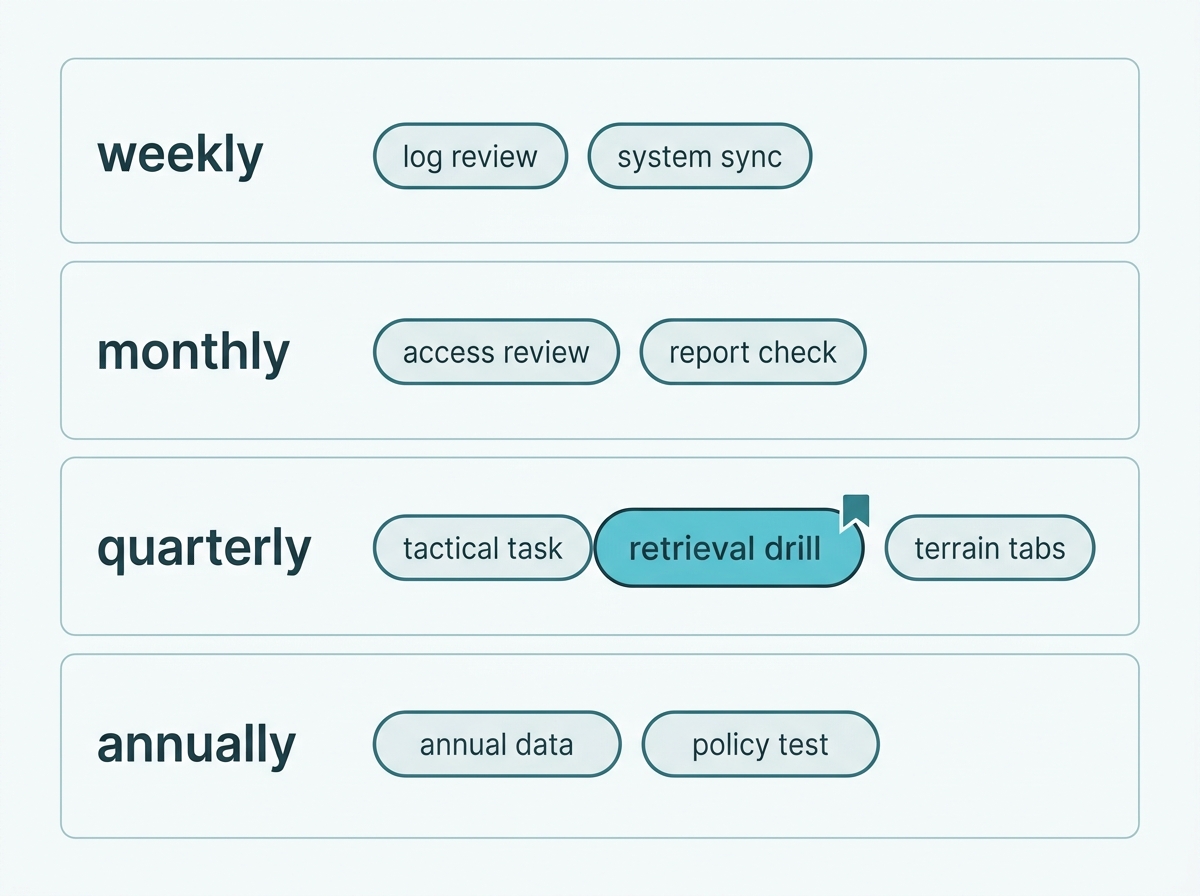
What it means for you: pick the weekly and monthly items you will actually do, and put the quarterly ones in a calendar. A short routine that runs is worth more than a thorough one that stops after two months.
How Often Do Lenses and Housings Need Attention?
Outdoor lenses roughly every one to three months, indoor ones far less. Those figures are working practice rather than a specification, and the environment is what actually decides.
A dirty lens is the most common cause of poor footage and the easiest to fix. It also degrades gradually enough that nobody notices from a live view they see every day. Two Philippine conditions shorten the interval sharply: salt air near the coast, which leaves a film that hazes night footage badly, and construction dust, which is a temporary problem that arrives without warning when a neighbor starts building.
The housing matters as much as the glass. Check for cracks, water inside the dome or lens cover, and insect nests, which are common in warm climates and can block a lens entirely. Check the cable entry and its seal at the same time, because moisture that gets in there reaches internal components long before the camera visibly stops working.
Night performance is the tell for a lens that needs cleaning. A camera that looks acceptable in daylight and hazy or flared after dark usually has a film on the lens cover scattering the infrared or white light back at the sensor.
What it means for you: clean on a schedule, but check after anything that changes the environment, such as construction nearby or a storm. And judge cleanliness by the night image, not the day one.
What Is a Footage Retrieval Drill?
Deliberately pulling a specific clip from a specific time on a specific camera, and confirming it exports with the right timestamp. It is the only check that tests the whole chain from lens to usable evidence, and for a Philippine business, it rehearses something you are legally required to be able to do.
What it means for you: put the drill in the calendar as a quarterly task and treat a failed export as an incident rather than an annoyance. It is the difference between a system that looks maintained and one that will deliver.
How Should Firmware Be Kept Current?
By automating it, not by remembering it. A maintenance routine that depends on someone diarizing an update every few months is a routine that will lapse.
Turn on automatic updates. VIGI supports online and automatic firmware upgrades, including scheduled automatic updates, so devices can keep themselves current without anyone downloading anything. This is the setting that removes the task rather than scheduling it.
Check after a security advisory. TP-Link publishes security advisories, and a security-relevant release is the one case where waiting for a scheduled window is the wrong call.
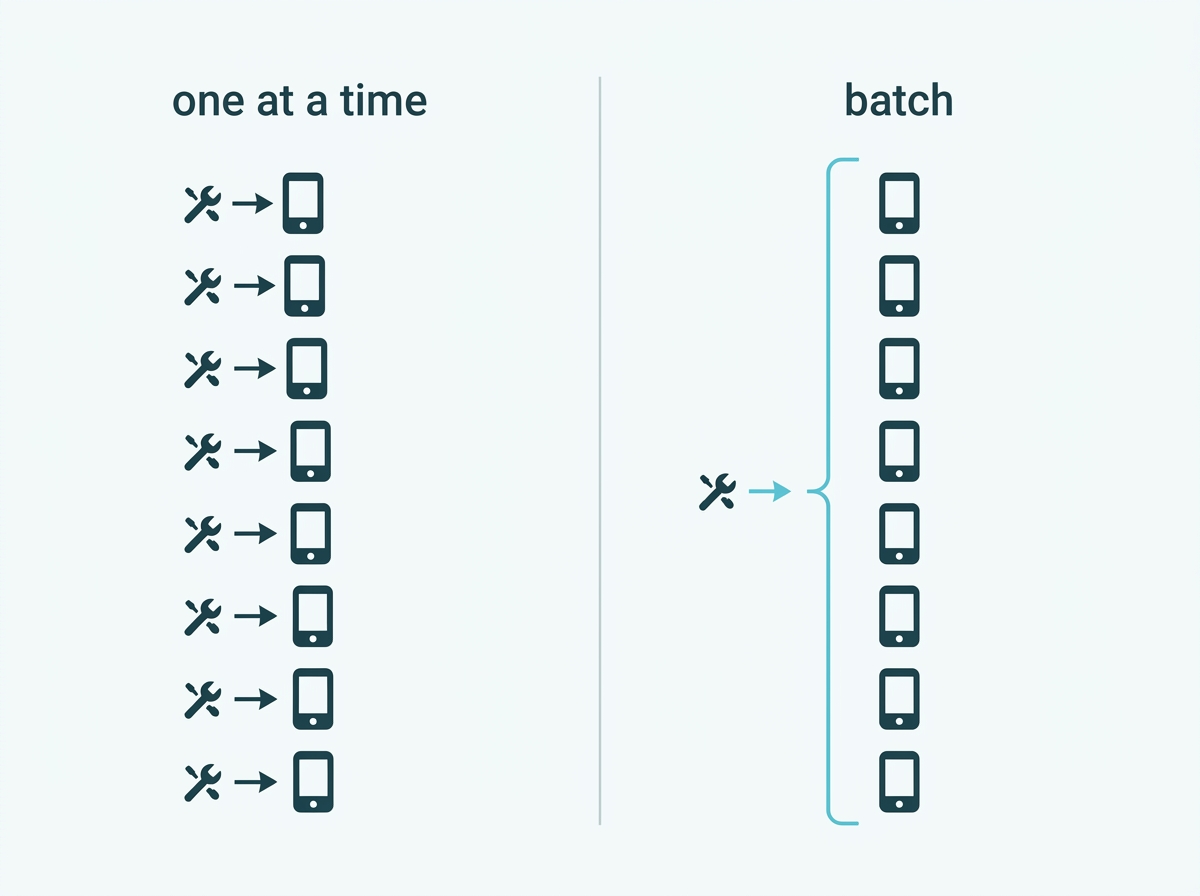
Use batch upgrade where updating is manual. VIGI Security Manager, which runs on Windows, lets you select several devices at once and upgrade them together rather than one at a time, which is what makes the task realistic on a system with more than a handful of cameras. TP-Link's guide to upgrading the firmware covers the methods available, including through the device interface and the app.
One practical note: devices reboot after a firmware upgrade, so a site with a single recorder will have a short gap in recording. Schedule it accordingly rather than mid-shift.
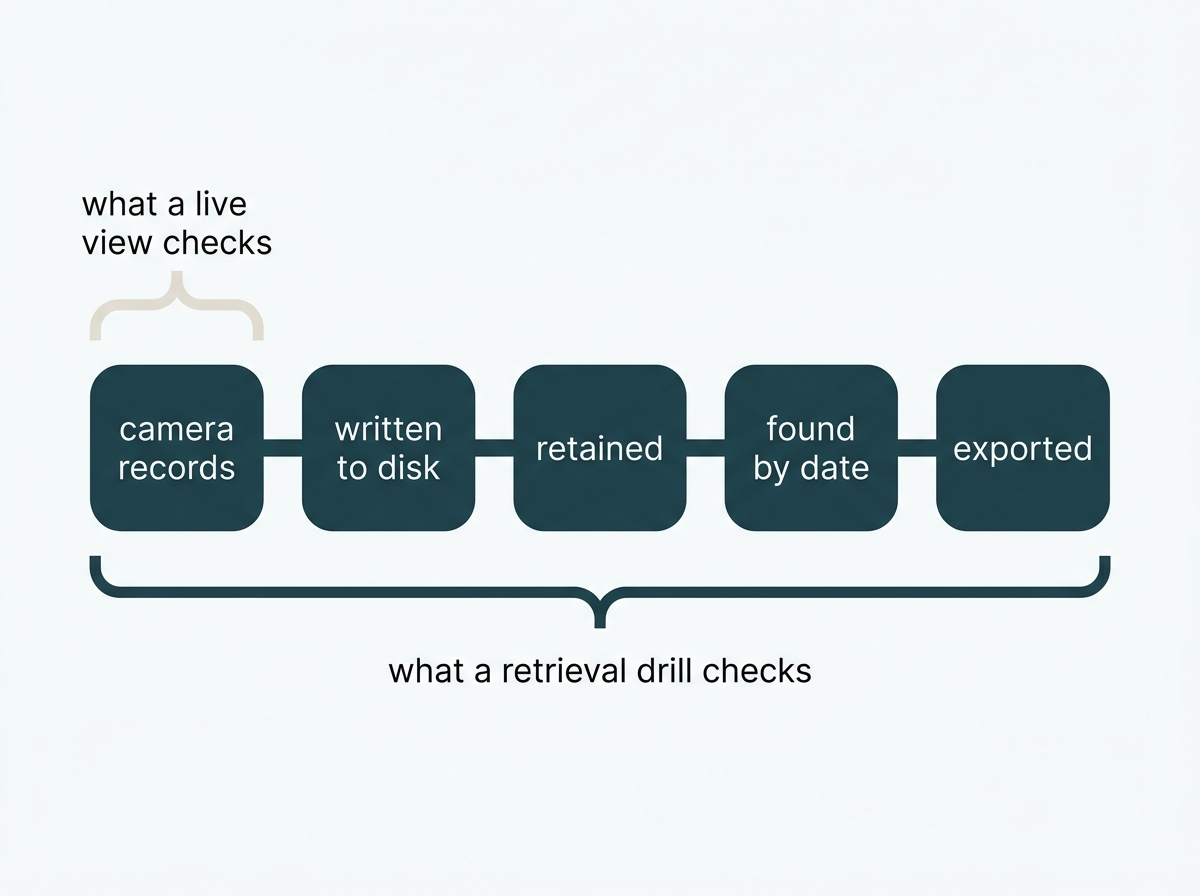
Everything else on a maintenance list checks one link. A live view checks the camera. A storage figure checks the disk. The drill checks all of it at once: that the camera recorded, that the recording was written, that retention did not remove it early, that you can find it by date and camera, and that the export produces a file someone else can open with a timestamp that is actually correct.
The failures it catches are the ones nothing else will. A storage error that silently stopped writing. A retention setting shorter than anyone remembers agreeing. An export function that produces a file nobody can play. A camera whose clock has drifted, which makes footage far less useful as evidence.
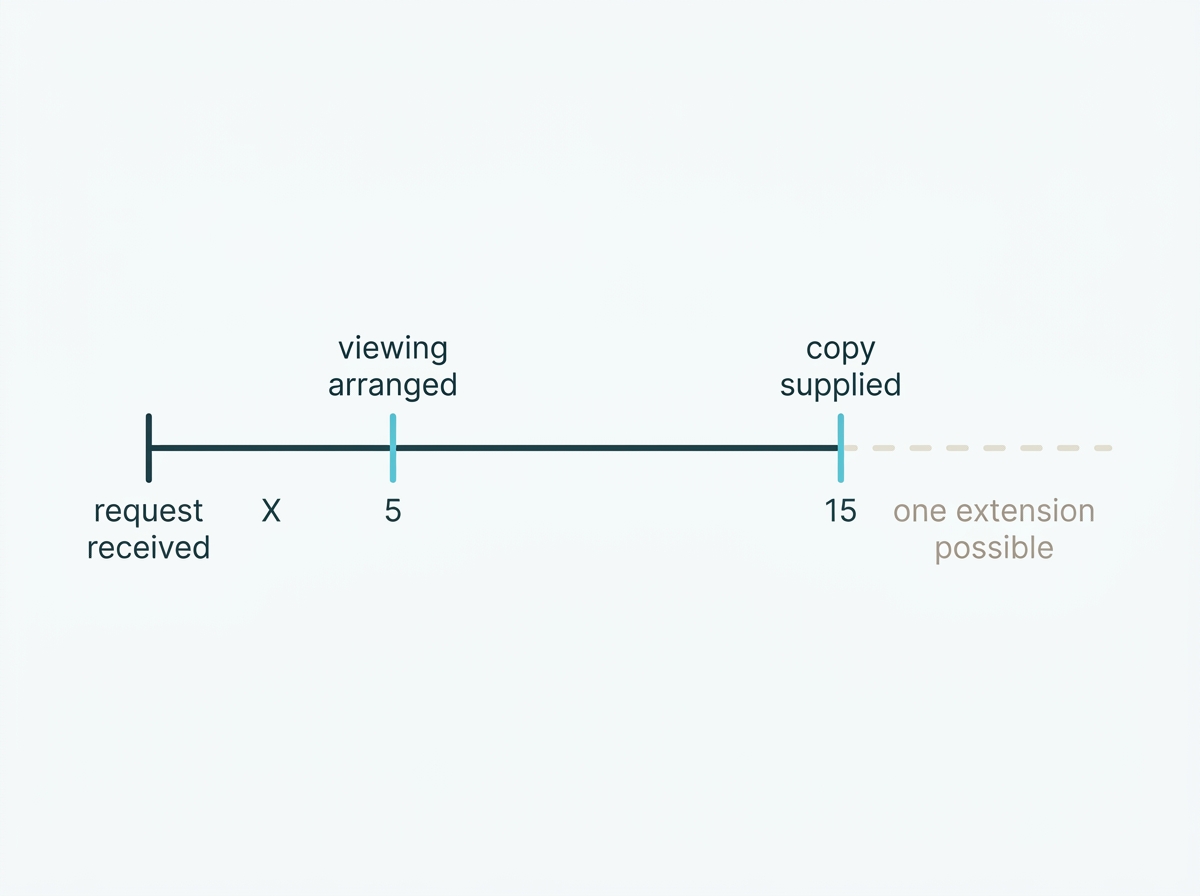
There is a deadline behind this for businesses. Under NPC Circular 2024-02, when someone requests footage of themselves, you have five working days to arrange a viewing and fifteen working days to provide a copy, extendable once by up to a further fifteen. Meeting that means being able to locate footage by date, time, and camera and export it intact. A quarterly drill is how you discover you cannot, on a quiet Tuesday, rather than on day four of a fifteen-day clock.
Run it properly: pick a time from a few days ago rather than an hour ago, pick a camera you rarely look at, export the clip, open it on a different machine, and check the timestamp against the actual time. If any step fails, that is the finding.
What it means for you: spend ten minutes enabling automatic updates once, and the recurring task disappears. If your setup cannot automate, use batch upgrade and pair it with a quarterly reminder rather than a monthly one.
What Should an Access Review Cover?
Who holds credentials, whether the password has been changed recently, and whether the recovery route still works. None of this is about hardware, and all of it can undo everything else on the list.
There is no default password to change on VIGI devices. Activation requires setting one before the device operates, so the common advice to change factory credentials does not apply here. What does apply is that the password chosen at setup is often still in place years later and is often known to more people than anyone realizes.
Rotate the password and keep the recovery route current. TP-Link documents how to change the password and recovery email for cameras, with a companion procedure for recorders. The recovery email is the part that quietly breaks, because it is often set to an address belonging to whoever installed the system or to a staff member who has since left.
Remove accounts for people who have left. This is the gap that persists longest, because nothing prompts it. A departure checklist that includes camera system access is worth more than any technical measure here.
Check who can view remotely. Remote viewing is an access route like any other, and the accounts holding it should be reviewed on the same schedule.
What it means for you: do this annually at minimum, and immediately when someone with access leaves. Set a calendar reminder tied to the recovery email in particular, because it is the one that fails silently.
What Does the Law Expect You to Maintain?
Two things that recur, both of which are maintenance rather than setup, and both of which a business is expected to keep doing rather than do once.
Footage has to be deleted when it is no longer needed. NPC Circular 2024-02 requires that footage be kept only as long as the declared purpose requires, that the retention period be documented in a written policy, and that footage be destroyed once that purpose ends. It also states that the retention period must not be determined solely by how much storage the system has. So maintenance includes confirming that deletion is actually happening on the schedule you documented, rather than assuming the recorder overwrites neatly.
Access logs have to be kept up to date. The Circular requires access to recorded footage to be limited to authorized personnel and requires logs covering viewing, copying, and transfers to be maintained. A log exists to answer a question later, so reviewing it periodically is part of keeping it useful.
The full set of obligations, including notice, purpose, and placement, is covered in CCTV System Philippines Buyer's Guide.
To see the management tools that make batch updates and system-wide health checks practical, see VIGI's management software, or explore VIGI's surveillance solutions.
What it means for you: add two lines to your quarterly routine, confirming footage older than your retention period is actually gone and glancing at the access log. Both take minutes, and both are things you would be asked to demonstrate rather than describe.
Frequently Asked Questions
How often should security camera lenses be cleaned?
Every one to three months for outdoor cameras as a working guide, more often in coastal or dusty conditions, and far less often for indoor cameras in controlled environments. The environment decides rather than the calendar, and the reliable test is the night image, since a film on the lens cover scatters infrared and shows up after dark before it shows up in daylight.
What is a footage retrieval drill and why does it matter?
It is a deliberate test of pulling a specific clip from a specific time and camera and confirming it exports with an accurate timestamp. It checks the whole chain from recording to usable file, catching storage errors, retention settings, and export problems that a live view will never reveal, and for a business it rehearses a response you may be legally required to produce.
How quickly do I have to provide CCTV footage if someone requests it?
Under NPC Circular 2024-02, a business has five working days to arrange a viewing and fifteen working days to supply a copy, with one extension of up to fifteen further days possible. Meeting that means being able to find footage by date, time, and camera and export it intact, which is exactly what a quarterly retrieval drill tests.
How often should camera firmware be updated?
Rather than setting a cadence, enable automatic updates, since VIGI supports online and scheduled automatic upgrades. Check manually when TP-Link publishes a security advisory, and where updating has to be done by hand, VIGI Security Manager allows several devices to be upgraded in one batch instead of individually.
Should I change the default password as part of maintenance?
There is no default password on VIGI devices, because activation requires setting one before the device will operate. What belongs in maintenance is rotating the password you chose, confirming the password recovery email still reaches someone who works there, and removing accounts for people who have left.
What are the warning signs a camera needs attention sooner?
Frequent offline status, footage that has become blurry or hazy at night, gaps in recorded video, or a camera visibly pointing somewhere other than where it was set. Any of these warrants a look before the next scheduled check rather than waiting for it.
Do indoor and outdoor cameras need the same maintenance?
No. Outdoor cameras carry the weather, dust, and insect exposure, so they need the physical inspection and cleaning far more often, including checks of seals and cable entries. Both follow the same firmware and access review schedule, since neither of those depends on where the camera sits.
Final Thoughts
The point of maintaining a camera system is not that the cameras keep working. It is that the footage is there and usable on the day someone needs it, and almost nothing on a standard maintenance checklist actually tests that. A live view confirms the least important link in the chain.
So the routine worth having is short. Let the system watch itself where it can, with health alarms for disk problems, video loss, and offline devices. Keep the physical checks proportionate: weekly for what moves or gets blocked, monthly for cleaning, quarterly for weather and seals. Automate firmware rather than diarizing it. And once a quarter, pull a real clip from a real date and check it exports properly, because for a Philippine business that is not thoroughness; it is a rehearsal for a request with a five- and fifteen-working-day clock attached.
If you would rather have this set up than remembered, bring a VIGI specialist three things: how many cameras and recorders you run and across how many sites, how many days of footage you have committed to keeping, and who currently holds credentials. You will get back a maintenance routine sized to your system, the health alerts and automatic updates configured so most of it runs without you, and a check that your retention setting matches what you have written down. Or explore VIGI's surveillance solutions to see the management tools that make most of this run without you.