Cloud Storage for Security Cameras: Costs and Trade-Offs
Published: August 12, 2026 | Last Updated: August 12, 2026
Quick Answer
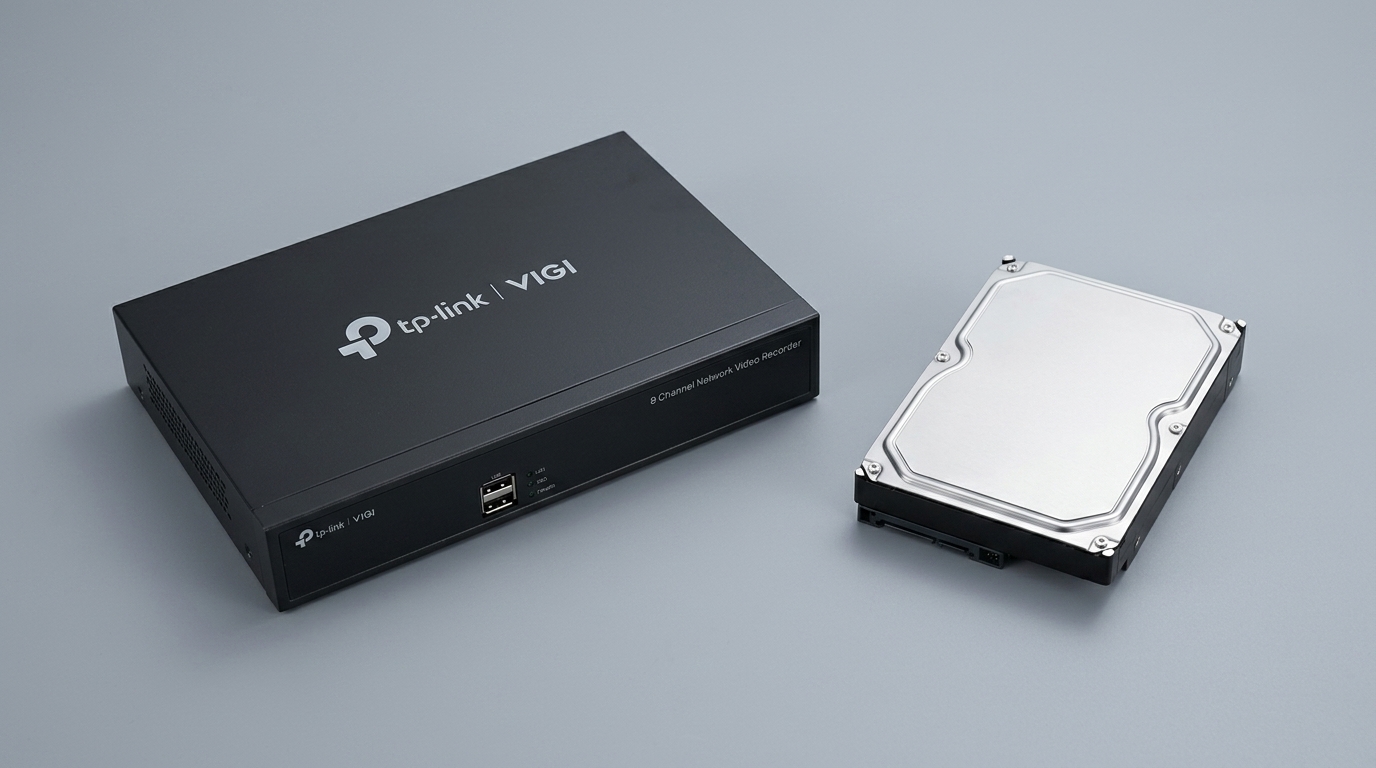
- VIGI Cloud VMS manages cameras across sites and does not store recordings. TP-Link recommends a VIGI NVR for storage, with FTP backup depending on the recorder model and firmware.
- VIGI Cloud Storage is a separate paid subscription that stores footage, available in some markets and supporting only some VIGI models, with validity starting from device activation.
- The cost people miss is upload bandwidth. TP-Link specifies at least 4 Mbps per 4MP camera, and on a constrained connection it may quietly reduce the bitrate it uploads.
Cloud storage sounds like the simpler option: footage goes off-site, nothing to steal, reachable from anywhere. The decision is more layered than that because a subscription is a cost that never stops and scales with camera count and retention length, and because continuous uploads from several cameras ask more of your internet connection than most business plans comfortably provide. There is also a distinction on the VIGI platform that catches people out: the free cloud management platform and the paid cloud storage service are different products, and only one of them holds your footage.
Table of Contents
What Does Cloud Storage Actually Cost?
What Does VIGI Actually Offer: Cloud VMS or Cloud Storage?
Why Is Upload Bandwidth the Hidden Cost?
How Does Retention Change the Bill?
What Should You Check Before Subscribing?
What Does Cloud Storage Actually Cost?
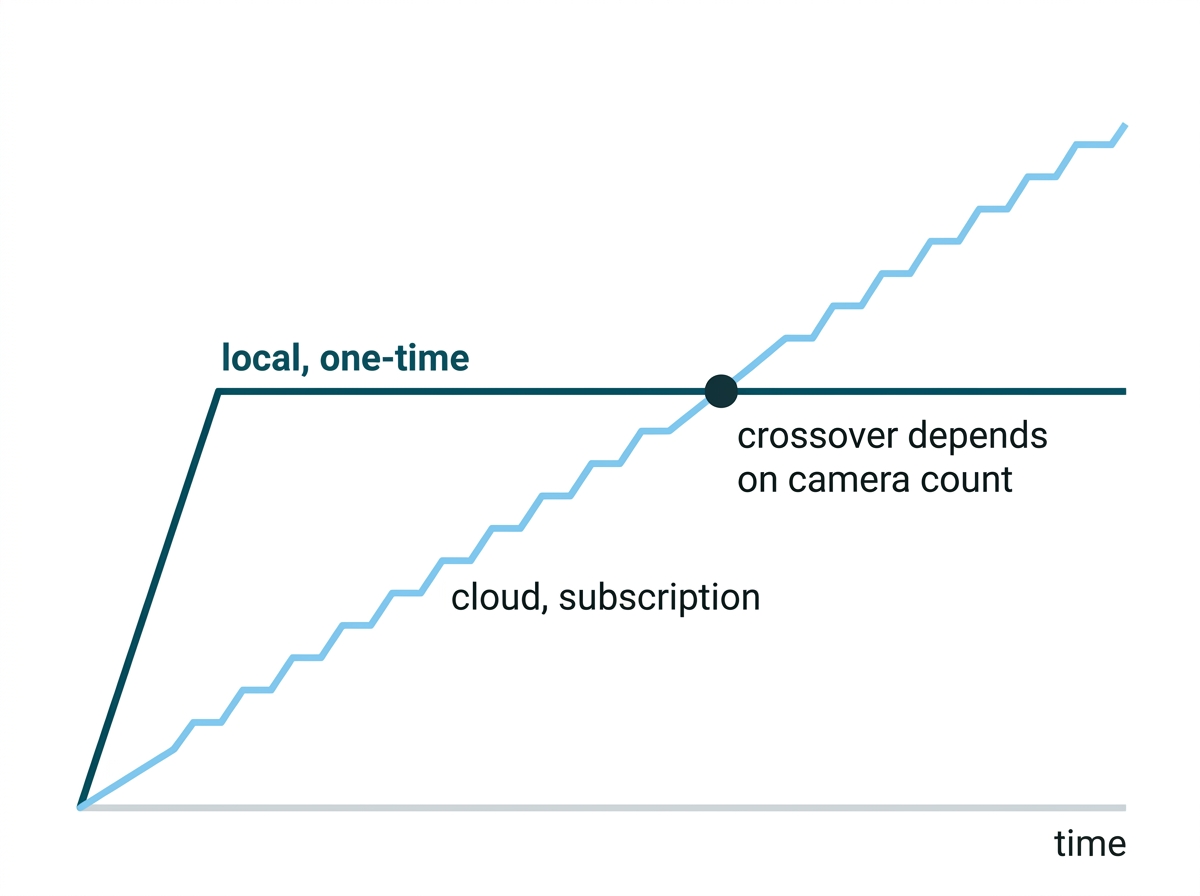
A monthly figure that never ends, scaling with three things: how many cameras you have, what resolution they run, and how many days you keep. That structure matters more than any specific price, because it is what makes cloud and local storage behave so differently over a few years.
Local storage is a purchase. You buy a recorder and a drive, and the cost is done. Cloud storage is a tenancy. The bill arrives every month for as long as the system exists, and it grows every time you add a camera.
Neither is inherently better, and the crossover point depends entirely on your camera count and how long you intend to run the system. What is worth understanding before comparing prices is that you are not comparing two numbers; you are comparing a number against a rate.
What it means for you: work out the cloud cost over three years, not one month, and compare it against the hardware you would buy instead. The answer flips as camera count rises.
What Does VIGI Actually Offer, Cloud VMS or Cloud Storage?
Two different products with confusingly similar names, and only one of them holds your footage. Getting this wrong is the most expensive misunderstanding in this article, because a business can believe its recordings are backed up off-site when they are not.
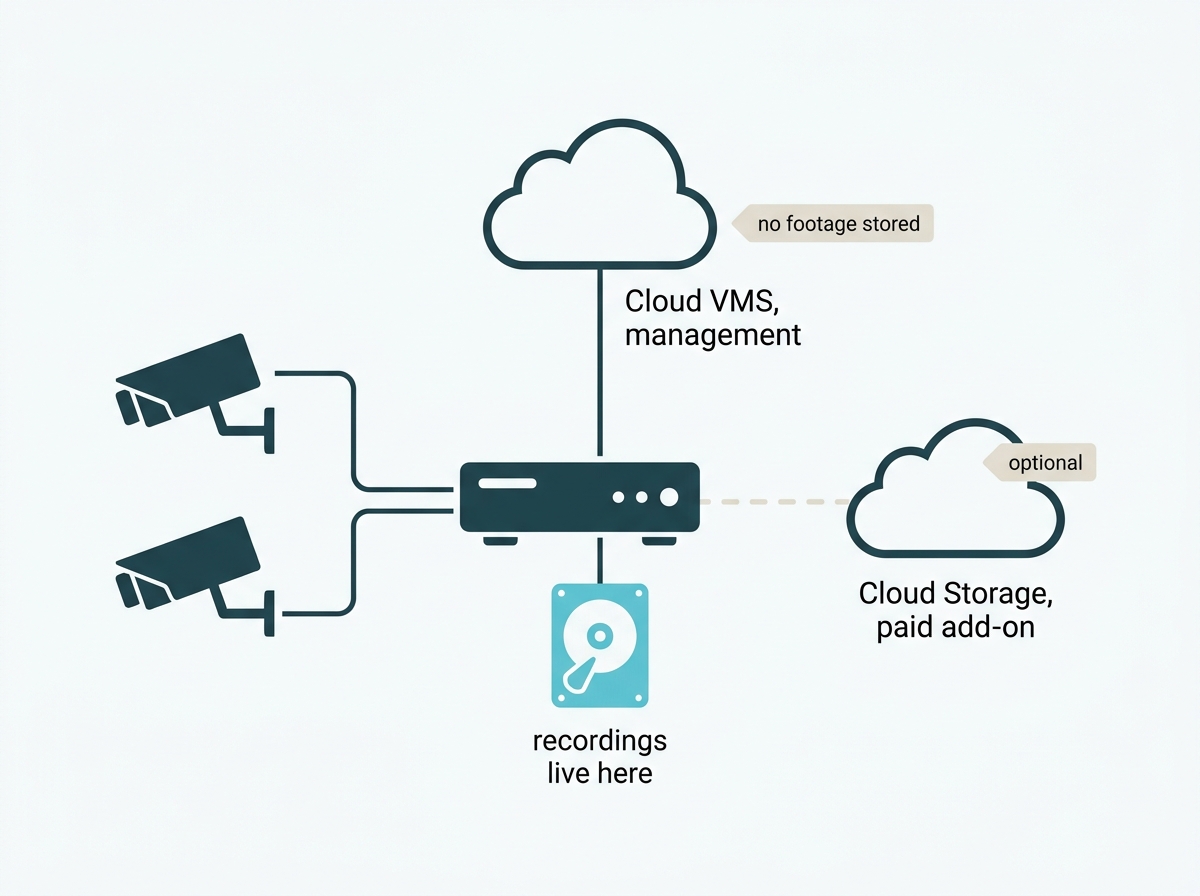
VIGI Cloud VMS is a management platform. It provides centralized cloud management for VIGI cameras, recorders, and solar panels across sites and organizations. TP-Link's own documentation is unambiguous: Cloud VMS does not support cloud storage. It recommends using a VIGI NVR to manage cameras and hold the recordings, with backup to an FTP server available depending on the recorder model and firmware version.
It also comes in two tiers rather than one. A free version provides the basic monitoring features, covering organization, site, user, video, and alarm management. A paid version adds capabilities including intelligent chain-store patrol, heatmap, customer flow analytics, and crowd and queue management. So "free" describes the entry tier, not the platform.
VIGI Cloud Storage is a separate paid subscription that does what its name says, sending footage captured by a VIGI camera to TP-Link's servers automatically. It runs in tiers; it is offered in some markets rather than universally, and it supports only some VIGI models, with behavior depending on firmware and app version.
So the honest summary is that on a VIGI system, footage lives on the recorder unless you have separately subscribed to cloud storage, and using Cloud VMS across several sites does not change that. Each site still needs local storage.
What it means for you: if you are running Cloud VMS and assume your footage is in the cloud, check. It is on the recorder at each site, and if that recorder is stolen, the footage goes with it.
Why Is Upload Bandwidth the Hidden Cost?
Because it is a cost that lands on your internet bill rather than your storage bill, and nobody quotes it. This is the part of the cloud decision most comparisons skip entirely.
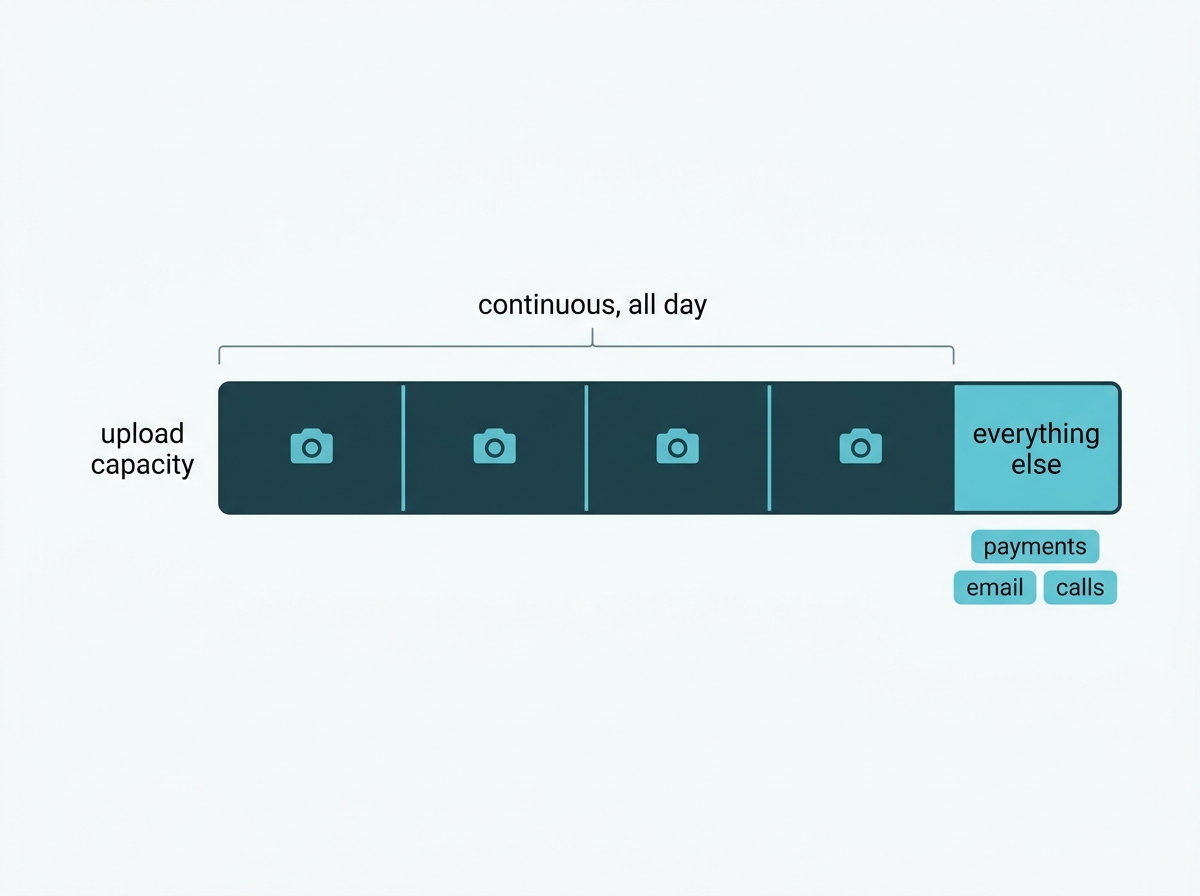
Local recording never touches your internet connection. A camera sends its stream across your local network to the recorder, and the internet is only involved when someone views remotely. Cloud storage inverts that. Every camera's stream travels up to the internet continuously, all day, whether anyone is watching or not.
Philippine business connections are typically asymmetric, meaning download speed considerably exceeds upload speed, and upload is the direction cloud storage consumes. Several cameras uploading around the clock can saturate that upload capacity, which does not just slow the cameras. It slows everything else sharing the connection, including payment terminals, cloud accounting, and video calls.
TP-Link publishes a figure for this in its own service agreement, and it is worth working from rather than estimating. Each VIGI device using the cloud storage service requires at least 4 Mbps of bandwidth for a 4MP camera, and two or more devices on the same network require more. So four 4MP cameras is at minimum 16 Mbps of sustained upload, before anything else in the building uses the connection.
What happens when there is not enough is the part worth knowing. The agreement states that where the network is unstable or upload bandwidth is limited, the system may automatically reduce the bitrate of the uploaded video to keep storage continuous. That is a sensible design choice, and it has a consequence: on a constrained connection, the footage reaching the cloud is lower quality than the footage the camera captured, and nothing announces it. You would find out when you needed the recording.
The agreement also lists conditions under which recordings simply are not saved, including the device being deleted from TP-Link Cloud and network or circuit interruption.
The consequence is that the real cost of cloud storage is sometimes the subscription plus an internet plan upgrade, and the second can be the larger of the two. It also does not scale gently: each camera added consumes its share again.
What it means for you: find your connection's upload speed, not its download speed, before considering cloud storage. If you do not know it, that is the first thing to check, and it decides whether this option is realistic at all.
Cloud or Local Storage?
Local for most multi-camera business systems, cloud where the off-site copy matters more than the running cost, and in practice a combination. Here is the comparison that actually decides it.
Feature-to-Benefit: Cloud Against Local
|
|
Cloud storage |
Local storage on an NVR |
|
Cost shape |
Recurring subscription per camera, forever |
One-time hardware purchase |
|
Cost as you grow |
Rises with every camera and every extra day of retention |
Fixed until you need a larger drive |
|
Internet dependency |
Required continuously, for recording itself |
Required only for remote viewing |
|
If the recorder is stolen |
Footage survives off-site |
Footage goes with it |
|
Upload bandwidth |
Substantial and continuous |
None |
|
During an outage |
Recording to cloud stops |
Recording continues locally |
Cloud storage costs a monthly fee that grows with the system and needs a connection good enough to carry every camera continuously, but the footage survives anything that happens to your building. Local storage costs once, needs no upload capacity, and keeps recording through an internet outage, but the recordings are physically in the building and share its risks. Those are genuinely different failure modes rather than a better and worse option.
The point about outages deserves weight in the Philippines specifically. A system whose recording depends on the internet stops recording when the internet stops, and that is often exactly when something is happening.
Recorder selection more generally is covered in our guide to choosing a surveillance video recorder.
What it means for you: decide which failure you are more worried about, losing the recorder or losing the connection. That question settles the choice faster than a cost comparison does.
How Does Retention Change the Bill?
It multiplies it, and for a business it is not purely a budget decision. Retention length is the input that cloud pricing scales on most steeply, and it is also something Philippine privacy rules require you to have settled.
NPC Circular 2024-02 requires footage to be kept only as long as the declared purpose needs, requires the period to be documented in a written policy, requires destruction once that purpose ends, and states plainly that the retention period must not be determined solely by the storage capacity of the system. So the sequence runs: decide the days your purpose actually needs, then buy the storage that holds them.
That inverts the habit of buying a drive or a plan and accepting whatever retention it happens to give. It also makes the number easy to price, because once you know your retention period you can calculate the storage it implies with VIGI's capacity calculator, which works from resolution, bit rate, encoding type, and camera count.
One practical consequence for cloud specifically: because subscription tiers are priced by retention window, cutting an over-generous retention period is the single most effective way to reduce a cloud bill, and it is also the change most likely to bring you closer to compliance rather than further from it.
What it means for you: write down the number of days your purpose actually requires before you look at any plan. It sizes the storage, it prices the subscription, and it is the thing you would be asked to produce if the system were ever queried.
Is a Hybrid Setup Worth It?
For most multi-camera businesses, yes, and it is the arrangement that emerges naturally rather than one you have to engineer.
The pattern is straightforward: primary recording and retention run locally on the recorder, where capacity is cheap and internet outages do not matter, while an off-site copy covers the specific risk local storage cannot, which is the recorder being stolen, damaged, or destroyed. The off-site layer only needs to cover what matters most, which keeps its cost far below subscribing every camera to continuous cloud recording.
On VIGI equipment, there are two routes to that off-site layer. FTP backup from the recorder, which is available depending on recorder model and firmware version, and which sends copies to a server you control. Or the paid Cloud Storage subscription, where availability and supported models are the things to check first.
What makes the hybrid worth the small extra complexity is that it prices the resilience benefit honestly. You pay for off-site protection on the footage where it matters, rather than paying continuously to duplicate every camera's entire recording.
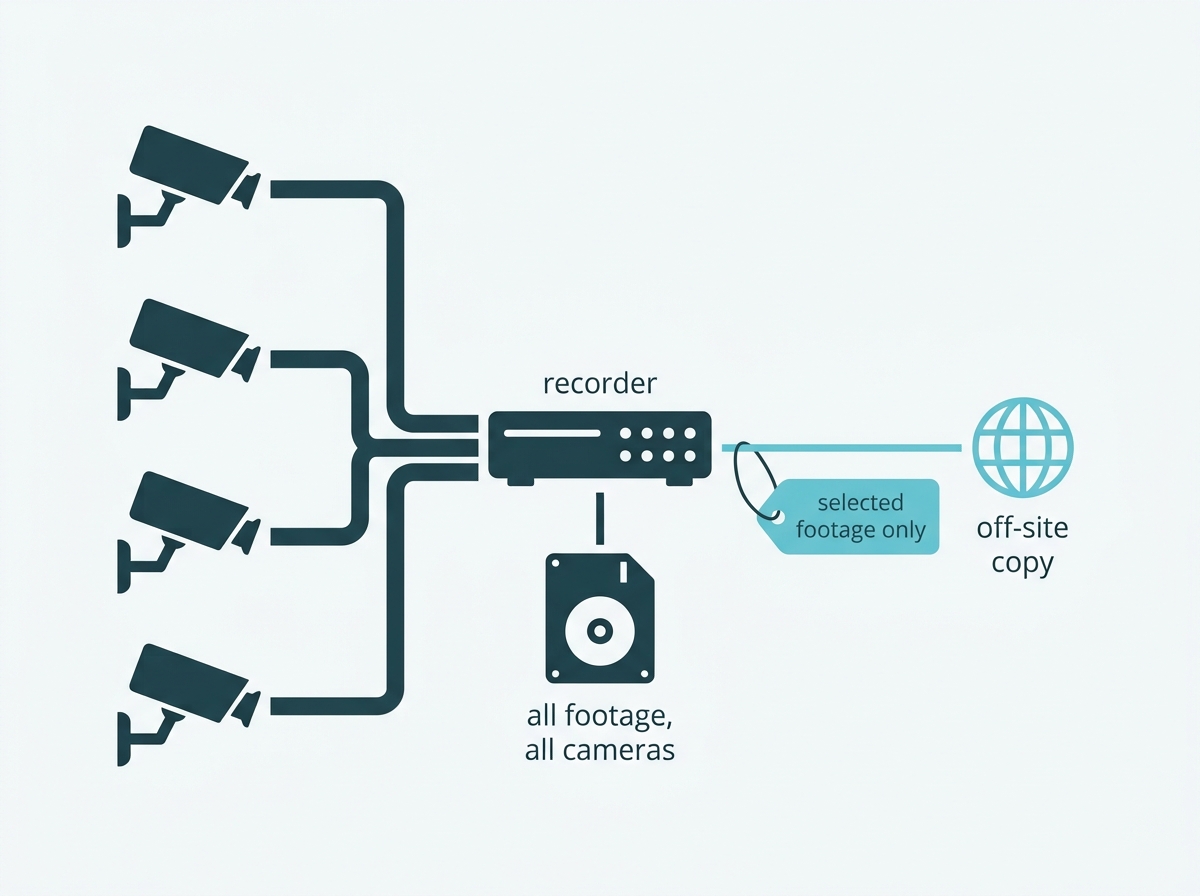
What it means for you: treat off-site storage as insurance on your most important footage rather than as a replacement for the recorder. That framing usually cuts the cost by more than it cuts the benefit.
What Should You Check Before Subscribing?
Five things, and three of them are conditions rather than prices.
Whether the service is offered where you are. Cloud storage availability varies by market, so confirm it is sold in the Philippines before planning around it.
Whether your cameras are supported. TP-Link states the VIGI Cloud Storage service supports only some VIGI product models, and that behavior may depend on your firmware and app version. Check your specific models rather than assuming the range is covered.
When the clock starts. The subscription validity period runs from the device activation date, not from the date you subscribe, which is not the assumption most people make.
What happens if you change plan? TP-Link states that changing your subscription may result in recordings being deleted where they become inaccessible under the new plan. Downgrading is therefore not a neutral action, and footage you still need should be exported first.
It is non-refundable. The service does not accept returns, refunds, or exchanges; cancellation affects only future charges, and the TP-Link ID using the service cannot be changed afterwards. That last point matters if the account was set up under a departing employee's ID.
To compare recorders and their storage capacity, browse VIGI network video recorders, or explore VIGI's storage solutions. How storage fits the wider recording picture is covered in Video Storage & Recording Systems for CCTV.
What it means for you: set the account up under a company ID rather than an individual's, and export anything important before changing plan. Both are easy at the start and awkward afterwards.
Frequently Asked Questions
Does VIGI Cloud VMS store my footage in the cloud?
No. TP-Link states that VIGI Cloud VMS does not support cloud storage, and recommends using a VIGI NVR to manage cameras and hold recordings, with backup to an FTP server available depending on the recorder model and firmware version. Cloud VMS is centralized management across sites, so each site still needs its own local storage.
What is the difference between VIGI Cloud VMS and VIGI Cloud Storage?
Cloud VMS is a management platform, available in a free tier with basic monitoring and a paid tier adding features such as heatmaps and customer flow analytics, and it holds no recordings. VIGI Cloud Storage is a separate paid subscription that does send footage to TP-Link servers. The names are similar, and the functions are not.
How much does cloud storage for security cameras cost?
It is a per-camera subscription that scales with resolution and with the length of the retention window, so the useful figure is what it totals over several years rather than per month. Compare that total against the one-time cost of a recorder and drive, because the two costs behave differently as camera count rises.
Does cloud storage need a fast internet connection?
It needs a fast upload speed specifically, which on most Philippine business connections is considerably lower than the download speed. TP-Link's own service agreement states that each VIGI device requires at least 4 Mbps for a 4MP camera and more where several share a network, and that on a constrained connection the system may automatically reduce the bitrate of uploaded video, so footage can reach the cloud at lower quality than it was captured.
Is local storage safer than cloud storage?
They fail differently. Local storage keeps footage entirely under your control but loses it if the recorder is stolen or destroyed, while cloud storage survives that but depends on a provider and on your connection, and stops recording during an internet outage. Which is safer depends on which of those risks is more likely at your site.
Can I use both cloud and local storage together?
Yes, and it is the arrangement most multi-camera businesses land on. Primary recording and retention stay on the recorder where capacity is cheap, and outages do not interrupt it, with an off-site copy covering only the footage that matters most, either through FTP backup where the recorder supports it or through a cloud storage subscription.
Does local storage still allow remote viewing?
Yes. Storing footage locally only means the recording happens on site, not that access is restricted to the building. Remote live view and playback work through the app or a browser as long as the recorder is online, which is a separate question from where the recordings are held.
Final Thoughts
Cloud storage for cameras is a trade rather than an upgrade. It buys resilience against the one thing local storage cannot survive, which is the recorder being taken or destroyed, and it charges for that every month in a way that grows with the system. Against it, local storage costs once, asks nothing of your internet connection, and keeps recording when the connection fails.
The distinction worth carrying away is the one about platforms. On a VIGI system, managing cameras through the cloud is not the same as storing footage in it, and Cloud VMS explicitly does not hold recordings. A business using it across several sites still has its footage sitting on a recorder at each of them, which is exactly the situation cloud storage is usually bought to avoid.
For most multi-camera deployments, the sensible answer is local primary storage with an off-site copy of what matters, sized from a retention period you have decided deliberately rather than inherited from a drive or a plan. If you want that worked out rather than estimated, bring a VIGI specialist three things: how many cameras across how many sites, the upload speed of the connection at each one, and how many days of footage you are required to keep. You will get back a storage plan sized to that retention, a clear answer on what belongs off-site and what does not, and a check on whether your connection can carry what you are considering.