_EU_1.0_overview_01_2-Pack_normal_20250903014858j.jpg)
_EU_1.0_overview_02_normal_20250903015000i.jpg)
_EU_1.0_overview_03_normal_20250915030925e.jpg)
_EU_1.0_overview_04_normal_20250903015034u.jpg)
_EU_1.0_overview_05_normal_20250903015126q.jpg)
_EU_1.0_overview_06_normal_20250903015143v.jpg)
_EU_1.0_overview_07_normal_20250903015159v.jpg)
_EU_1.0_overview_08_normal_20250903015215g.jpg)
_EU_1.0_overview_09_normal_20250903015229g.jpg)
(EU)_1.0-240x234x116mm-7000001548_normal_20250903015246u.png)
_EU_1.0_overview_01_2-Pack_large_20250903014858n.jpg)
_EU_1.0_overview_02_large_20250903015000k.jpg)
_EU_1.0_overview_03_large_20250915030925s.jpg)
_EU_1.0_overview_04_large_20250903015034a.jpg)
_EU_1.0_overview_05_large_20250903015126a.jpg)
_EU_1.0_overview_06_large_20250903015143l.jpg)
_EU_1.0_overview_07_large_20250903015159a.jpg)
_EU_1.0_overview_08_large_20250903015215b.jpg)
_EU_1.0_overview_09_large_20250903015229b.jpg)
(EU)_1.0-240x234x116mm-7000001548_large_20250903015246b.png)
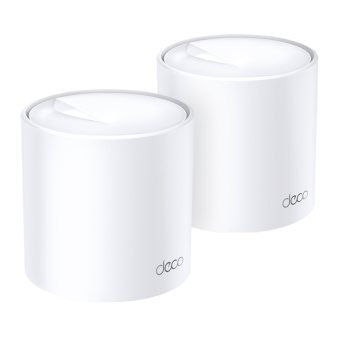
Deco PX10
AX1500 + AV1000 Whole Home Powerline Mesh WiFi 6 System
- AX1500 Dual Band WiFi – 1201 Mbps (5 GHz) + 300 Mbps (2.4 GHz).†
- HomePlug AV2 1000 Mbps – 1 Gbps Powerline Network speeds ***
- Network Passes Through Walls and Floors – Reduce the impact of walls and other obstacles on signal.
- AI-Driven Mesh – Intelligently learns your network environment to provide ideal WiFi unique to your home.*
- Gigabit Wired Speed – 3× Gigabit ports provide sufficient connectivity.§
- HomeShield – Provides comprehensive network protection, robust parental controls, and real-time IoT security.**
Superior Mesh WiFi. Everywhere.
Whole Home Powerline Mesh Wi-Fi 6 System AX1500 + AV1000
Deco PX10




Dual-Band WiFi 6 AX1500
HomeShield
Security
AI-Driven
Mesh
Cover up to
2 Pack
4,100 ft² / 380 m²
3 Pack
6,100 ft² / 530 m²
Connect up to
120 Devices
HomePlug AV2
1000 Mbps
Mesh WiFi 6 + Powerline: Signal Through Walls
Deco PX10 combines dual-band WiFi and Powerline to transmit data between Deco units. Powerline technology uses your home's electrical wiring to create a stronger connection between Deco units, reducing the impact of walls, floors, and other obstacles on signals. ***
Internet
AV1000 Gigabit Powerline
ThickWall
Dual-Band WiFi 6 Mesh
Armed with WiFi 6 technology, Deco whole home mesh WiFi is designed to deliver a huge boost in coverage, speed, and total capacity. Enjoy faster loading and more connections.
-
4× Larger Capacity
-
3× Faster Speed
-
Boosted Coverage
Superfast. No Lag.
WiFi + Powerline Hybrid Bandwidth
Powerline and wireless connections work together to transmit data between Deco units. PX10 delivers phenomenal speeds compared with traditional mesh WiFi.
-
Deco PX10 (WiFi + Powerline)
1201 Mbps
300 Mbps
1000 Mbps
-
Traditional Mesh WiFi
Far-Reaching WiFi Coverage
To blanket your entire home with WiFi, Deco PX10 units work together as a powerful mesh network to boost broader coverage for connections in every corner.Want more coverage? Simply add another Deco. All TP-Link Deco can work together.†
-
 1-Pack
 -
 2-Pack
 up to 4,100 ft² or 380 m²
 -
3-Pack up to 6,100 ft² or 530 m²


More Capacity for More
Devices
Enhanced by WiFi 6, featuring with OFDMA and MU-MIMO technology, Deco PX10 allows you to connect up to 120 devices. Enjoy a more efficient network that loads faster without dragging down performance.
Gaming
8K Streaming
Phones and
Tablets
1080P Streamings
Smart Home
Devices
High-Speed
Downloading
4K Streaming
IP Camera
Streaming
Web Browsing
connections for up to
120
devices
Intelligent Networking for a Smarter Home
Deco uses its custom algorithms to automate the connections on your network, ensuring the strongest possible signals at all times.△
Learn more about AI-Driven Mesh >>
-
Sophisticated Algorithms
-
Self-Learning Capability
-
Customized Wi-Fi
Self-Learning
Advanced Algorithms
Seamless Roaming with One WiFi Name
TP-Link Mesh means Deco units work together to form one unified network. Your phone or tablet automatically connects to the fastest Deco as you move through your home, creating a truly seamless WiFi experience.‡
-
Whole Home Coverage
Eliminate weak signal areas throughout your house
-
Seamless Roaming
Uninterrupted streaming when moving between rooms
-
One WiFi Name
No more switching WiFi network names
-
Unified Management
Control your home WiFi by managing the central node via the Deco App
-
Deco PX10
Mesh Wi-Fi System Wi-Fi Home-Deco Wi-Fi
-
Traditional Router
with Extender Wi-Fi

Smart Security for Smart Living
HomeShield provides a series of built-in services that protect all your devices comprehensively with various features for when you’re at home or on the go. With HomeShield, safer internet experiences bring more happiness to your smart living.
-
Network Protection
Simply configure your gateway and achieve whole home network security. HomeShield examines your network by scanning and identifying potential risks, stopping them in their tracks before they harm your network.*
-
Parental Controls
Parental Controls protect your kids, while helping them maintain healthy digital habits. Parents can set app blocking, web filtering, YouTube restrictions, SafeSearch, and online time limits to keep kids safe while they’re having fun online.*
-
Maintain Protection Away from Home
KidShield App
Devices Security App
Devices remain secure everywhere with devices security app. And through KidShield, parents can monitor their kids’ locations. This way, kids stay digitally protected even on the go.*
Simply Plug and Play with Deco App
Setup and manage your network anytime and anywhere on the friendly TP-Link Deco app. In just three easy steps your entire home can be blanketed in strong and reliable WiFi. Set up one Deco, and the other Deco in the same set can automatically join the mesh network after powered on.
-
1 Connect
to a modem and power on both. -
2 Download
and launch the Deco app. -
3 Configure
by following the in-app instructions. -
4 Power
on the Deco in the same set.
Control Anyway You Want
-

Easy Management
Manage your WiFi at home or away on the Deco app. See every connected device, prioritize your own, and set up a guest network.
-

Voice Control
Use an Amazon Alexa or Google Assistant-enabled device to control
Deco PX10 with just your voice.
-

All Decos Work Together
Deco PX10 is compatible with every other Deco model to form a Mesh network. Expand Mesh WiFi coverage anytime by adding more Decos.***
Note: Compatible with all Deco models via wireless hut only supports powerline connections via the HomePlug Standard.
-
Bodrum

-
Bahçe

-
Garaj

Uyarlamalı Yol Seçimi
Deco birimleri, tek bir birleşik ağ oluşturmak için birlikte çalışır. Siz evde dolanırken telefonunuz veya tabletiniz en hızlı Deco'ya otomatik olarak bağlanarak gerçek anlamda sorunsuz bir çevrimiçi deneyim oluşturur. IEEE 802.11r ve 802.11k/v desteği, bir Deco'dan diğerine geçişin son derece sorunsuz gerçekleştiği, İnternet yayını sırasında bile bu geçişin fark edilmediği anlamına gelir.


-
Adaptif Yol Seçimi
TP-Link Mesh Teknolojisi verileriniz için dinamik olarak en iyi rotayı ve bandı en iyi rotayı ve band seçerek evin neresinde olursanız olun
hızlı bağlantıyı garanti eder. 

-
Kendi Kendini Onarma
Bir Deco'da sorun varsa sistem,
çevrimiçi kalmanız için otomatik olarak
diğer Deco'lar aracılığıyla verileri yeniden yönlendirir.
Wi-Fi + Powerline
Enerji hattı bağlantıları, Deco'ları bağlamak için evinizin elektrik devresini kullanarak en kalın duvarları ve tavanları bile geçer.
Enerji hattı ve kablosuz bağlantı birleşimi, yalnızca kablosuz bağlantısına kıyasla %60 daha yüksek ağ hızı elde eder.
- Daha yüksek hız
- 60%
- Standart Wi-Fi Sistemi
- Hibrit Wi-Fi Sistemi
- Powerline
- Note:Wi-Fi + Powerline sadece Deco P7 bulunur!
IoT Nesnelerin İnterneti Mesh
Geleneksel akıllı hub'lardan farklı olarak, TP-Link Mesh Teknolojisi,tek bir sistemde entegre Wi-Fi, Bluetooth ve Zigbee ile evin tamamanıda nesnelerin interneti kapsamı sağlar.TP-Link Mesh Teknolojisi ile her odada akıllı evinizindeki sihrin tadını çıkartın. Sayısız hub'a elveda diyin.
- - - - Wi-Fi
- - - - Zigbee
- - - - Bluetooth
TP-Link Karma Teknolojisi
neden sektör lideri bir çözümdür?
| Tam Karşılaştırma | |||
| Model Numarası | TP-Link Deco | Netgear Orbi | Google WiFi |
| Kablosuz Ana Taşıyıcı | Tri-Band (2.4G+5G_1+5G_2)¹ | Single-Band (5G_1 Only) | Dual-Band (2.4G+5G) |
| Mesh Protokol Desteği | IEEE 802.11k/v/r | IEEE 802.11k/v | IEEE 802.11s |
| Gerçek Anlamda Sorunsuz Dolaşım | √ | × | × |
| APS(Adaptif Yol Seçimi) | √ | × | √ |
| IoT Mesh | √² | × | × |
| Powerline Backhaul | √³ | × | × |
| Wireless + Powerline Bant kontrol | √4 | × | × |
| Band Steering | √ | √ | √ |
| AP Steering | √ | √ | √ |
| Kendini Onarma | √ | √ | √ |
| Notlar: 1 ve 2: Deco M9 Plus için Yalnızca 3 ve 4: Deco P7 için Yalnızca Aralık 2017 Tarihli Teknik Özellikler | |||
Deco Series
Deco
-

Deco BE85
BE19000 Üç Bantlı Tüm Ev İçin Mesh Wi-Fi 7 Sistemi
-

Deco X60
AX5400 Tüm Ev Mesh Wi-Fi 6 Ünitesi
-

Deco XE75
AXE5400 Üç Bantlı Mesh Wi-Fi 6E Sistemi
-

Deco S7
AC1900 Tüm Ev Mesh Wi-Fi Sistemi
-
_normal_20230201014412u.png)
Deco M4
AC1200 Tüm Ev Mesh Wi-Fi Sistemi
-

Deco BE65
BE9300 Tüm Evler için Mesh Wi-Fi 7 Sistemi
-
_Overview_normal_20211225093625r.png)
Deco X50
AX3000 Tüm Ev Mesh WiFi 6 Sistemi
-
Deco X20
AX1800 Whole Home Mesh Wi-Fi 6 System
-

Deco X50-PoE
AX3000 Whole Home Mesh WiFi 6 System with PoE
Sadece Parmaklarınızı Kullanarak Deco Ağı'nı Yapılandırın !
Deco uygulaması iOS veya Android cihazlarınızla Deco Bütün Ev Mesh Wi-Fi Sisteminizi kurmanın, yönetmenin ve izlemenin en kolay yolunu sunar.
Kurulum Çok Daha Kolay
Deco'yu kutudan çıkarıp Prize takın, uygulamayı yükleyin ve sonra ekrandaki talimatları izleyin. Deco uygulaması gerisini halledecek ve ağınızı birkaç dakika içinde kullanıma hazır hale getirecektir.
-
Deco'yu kablo modeminize bağlayın ve her iki cihazı da açın
-
Deco uygulamasını indirin ve başlatın
-
Deco sisteminizi yapılandırmak için uygulama içi talimatları izleyin.
Yönetimi Basit
Deco, Evde, işte veya herhangi bir yerdeyken, Wi-Fi'nizi istediğiniz yerden yönetmeyi kolaylaştırır.
-
Basit Yönetim Ekranı
Ağınızın çalışma durumunu görüntüleyin, bağlı cihazları kontrol edin ve yönlendiricinizin sunduğu tüm özellikleri edinin..
-
Birden Çok Deco, Tek Uygulama
Deco uygulaması, Deco Wi-Fi'inize bağlı tüm Deco ağlarınızı ve cihazlarınızı yönetir.
-
Bağlı Cihazları Kontrol Edin
İnternet erişimini duraklatma ve sürdürme, internet hızını test etme ve cihazlara öncelik verme veya engelleme özelliği olan bağlı cihazlarınızın listesini görüntüleyin.
-
Uzaktan Yönetim
Nerede bulursanız olun, telefonunuzun bir dokunuşuyla ağın uzaktan kontrolünü elinize alın.
Güçlü Ebeveyn Denetimleri
Basit, sezgisel ebeveyn denetimleri, çocuklarınızı çevrimiçiyken güvende tutmayı kolaylaştırır.
-
Her aile üyesi için kolayca bir profil oluşturun ve özel zaman sınırlarını ve çevrimiçi zaman ayırmalarını ayarlayın. Aygıtları profillere atamayınböylece kuralların tek tek aygıtlara ve aile üyelerine yayabilirsiniz.
-
Ailenizin içeriğe uygunluğunu engelleyen tek dokunuşla güvenlik ayarları ile ailenizi çevrimiçi ortamda güvende tutun.
-
Ailenizdeki her bir kişinin çevrimiçi ortamda ne kadar zaman geçirebileceği ile ilgili sınırları belirleyin.
-
Insights ile çocuklarınızın hangi siteleri ziyaret ettiğini ve her biri için ne kadar zaman harcadıklarını kontrol edebilirsiniz. 'Çevrimiçi ortamda eğlenirken çocuklarınızın güvende olduğunu bilmenin harika bir yolu'.
-
Aile oyun geceleri için Wi-Fi'den biraz dinlenin. Evinizdeki herkes için internet erişimini askıya alabilir için bir düğmeye dokunmanız yeterli.
Özelliklerle dolu Sezgisel Bir Uygulama
Aylık Kullanım Özeti
Kullanım dahil her ay ağ ayrıntılarınızın kapsamlı bir listesine bakın,
engellenen içerik, güvenlik tehditleri ve daha fazlası.
Ev Otomasyonu
Güçlü otomasyon ve ses kontrol araçlarıyla hayatınızı kolaylaştırın.
*Şu anda sadece Deco M9 Plus için
Esnek Kısayol
Tek bir tıklama ile tüm cihazları telefonunuzdan veya tabletinizden esnek bir şekilde kontrol edin.
*Şu anda sadece Deco M9 Plus için
Ağınızı Koruyun
Dahili Antivirüs, kötü amaçlı web sitelerine karşı korunmanıza ve çevrimiçi ödemenizi korumanıza yardımcı olur.
*Sadece Deco M9 Plus, Deco P7 ve Deco M5 için
Cihazlarınıza Öncelik Verin
Hangi cihazın her zaman en hızlı bağlantıya sahip olacağını seçin
veya belirli bir süre için önceliği belirleyin.
Uygulama Önceliklerini Ayarlayın
Basit kontrollerle sizin için en önemli olan faaliyetler için daha fazla bant genişliği tahsis edin.
*Şu anda sadece Deco M9 Plus, Deco P7 ve Deco M5 için
Wi-Fi'yi Arkadaşlarınızla Paylaşın
Misafirler için ayrı Wi-Fi profilleri ayarlayın ve şifreyi
ile paylaşın çevrimiçi atlamalarını kolaylaştırmak.
Hızınızı Kontrol Edin
Run a speed test to ensure you’re getting the internet speeds you’re paying for.
View every device on your network and see how much bandwidth they’re using.
Desteğimiz Her Zaman Arkanızda
Deco hakkında sorularınız mı var? Yardım her zaman sadece bir tık uzaklıktadır. Deco uygulamasında cevapları bulun ve sadece basit bir tıklama ile bizimle irtibata geçmekten çekinmeyin.
DESTEK| Standards and Protocols | Wi-Fi 6IEEE 802.11ax/ac/n/a 5 GHzIEEE 802.11ax/n/b/g 2.4 GHz |
|---|---|
| WiFi Speeds | AX15005 GHz: 1201 Mbps (802.11ax)2.4 GHz: 300 Mbps (802.11ax) |
| Powerline Speeds | HomePlug AV21000 Mbps Powerline |
| WiFi Range | 4-6+ Bedroom Houses (3-pack) TP-Link Mesh TechnologyOptional Ethernet backhaul work together to link Deco units to provide seamless coveragePowerline TechnologyUses your home's electrical wiring to create stronger connections between Deco units, reducing the impact of walls or other obstacles on signal2 × dual-band antennasMultiple antennas form a signal-boosting array to cover more directions and large areas |
| WiFi Kapasitesi | Medium Dual-BandDistribute devices to different bands for optimal performanceMU-MIMOSimultaneously communicates with multiple MU-MIMO clientsOFDMASimultaneously communicates with multiple WiFi 6 clients |
| Working Modes | Router ModeAccess Point Mode |
| Network Security | SPI FirewallAccess ControlHomeShield Security Real-Time IoT ProtectionMalicious Site BlockerIntrusion Prevention SystemDDoS Attack PreventionHome Network Scanner |
|---|---|
| Guest Network | 1× 5 GHz Guest Network1× 2.4 GHz Guest Network |
| WiFi Encryption | WPA/WPA2/WPA3 |
| Ethernet Ports | 3 × Gigabit ports*Per Deco Unit Supports WAN/LAN auto-sensing |
|---|---|
| Butonlar | Reset Button |
| Protocols | IPv4IPv6 |
|---|---|
| Service Kit | HomeShieldLearn More> |
| Parental Controls | HomeShield Parental Controls Youtube RestrictionSafeSearchCustom ProfilesProfessional Content Filter LibraryFamily TimeBedtimeOff TimeTime RewardsFamily Online Time RankingPause the InternetWeekly and Monthly Reports |
| WAN Types | Dynamic IPStatic IPPPPoEL2TPPPTP |
| Quality of Service | HomeShield QoS QoS by Device |
| Cloud Service | OTA Firmware UpgradeTP-Link IDDDNS |
| NAT Forwarding | Port Forwarding UPnP |
| IPTV | IGMP ProxyIGMP SnoopingBridgeTag VLAN |
| DHCP | Address ReservationDHCP Client ListServer |
| DDNS | TP-Link |
| Management Features | Deco App |
| Network Services Enabled by Default | Web Server Manage and configure device through web (HTTP/HTTPS)• Port: 80/443 Protocol: TCP DNS DNS• Port: 53 Protocol: TCP & UDP DHCP Server IP address assignment (DHCP)• Port: 67 Protocol: UDP App management Manage and configure device through app• Port: 22 Protocol: TCP• Port: 20001 Protocol: TCP• Port: 30001 Protocol: TCP• Port: 20002 Protocol: UDP |
|---|---|
| WiFi Transmission Power | CE:<20 dBm (2.4 GHz)<23 dBm (5 GHz)FCC:<30 dBm |
|---|---|
| Dimensions (W×D×H) | 4.1 × 4.1 × 6.7 in (105 × 105 × 169 mm) |
|---|---|
| Package Content | Deco PX10 (3-pack)3× Deco PX10 Units(routers with powerline)1× RJ45 Ethernet Cable3× Power CordsQuick Installation GuideDeco PX10 (2-pack)2× Deco PX10 Units(routers with powerline)1× RJ45 Ethernet Cable2× Power CordsQuick Installation Guide |
| Sertifikalar | CE, FCC, RoHS |
|---|---|
| Ortam | Operating Temperature: 0°C~40°C (32 °F~104 °F)Storage Temperature: -40°C~60°C (-40 °F~140 °F)Operating Humidity: 10%~90% RHStorage Humidity: 5%~90% RH |
†Maximum wireless signal rates are the physical rates derived from IEEE Standard 802.11 specifications. Actual wireless data throughput and wireless coverage, and quantity of connected devices are not guaranteed and will vary as a result of network conditions, client limitations, and environmental factors, including building materials, obstacles, volume and density of traffic, and client location.
‡Clients need to support 802.11k/v/r and may require additional set up. Performance may vary depending on the client device.
△Use of Wi-Fi 6 and other features including OFDMA, MU-MIMO, 1024-QAM, BSS Color and WPA3 require clients to also support the corresponding features.
§Compatible with all Deco models via wireless but only supports powerline connections via the HomePlug Standard. Maximum Powerline signal rates are the physical rates derived from HomePlug AV/AV2 specifications. Actual Powerline data throughput and Powerline range are not guaranteed and will vary as a result of network conditions and environmental factors, including electrical interference, volume of traffic and network overhead, AFCI circuit breaker, and Powerline being located in a separate circuit.
*HomeShield includes both basic and advanced features. Advanced features require a paid subscription. For details, visit tp-link.com/homeshield.
**Wi-Fi generations represent the wireless standard IEEE 802.11 a/b/g/n/ac/ax.
Actual network speed may be limited by the rate of the product's Ethernet WAN or LAN port, the rate supported by the network cable, Internet service provider factors and other environmental conditions.
This Deco may not support all the mandatory features as ratified in the IEEE 802.11ax specification. Further software upgrades for feature availability may be required.