Katalog
TX301 1.0_Product and Installation Guide
About This Guide
This guide is a complement to Quick Installation Guide. The Quick Installation Guide instructs you on quick installation, and this guide provides the product overview and detailed instructions for each steps.
When using this guide, please notice that features available of the adapter may vary by model and software version. It may also vary by region or ISP. All images, steps, and descriptions in this guide are only examples and may not reflect your actual experience.
Conventions
In this guide the following conventions are used:
|
Convention |
Description |
|---|---|
|
Underline |
Underlined words or phrases are hyperlinks. You can click to redirect to a website or a specific section. |
|
Bold |
Contents to be emphasized and texts on the web page are in bold, including the menus, items, buttons and so on. |
|
> |
The menu structures to show the path to load the corresponding page. For example, Settings > System Tools > Firmware Upgrade means the Firmware Upgrade page is under the System Tools menu that is located in the Settings tab. |
|
Note: |
Ignoring this type of note might result in a malfunction or damage to the device. |
|
Tip: |
Indicates important information that helps you make better use of your device. |
Get to Know About Your Adapter
1. Product Overview
Experience smoother streaming, faster downloads, and instant transfers with 5 Gbps speeds—up to 5× faster than typical Gigabit adapters. TX301 delivers next-level performance to every high-bandwidth task with the latest 5GBase-T technology. †
With extreme speed and ultra-low latency, 5GBase-T is backwards compatible with Fast Ethernet and Gigabit Ethernet, automatically negotiating between higher and lower speed connections.
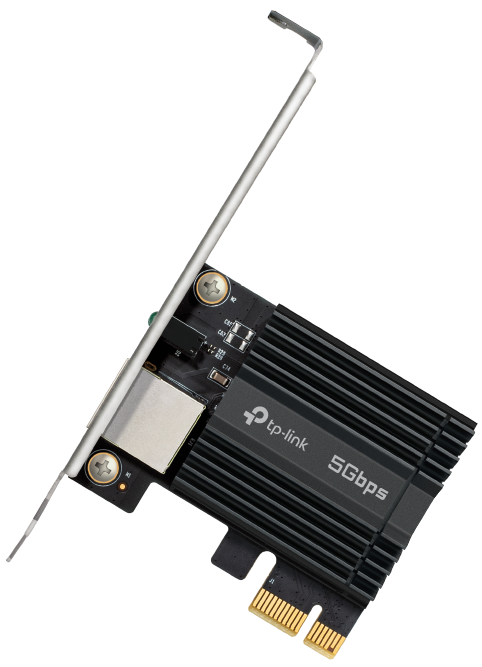
2. LED Status
| LED | Status | Indication |
|---|---|---|
| 5G Link | Flashing | The adapter is working at 5 Gbps. |
| Steady On | Connected to a 5 Gbps LAN Port and the driver is installed successfully. | |
| Off | No link or the adapter is working at a speed lower than 5 Gbps. | |
| 2.5G Link and below |
Flashing | The adapter is working at 2.5 Gbps/ 1 Gbps/ 100 Mbps/ 10 Mbps. |
| Steady On | Connected to a 2.5 Gbps/ 1 Gbps/ 100 Mbps/ 10 Mbps LAN Port and the driver is installed successfully. | |
| Off | No link or the adapter is working at 5 Gbps. |
Note: If all LEDs are off, check whether the adapter is detected by the computer or the driver is successfully installed.
Connect to a Computer
1. Turn off your computer, unplug the power cable then remove the case panel.
Note: Before you start, please make sure you have unplugged all existing Intel® wireless adapters.

2. Locate an available PCIE slot (X1, X4, X8, or X16) and carefully insert the adapter.
Tip:
If the bracket is not suitable for your computer, detach it from the adapter’s board and replace it with the low-profile bracket.
DO NOT insert the adapter into a PCI slot, or any slots except PCIe slots.
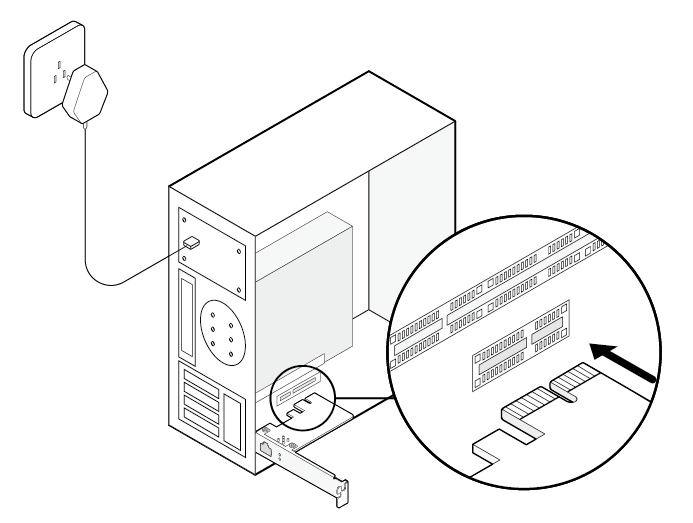
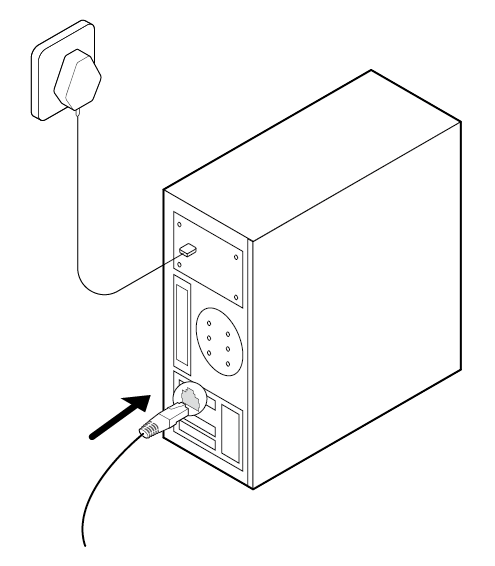
3. Replace the case panel, plug in the power cable and turn on your computer. Then connect the adapter to the front-end router using an Ethernet cable.
Install the Driver
• For Windows 11 (Plug and Play)
Once the adapter is connected to your computer, the system will automatically complete the driver setup for immediate use.
Tip: For the best performance, update to the latest drivers at our Download Center: https://www.tp-link.com/download-center
• For Other Operating Systems
If the adapter is not automatically recognized, follow these steps to install the driver manually:
a. Download the driver or check the new release at https://www.tp-link.com/download-center.
b. Unzip the downloaded folder and run the Autorun.exe.
c. Select your adapter and follow the instructions to complete the installation.
Note:
1. To install driver on Linux, refer to https://www.tp-link.com/faq-2868.html
2. If you can’t install the driver successfully, disable the antivirus software and firewall, then try again.
Troubleshooting
T1: What should I do if the adapter is not detected?
- Make sure the adapter is securely located in the appropriate PCI-E slot (X1, X4, X8, or X16).
- Make sure you use the latest driver for your specific adapter. The latest drivers can be found at the product’s Support page at https://www.tp-link.com/download-center.
- Try restarting the computer or try the adapter on a different computer.
T2: How to check if I have installed the driver for my adapter successfully or not?
1. On your computer, please right click the Computer icon and go to Manage;
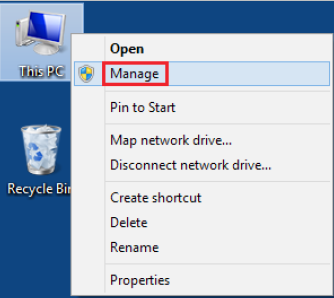
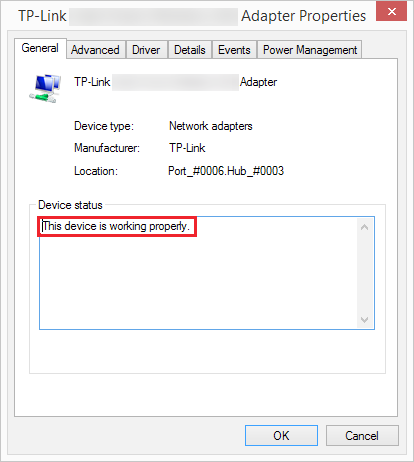
2. Open the Device Manager and go to Network adapters, and then find the corresponding TP-Link adapter, right click it and then go to Properties;
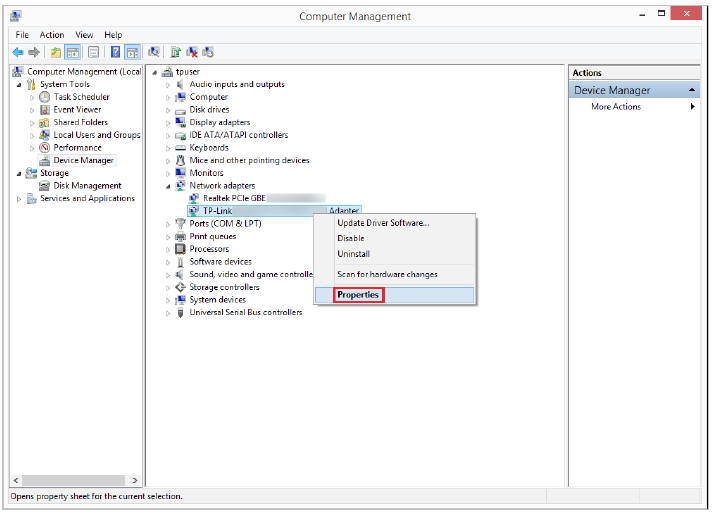
3. If you can see “This device is working properly.” in the red box, you have already installed the driver successfully.
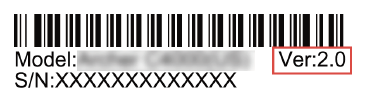
T3: How to find the hardware version of the adapter?
- The hardware version is printed on the product label on the package or the adapter. There is a character string “Ver:X.Y” (for example, Ver:2.0) in the Serial Number field, and the number X is the hardware version of the adapter.
- Visit https://www.tp-link.com/faq-46.html and follow the second method to find the hardware version of the adapter.
More Info
†Maximum wired data throughput rates are the physical rates derived from IEEE Standard 802.3 specifications. Actual wired data throughput is not guaranteed and will vary as a result of environmental factors, Ethernet cable class, and computer performance.
‡To ensure compatibility, you may need to update the adapter’s drivers after an OS update. You can check the full list of OS support in the download center at tp-link.com/download-center.
Authentication
FCC compliance information statement

Product Name: 5 Gigabit PCIe Network Adapter
Model Number: TX301
Responsible Party:
TP-Link Systems Inc.
Address: 10 Mauchly, Irvine, CA 92618
Website: http://www.tp-link.com/us/
Tel: +1 626 333 0234
Fax: +1 909 527 6804
E-mail: sales.usa@tp-link.com
This equipment has been tested and found to comply with the limits for a Class B digital device, pursuant to part 15 of the FCC Rules. These limits are designed to provide reasonable protection against harmful interference in a residential installation. This equipment generates, uses and can radiate radio frequency energy and, if not installed and used in accordance with the instructions, may cause harmful interference to radio communications. However, there is no guarantee that interference will not occur in a particular installation. If this equipment does cause harmful interference to radio or television reception, which can be determined by turning the equipment off and on, the user is encouraged to try to correct the interference by one or more of the following measures:
Reorient or relocate the receiving antenna.
Increase the separation between the equipment and receiver.
Connect the equipment into an outlet on a circuit different from that to which the receiver is connected.
Consult the dealer or an experienced radio/ TV technician for help.
This device complies with part 15 of the FCC Rules. Operation is subject to the following two conditions:
This device may not cause harmful interference.
This device must accept any interference received, including interference that may cause undesired operation.
Any changes or modifications not expressly approved by the party responsible for compliance could void the user’s authority to operate the equipment.
We, TP-Link Systems Inc., has determined that the equipment shown as above has been shown to comply with the applicable technical standards, FCC part 15. There is no unauthorized change is made in the equipment and the equipment is properly maintained and operated.
Issue Date: 2026-06-04
CE Mark Warning

EU declaration of conformity
TP-Link hereby declares that the 5 Gigabit PCIe Network Adapter is in compliance with the essential requirements and other relevant provisions of directives 2014/30/EU,2011/65/EU and (EU)2015/863.
The original EU declaration of conformity may be found at https://www.tp-link.com/en/ce
UKCA Mark Warning

UK Declaration of Conformity
TP-Link hereby declares that the 5 Gigabit PCIe Network Adapter is in compliance with the essential requirements and other relevant provisions of the Electromagnetic Compatibility Regulations 2016.
The original UK declaration of conformity may be found at https://www.tp-link.com/support/ukca/
Canadian Compliance Statement
This device contains licence-exempt transmitter(s)/receiver(s) that comply with Innovation, Science and Economic Development Canada’s licence-exempt RSS(s). Operation is subject to the following two conditions:
(1) This device may not cause interference.
(2) This device must accept any interference, including interference that may cause undesired operation of the device.
L’émetteur/récepteur exempt de licence contenu dans le présent appareil est conforme aux CNR d’Innovation, Sciences et Développement économique Canada applicables aux appareils radio exempts de licence. L’exploitation est autorisée aux deux conditions suivantes :
1) L’appareil ne doit pas produire de brouillage;
2) L’appareil doit accepter tout brouillage radioélectrique subi, même si le brouillage est susceptible d’en compromettre le fonctionnement.
Industry Canada Statement
CAN ICES-003 (B)/NMB-003(B)
Korea Warning Statements:
당해 무선설비는 운용중 전파혼신 가능성이 있음.
Safety Information
Keep the device away from water, fire, humidity or hot environments.
Do not attempt to disassemble, repair, or modify the device. If you need service, please contact us.
Do not use the device where wireless devices are not allowed.
Operating Temperature: 0℃ ~ 40℃ (32℉ ~ 104℉)/ 運作溫度: 0°C~40°C (32°F~104°F)
This product uses radios and other components that emit electromagnetic fields. Electromagnetic fields and magnets may interfere with pacemakers and other implanted medical devices. Always keep the product and its power adapter more than 15 cm (6 inches) away from any pacemakers or other implanted medical devices. If you suspect your product is interfering with your pacemaker or any other implanted medical device, turn off your product and consult your physician for information specific to your medical device.
Please read and follow the above safety information when operating the device. We cannot guarantee that no accidents or damage will occur due to improper use of the device. Please use this product with care and operate at your own risk.
注意!
安全諮詢及注意事項
• 請使用原裝電源供應器或只能按照本產品注明的電源類型使用本產品。
• 清潔本產品之前請先拔掉電源線。請勿使用液體、噴霧清潔劑或濕布進行清潔。
• 注意防潮,請勿將水或其他液體潑灑到本產品上。
• 插槽與開口供通風使用,以確保本產品的操作可靠並防止過熱,請勿堵塞或覆蓋開口。
• 請勿將本產品置放於靠近熱源的地方。除非有正常的通風,否則不可放在密閉位置中。
• 不要私自拆開機殼或自行維修,如產品有故障請與原廠或代理商聯繫。
限用物質含有情況標示聲明書
| 設備名稱:5 Gigabit PCIe Network Adapter 型號(型式):TX301 Equipment name Type designation (Type) |
||||||
|---|---|---|---|---|---|---|
| 單元 Unit |
限用物質及其化學符號 Restricted substances and its chemical symbols |
|||||
| 鉛 Lead (Pb) |
汞 Mercury (Hg) |
鎘 Cadmium (Cd) |
六價鉻 Hexavalent chromium (Cr+6) |
多溴聯苯 Polybrominated biphenyls (PBB) |
多溴二苯醚 Polybrominated diphenyl ethers (PBDE) |
|
| PCB | ○ | ○ | ○ | ○ | ○ | ○ |
| 外殼 | ○ | ○ | ○ | ○ | ○ | ○ |
| 五金組件 | − | ○ | ○ | ○ | ○ | ○ |
| 其他及其配件 | − | ○ | ○ | ○ | ○ | ○ |
| 備考1.〝超出0.1 wt %〞及〝超出0.01 wt %〞係指限用物質之百分比含量超出百分比含量基準值 Note 1:“Exceeding 0.1 wt %” and “exceeding 0.01 wt %” indicate that the percentage content of the restricted substance exceeds the reference percentage value of presence condition. 備考2.〝○〞係指該項限用物質之百分比含量未超出百分比含量基準值。 Note 2:“○” indicates that the percentage content of the restricted substance does not exceed the percentage of reference value of presence. 備考3.〝-〞係指該項限用物質為排除項目。 Note 3:The “−” indicates that the restricted substance corresponds to the exemption. |
||||||

Продукт сертифицировано згідно с правилами системи УкрСЕПРО на відповідність вимогам нормативних>Продукт сертифіковано згідно с правилами системи УкрСЕПРО на відповідність вимогам нормативних документів та вимогам, що передбачені чинними законодавчими актами України.


Explanation of the symbols on the product label
Note: Symbols may vary from products.
注意:符號可能因產品而異。
| Symbol 符號解釋 |
Explanation 解釋 |
|---|---|
 |
Class II equipment Class II 設備 |
 |
Class II equipment with functional earthing 具有功能接地的Class II 設備 |
 |
Alternating current 交流電 |
 |
DC voltage 直流電壓 |
 |
Polarity of output terminals 輸出端子極性 |
 |
Indoor use only 僅限室內使用 |
 |
Dangerous voltage 危險電壓 |
 |
Caution, risk of electric shock 注意,有觸電危險 |
 |
Energy efficiency Marking 能源效率標示 |
 |
Protective earth 保護接地 |
 |
Earth 接地 |
 |
Frame or chassis 機架接地 |
 |
Functional earthing 功能接地 |
 |
Caution, hot surface 警告,表面高溫 |
 |
Caution 警告 |
 |
Operator’s manual 操作手冊 |
 |
Stand-by 待機 |
 |
“ON”/”OFF” (push-push) 「開」/「關」 ( 按壓式) |
 |
Fuse 保險絲 |
 |
Fuse is used in neutral N 保險絲用於中性線N |
 |
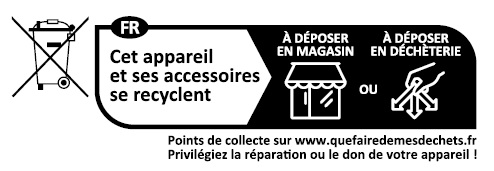
RECYCLING This product bears the selective sorting symbol for Waste electrical and electronic equipment (WEEE). This means that this product must be handled pursuant to European directive 2012/19/EU in order to be recycled or dismantled to minimize its impact on the environment. User has the choice to give his product to a competent recycling organization or to the retailer when he buys a new electrical or electronic equipment. 回收利用 本產品標示有「廢棄電氣電子設備(WEEE)」的分類回收標誌。這表示本產品必須依據歐盟指令 2012/19/EU 進行妥善回收或拆 解,以減少對環境的影響。 使用者可選擇將本產品交給合格的回收機構,或在購買新電器或電子設備時,交回給零售商進行回收處理。 |
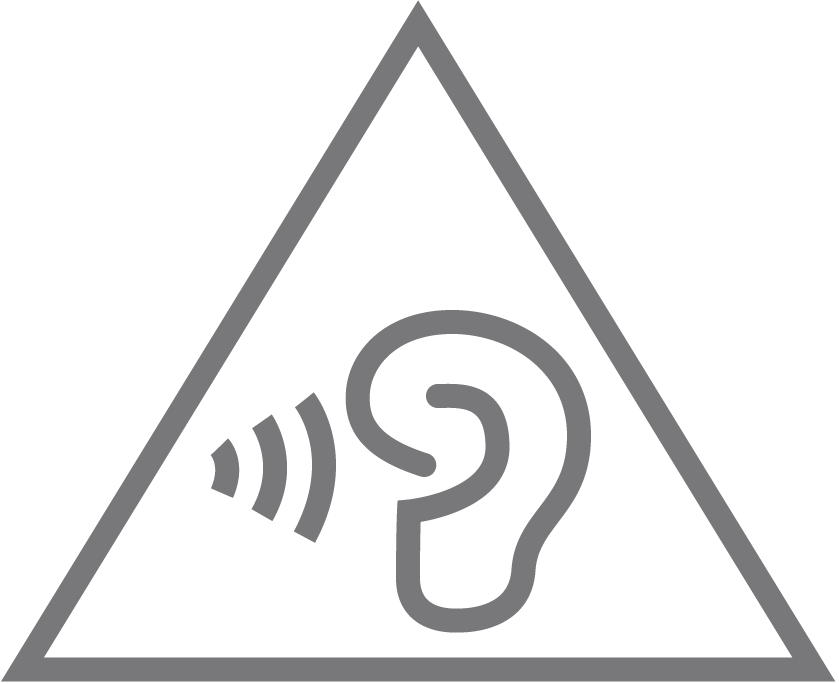 |
Caution, avoid listening at high volume levels for long periods 注意,避免長時間以高音量收聽 |
 |
Disconnection, all power plugs 斷開所有電源插頭 |
| m | Switch of mini-gap construction 微間隙結構的開關 |
| µ | Switch of micro-gap construction (for US version) Switch of micro-gap / micro-disconnection construction (for other versions except US) 微小間隙結構開關(適用於美國版) 微小間隙 / 微小斷開結構開關(適用於美國以外的其他版本) |
| ε | Switch without contact gap (Semiconductor switching device) 無接點間隙開關(半導體開關裝置) |
Von United States?
Erhalten Sie Produkte, Events und Leistungen speziell für Ihre Region