Best IP Camera in the Philippines: What the Specs Decide
Published: August 10, 2026 | Last Updated: August 10, 2026
Quick Answer
- Protection ratings are per model, not per range. VIGI's own camera filter includes IP66, IP67, and None, so two cameras from the same lineup can be rated for different weather or for none at all.
- Channel count is not capacity. VIGI's eight-channel NVR1008H family carries 80 Mbps of incoming bandwidth in total, and its decoding capability at 25fps is eight channels at 2MP, four at 4MP, or two at 8MP.
- H.265 is an international standard, and Fraunhofer HHI puts its gain at about 50 percent bit-rate reduction at the same subjective quality versus H.264. H.265+ is a vendor feature on top of it, and its published savings come from laboratory testing.
There is no single best IP camera, and any page that names one is answering a different question from the one you are asking. What there is, is a specific model that fits a specific position, and four fields on a datasheet that decide whether it does: the model's own protection rating, its DORI distances, its bitrate, and whether the recorder you are pairing it with can take that bitrate across every camera at once. Those four are where shortlists fall apart, because they vary between models that look identical in a product photo and are rarely compared side by side.
Table of Contents
What Makes One IP Camera Better Than Another?
Why Do Models in the Same Lineup Have Different Weather Ratings?
Does H.265 Compression Change What You Need to Buy?
Will Your Cameras Fit Inside the Recorder's Bandwidth?
What Does Channel Count Not Tell You?
Should You Choose a PoE or a Wi-Fi Camera?
Can You Mix Camera Brands on One Recorder?
What Makes One IP Camera Better Than Another?
Fit to the position it will occupy, which is decided by four fields you can look up before buying rather than by anything in the product headline. Those four sit inside a larger decision about the system as a whole, which our CCTV and security camera buying guide sets out.
An IP camera, meaning a camera that sends video over a network rather than a coaxial cable, publishes a specification tab that almost nobody opens. If you are choosing between models, that tab settles the argument faster than any comparison of headline features, and the four fields that matter are these.
Feature-to-Benefit: The Four Datasheet Fields That Decide Fit
|
Field |
What it tells you |
What goes wrong if you skip it |
|
Protection level |
Whether this specific model is rated for the weather at its mounting point, and against which hazard |
An indoor-rated camera goes outside and fails at the seals in the first wet season |
|
DORI distances |
How far away this camera and lens can detect, observe, recognize, and identify |
Footage that is clearly recorded and identifies nobody |
|
Video bit rate |
How much network and storage each stream consumes |
A recorder that cannot take the whole set once every camera is live |
|
Recorder incoming bandwidth and decoding capability |
How many of these cameras one recorder can actually accept and display |
Channels that exist on paper and stutter in practice |
The protection level tells you whether the model survives where you are putting it, the DORI figures tell you what it can resolve at your distance, the bit rate tells you what each camera costs in network and storage, and the recorder's bandwidth and decoding figures tell you how many of them can run together. Each is a number on a page. None of them appears in a product name.
The DORI line deserves one note here and no more, because it is the field people most often ignore. It gives four distances, from detecting that someone is present to identifying a stranger, and they are nothing like each other on the same camera. If that is new to you, our CCTV system buying guide covers how to use it.
What it means for you: open the specification tab on every model you are considering and write those four fields into a row each. A comparison that takes ten minutes settles most shortlists, and it will usually eliminate one candidate outright.
Why Do Models in the Same Lineup Have Different Weather Ratings?
Because the rating belongs to the model, not the range, and manufacturers build indoor and outdoor variants that look almost identical.
You can confirm this in one click on VIGI's own VIGI cameras page. Its Protection Level filter offers IP66 Weatherproof, IP67 Weatherproof, IK08 and IK10 vandal resistance, and None. That last option is the important one: the range contains cameras carrying no weatherproof rating, built for indoor or covered placement, and they sit in the same product family and the same housing shapes as the outdoor models. The C230I Mini is one example, listed with IK08 vandal resistance and no IP rating at all, in a dome housing that looks like any other dome on the page.
Two further examples from VIGI's published specifications make the variation concrete. The C540, an outdoor pan-tilt camera, is rated IP66. The C320I, an outdoor bullet camera, is rated IP67. Both are outdoor cameras, both are current, and they carry different ratings, because IP66 and IP67 are tested against different water hazards rather than being two rungs of one ladder. Our guide to what those ratings actually protect against sets out which suits which position.
The failure this prevents is not dramatic, and it is not immediate. A camera without a rating, mounted under an eave that turns out to be less sheltered than it looked, will run fine through the dry months and start failing at the cable entry and the seals once the rain arrives properly. By then it is a warranty conversation rather than a purchasing one.
What it means for you: never infer a rating from a sibling model or a product family name. Filter by protection level, read it off the individual model's specification tab, and treat any model listing no rating as an indoor camera regardless of how rugged it looks.
Does H.265 Compression Change What You Need to Buy?
Yes, mostly by changing how much storage and network each camera consumes, and it is worth knowing which part of it is a standard and which part is a vendor feature.
H.265, also known as HEVC, is an international video compression standard, approved as ITU-T H.265 and ISO/IEC 23008-2 and developed by the Joint Collaborative Team on Video Coding. Fraunhofer HHI, one of the institutes that contributed to it, states that HEVC achieves about 50 percent bit-rate reduction at the same subjective video quality compared with H.264. That is the headline figure, and it is worth knowing where it comes from, because measured savings in real deployments are commonly lower and vary with the scene and the resolution. A still corridor compresses far better than a busy street, and lower-resolution streams tend to show smaller gains than 4K ones. Treat it as a strong general improvement rather than a number to plan against precisely.
H.265+ is a different thing. It is a vendor implementation layered on top of the standard, adding scene-adaptive coding, and VIGI cameras and recorders support it. TP-Link publishes comparison figures for it, and those figures carry the same disclaimer that its PoE budget numbers do: the calculations come from laboratory testing, and actual performance varies with the amount of activity recorded, the resolution, and other variables. That is the vendor telling you the savings are real, and the exact percentage is not a promise.
For purchasing, the practical consequence is that compression support belongs on your comparison row alongside the other four fields, and that both the camera and the recorder need to support the same coding for the savings to arrive. A camera streaming H.265+ into a recorder that only handles H.264 gives you the older format's storage appetite.
What it means for you: check that camera and recorder both list H.265 or H.265+, and size storage with a margin rather than assuming the headline saving. The savings is a reason to buy less storage than H.264 would need, not a reason to buy the smallest disk that fits on paper.
Will Your Cameras Fit Inside the Recorder's Bandwidth?
Total incoming bandwidth is a fixed ceiling on the recorder, and it is a separate number from the channel count printed on the box.
VIGI publishes the figure for each model. Across the NVR1008H family, including the NVR1008H, the NVR1008H-8P, and the NVR1008H-8MP, the specification is 80 Mbps incoming and 60 Mbps outgoing. Notably, the four-channel NVR1004H carries the same 80 Mbps, which tells you that bandwidth and channel count are set independently.
TP-Link is direct about what that ceiling means. An earlier NVR1008 datasheet states that 80 Mbps is the maximum bandwidth available for managed cameras connected to the recorder, and describes it as sufficient for eight 4MP cameras, with a note that the calculation comes from laboratory testing using VIGI cameras.
So the check is arithmetic, and it takes a minute. Find the video bit rate on each camera's specification tab, which on a camera like the C540 runs up to 4 Mbps on the main stream, add up every camera you intend to connect at the settings you intend to use, and compare the total against the recorder's incoming figure. Eight cameras at 4 Mbps is 32 Mbps and comfortable. Eight higher-resolution cameras at higher frame rates and low compression can approach the ceiling, and a system sitting at the ceiling behaves like a system that fits until the day something busy happens in front of every camera at once.
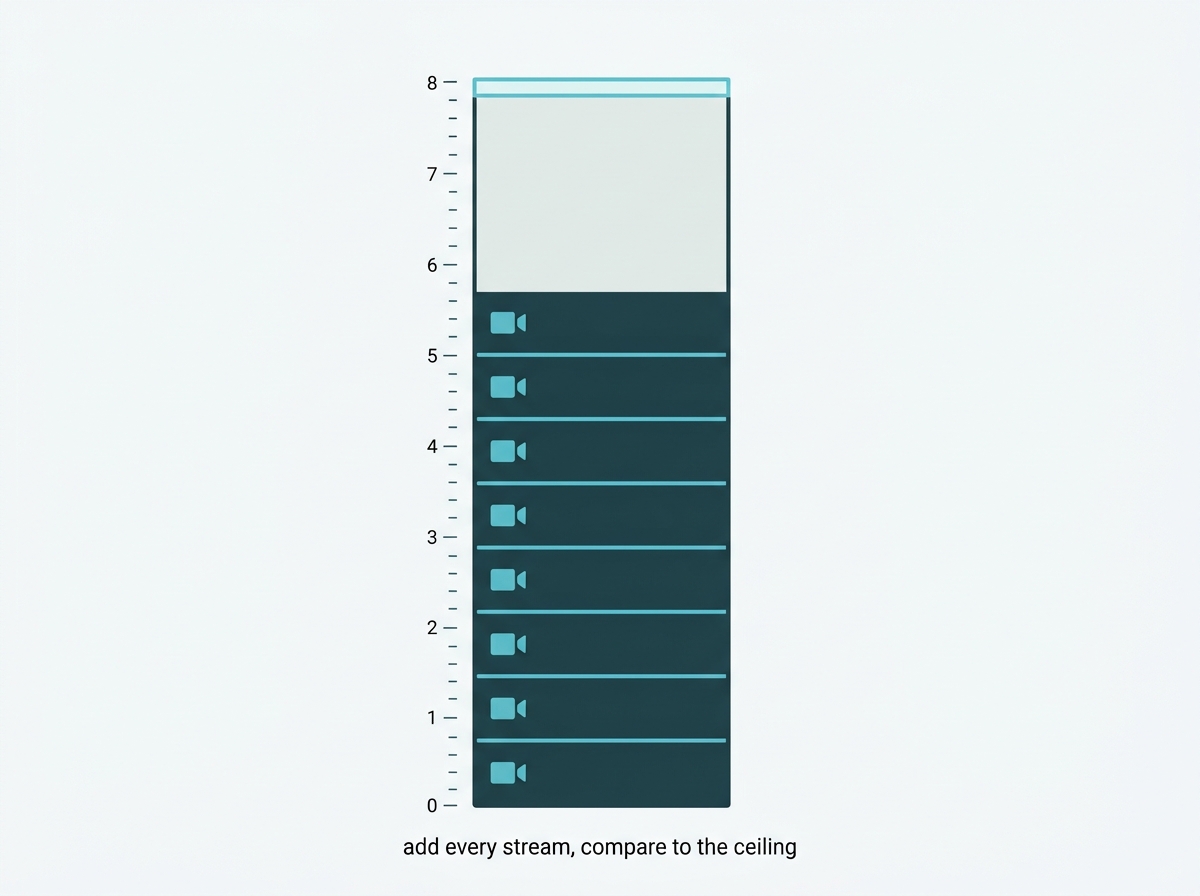
One thing that moves the ceiling: if you intend to run detection on the recorder rather than on the cameras, TP-Link documents that enabling its AI by NVR feature reduces the available receive bandwidth, in its own example from 320 Mbps to 160 Mbps. Budget for that before you fill the ceiling, not after.
You do not have to do the arithmetic by hand. VIGI publishes a set of online calculation tools, including a capacity calculator that takes resolution, bit rate, encoding type, and camera count, and a lens calculator that solves focal length against object distance and width, with a bandwidth calculator alongside them. Both state that their results are for reference only. The same calculators are built into the VIGI app.
What it means for you: do the addition before you order, using each camera's own bit rate rather than an average. If the total lands close to the recorder's incoming figure, move up a model rather than trimming quality settings later.
What Does Channel Count Not Tell You?
How many of those channels the recorder can decode and display at full resolution at the same time. That is a separate specification, and it is usually the one that surprises people.
The VIGI NVR1008H-8MP is an eight-channel recorder. Its published decoding capability at 25fps is eight channels at 2MP, four channels at 4MP, or two channels at 8MP. All three of those are true statements about the same device. So eight 4MP cameras on an eight-channel recorder is a legitimate, working configuration for recording, and it is not a configuration that puts all eight on screen at 4MP simultaneously.
This matters more for some buyers than others. If the recorder sits in a back office and the footage is reviewed after an event, decoding capability is close to irrelevant. If someone watches a live wall during trading hours, it is the specification that decides whether that wall works, and it is not the one on the front of the box.
Recorder selection has more to it than these two figures, including drive capacity and how storage is sized to the days you need. Our guide to choosing a surveillance video recorder covers that side, and the VIGI network video recorders range lists both figures per model.
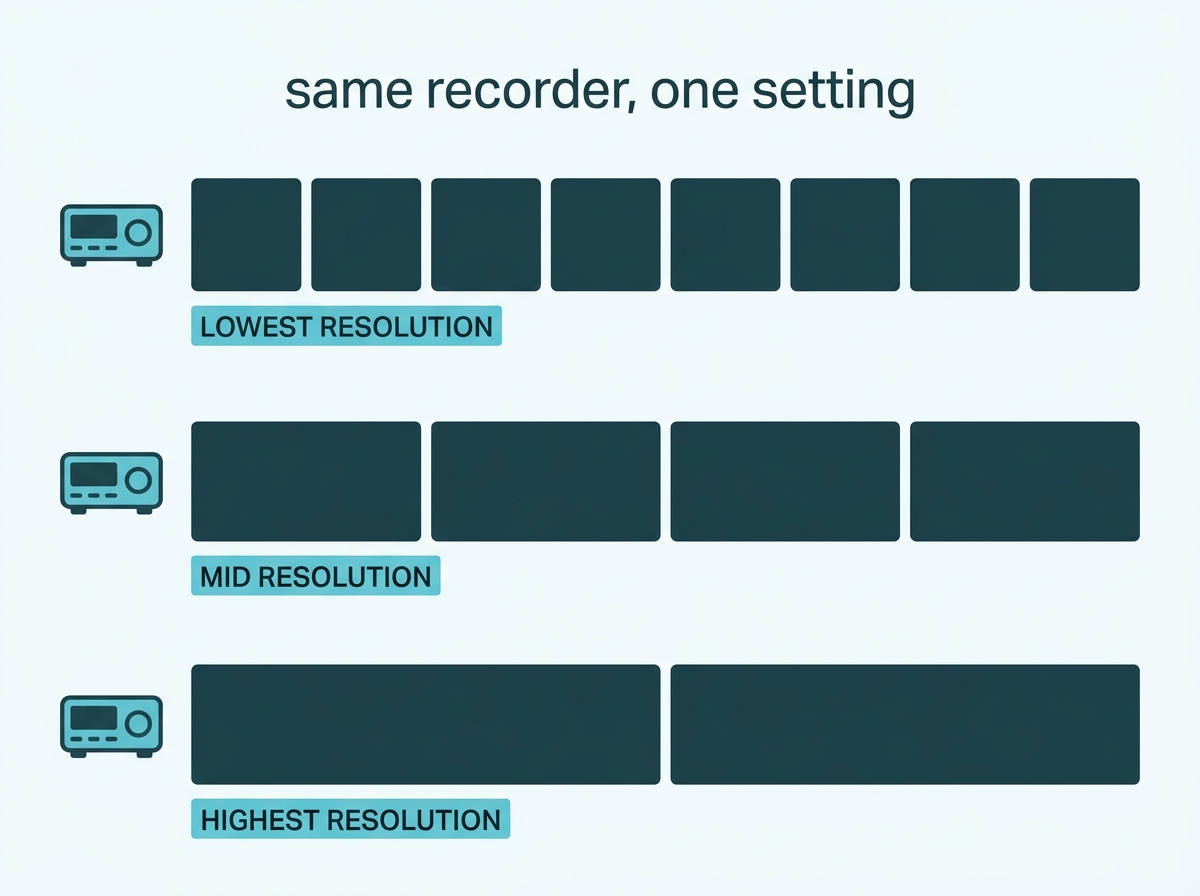
What it means for you: decide whether anyone will be watching live before you choose a recorder. If they will, read the decoding line and match it to the resolution you are actually buying, not to the channel count.
Should You Choose a PoE or a Wi-Fi Camera?
PoE where you can run a cable, Wi-Fi where you cannot. The choice is about installation constraints rather than image quality, since the same model often comes in both forms.
A PoE camera takes power and data down one Ethernet cable, which means one run to each position and no separate power supply at the camera. A Wi-Fi camera such as the C440-W skips the cable run and depends instead on the wireless signal reaching the mounting point reliably, plus a power source nearby. VIGI also builds 4G variants for positions with neither.
For a new build or a renovation where cable can be pulled, PoE is the more predictable choice. For a retrofit into a finished building, or a position across a yard from the nearest cable path, wireless is often the only practical option, and the question becomes whether the signal at that exact spot is dependable when it rains and when the building is full.
What it means for you: decide this per position rather than per system. A mixed installation with PoE where cable runs are easy and wireless for the two awkward corners is normal, and it is usually cheaper than forcing either choice across the whole site.
Can You Mix Camera Brands on One Recorder?
Usually yes, through ONVIF, with a caveat the vendor states in its own documentation.
ONVIF is an industry interoperability standard, and VIGI cameras and recorders support it, which is what allows third-party cameras to be added to a VIGI NVR and VIGI cameras to be added to other systems. For anyone with working cameras already installed, that is the difference between extending a system and replacing one.
The caveat is worth reading before committing. VIGI datasheets carry a footnote stating that some features may operate sub-optimally due to compatibility issues, and recommending VIGI NVRs be used with VIGI cameras for best performance. Interoperability generally covers the video stream and basic control. The features layered above it, such as smart detection events and the classification that sorts recorded footage, are where mixed deployments tend to lose capability, because those depend on how each manufacturer implements them rather than on the shared protocol.
What it means for you: if you are extending an existing mixed system, expect video to work and expect to check each smart feature individually rather than assuming it carries over. If you are specifying from scratch, matching camera and recorder brand costs nothing extra and removes the question.
To compare models by protection rating, resolution, and detection features, browse VIGI cameras, or explore VIGI's camera lineup. If you are new to network cameras, our guide to what separates an IP camera from analog CCTV covers the ground this article assumes, and choosing the right camera for the space covers form factors and lens types.
Frequently Asked Questions
What resolution is best for an IP camera?
There is no best resolution without a distance attached. What decides whether a camera can identify a face is its DORI figures, published on each model's specification tab as four separate distances for detecting, observing, recognizing, and identifying, so compare those against the distance from the mounting point to the subject rather than comparing megapixel numbers. VIGI's online lens calculator complements that by working out which focal length covers a given width at a given distance, though coverage and identification are separate questions and the DORI line is the one that answers the second.
Are all cameras in the same product lineup rated for outdoor use?
No. VIGI's own camera category page filters by Protection Level, and the options include None alongside IP66 and IP67, which means the range contains models built for indoor or covered placement that sit beside outdoor models in the same family. Always read the rating from the individual model's specifications rather than inferring it from a sibling.
How much bandwidth does an IP camera use?
It depends on resolution, frame rate, and compression, and each camera publishes a video bit rate range in its specifications. A camera like the VIGI C540 lists a main stream up to 4 Mbps, so eight of them at maximum would total around 32 Mbps. Add your own cameras at your intended settings rather than using a general figure.
How many cameras can one NVR actually handle?
Two limits apply, and the channel count is only the first. The VIGI NVR1008H family publishes 80 Mbps of total incoming bandwidth, and TP-Link describes that as sufficient for eight 4MP cameras based on laboratory testing, so the combined bit rate of your cameras has to fit under it as well as the count fitting the channels.
Does H.265 compression actually make a difference?
Yes. H.265, or HEVC, is an international standard approved as ITU-T H.265, and Fraunhofer HHI, one of the institutes behind it, puts the gain at about 50 percent bit-rate reduction at the same subjective quality compared with H.264. That matters most across a multi-camera system recording continuously, though measured savings are commonly lower and depend on how much movement is in the scene and what resolution you are running, and H.265+ figures published by manufacturers come from laboratory testing rather than guaranteed performance.
Should I choose a PoE or a wireless IP camera?
PoE is the more predictable choice wherever a cable can be run, since one Ethernet cable carries both power and data and the connection does not depend on wireless conditions. Wireless models suit retrofits and positions where new cabling is impractical, provided the signal at the exact mounting point is reliable in bad weather and when the building is busy.
Can I add a third-party camera to a VIGI NVR?
Generally yes, using the ONVIF interoperability standard, which VIGI supports. TP-Link notes in its own datasheets that some features may operate sub-optimally due to compatibility issues and recommends pairing VIGI recorders with VIGI cameras, so expect the video stream to work and check smart detection features individually.
Final Thoughts
The best IP camera for a given position is the one whose published specifications match what that position needs, and almost every disappointing installation traces back to a field nobody opened. A camera with no protection rating mounted outdoors. A lens whose identification distance was a third of the driveway. Eight cameras whose combined bit rate sat at the recorder's ceiling. None of those is a bad product. Each is a good product asked to do something its datasheet said it would not.
The check takes ten minutes, and it is the same four rows every time: the model's own protection rating, its DORI distances, its bit rate, and the recorder's incoming bandwidth and decoding capability. If a model's specification tab does not answer one of them, that absence is itself an answer.
If you would rather have the shortlist checked than check it, send a VIGI specialist three things: the models you are comparing, the distance from each mounting point to what it needs to see, and whether the position is exposed, covered, or indoor. You will get back a straight answer on which model fits which position, whether the recorder you are considering can take the whole set at the settings you want, and a flag on any position where the camera you have picked will not resolve what you are expecting it to.