How Much CCTV Storage Do You Need for 24/7 Recording?
Published: September 30, 2026
Quick Answer
-
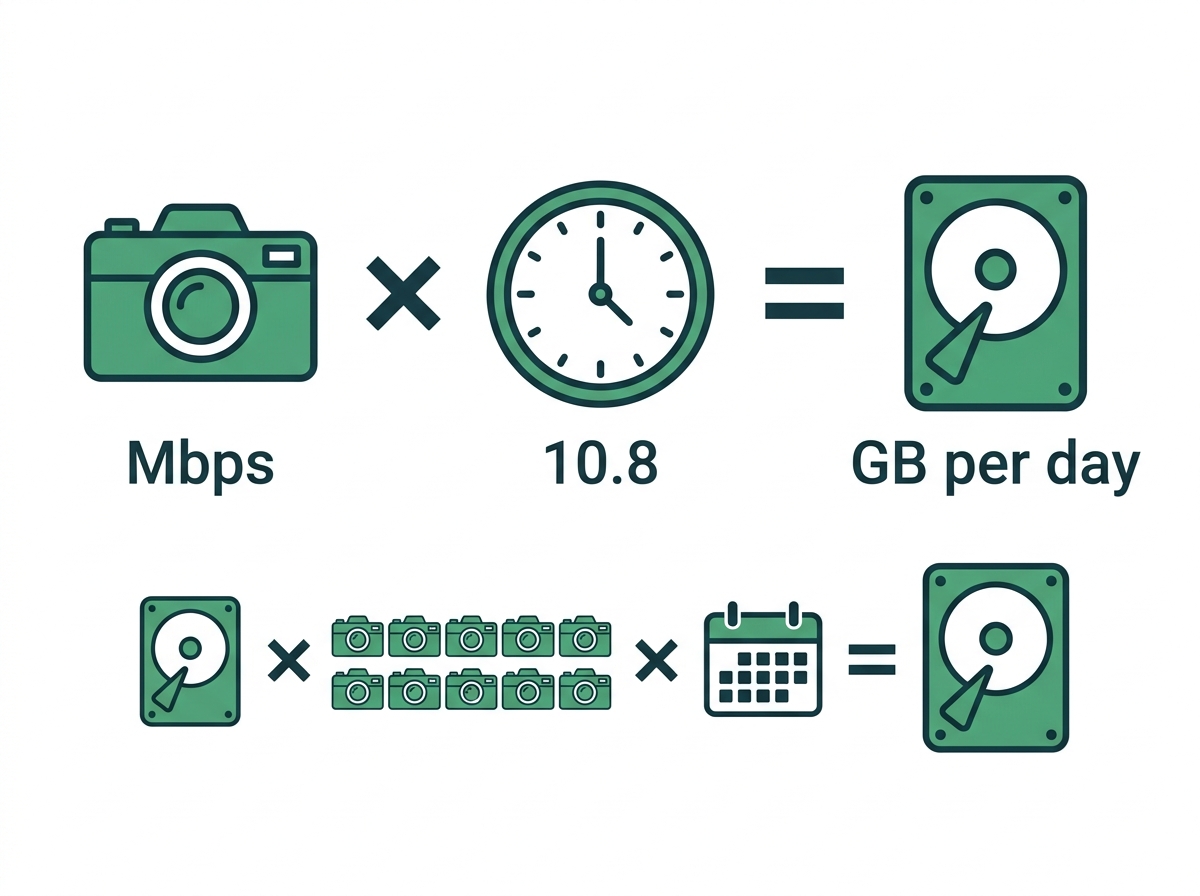
Multiply each camera's bitrate in Mbps by 10.8 to get gigabytes per day, then multiply by the number of cameras and the days you keep footage.
-
Eight 4MP cameras at 4 Mbps need about 10.4 TB for 30 days, which outgrows a single 10 TB drive once you add headroom, so that job belongs on a two-bay recorder.
-
Scene activity, frame rate, and night noise change bitrate more than resolution alone, so confirm the real bitrate on your NVR after installation before buying the final drives.
CCTV storage comes down to one number per camera: bitrate times 10.8 equals gigabytes per day. Storage is the line in a CCTV quote most owners skim, until they discover the night that mattered was overwritten on day 12. The math isn't hard, and once you see it, you can check any installer's quote in five minutes. This guide covers the formula, the settings that move it, and worked examples on VIGI NVRs. To see how 24/7 storage needs connect to your overall recording strategy, start with our recording systems guide.
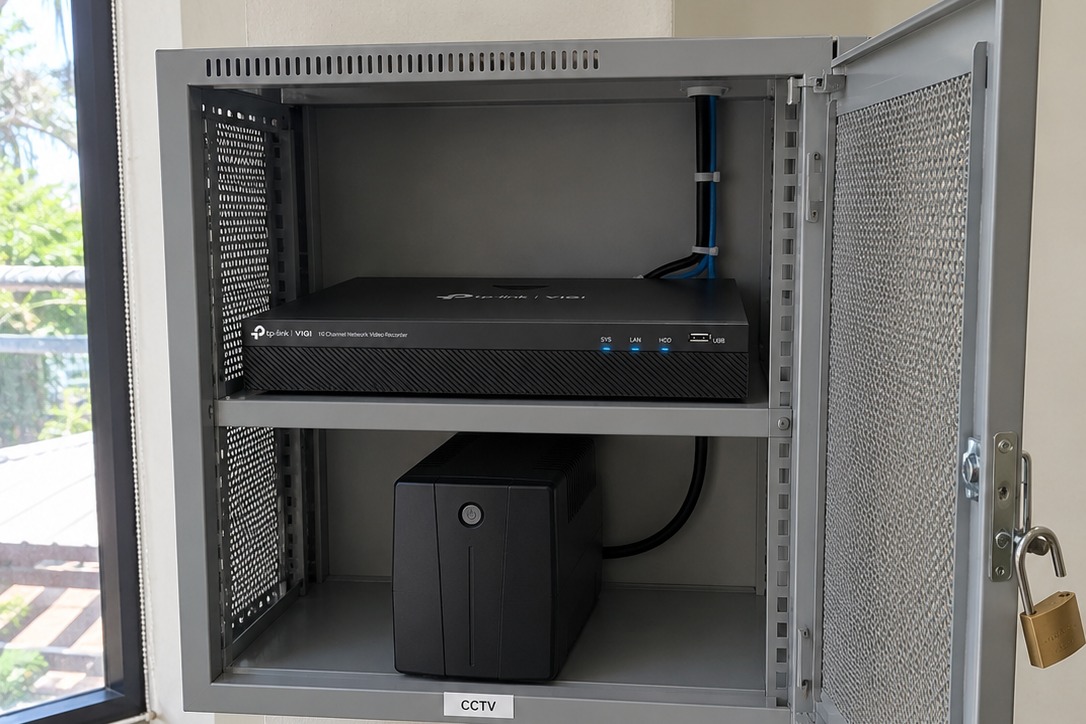
Table of Contents
How Do You Calculate CCTV Storage?
What Changes a Camera's Bitrate?
How Much Storage Do 4, 8, and 16 Cameras Need?
How Long Should You Keep Footage?
How Can You Cut Storage Without Losing Evidence?
How Do You Protect the Footage You Keep?
How Do You Calculate CCTV Storage?
Multiply bitrate by recording time. Every camera sends a stream of data measured in megabits per second (Mbps).
Daily storage per camera (GB) = bitrate (Mbps) x 10.8
The 10.8 comes from the clock. One megabit per second over the 86,400 seconds in a day equals 86,400 megabits. Divide by eight to get megabytes, and you land on 10,800 MB, or 10.8 GB.
Then scale it up:
Total storage = daily GB per camera x number of cameras x days to keep
|
Bitrate per Camera |
Per Day |
Per 30 Days |
|
1 Mbps |
10.8 GB |
324 GB |
|
2 Mbps |
21.6 GB |
648 GB |
|
4 Mbps |
43.2 GB |
1.3 TB |
|
8 Mbps |
86.4 GB |
2.6 TB |
That table is the whole game. The rest of this guide is about working out which row your cameras live in. If you'd rather not do it by hand, the online VIGI storage capacity calculator runs the same math based on resolution, bitrate, encoding, and camera count.
What Changes a Camera's Bitrate?
Five settings and conditions decide how many megabits each camera pushes.
Resolution. A 4MP image has roughly twice the pixels of a 2MP image, so it needs more data to describe.
Frame rate. Storage scales almost directly with frames per second. Recording at 15 fps uses about half the space of 30 fps.
Compression codec. H.265 cuts bitrate by about half compared with H.264 at the same visual quality, according to Fraunhofer HHI, one of the main contributors to the H.265 standard. VIGI's H.265+ saves further by spending fewer bits on parts of the scene that don't move. The saving is biggest on quiet scenes like an empty stockroom and smallest on busy ones like a street-facing entrance.
Scene activity. A camera watching a busy jeepney route always uses more data than one watching a hallway. Trees swaying in the wind count as activity too.
Night noise. Low light adds grain, and the encoder treats grain as movement, so night footage often runs a higher bitrate than daytime. Cameras with strong low-light sensors produce cleaner night video that compresses better.
Because so much depends on the scene, check real numbers after installation. Your VIGI NVR shows each channel's live bitrate, and that figure beats any brochure guess for final sizing.
How Much Storage Do 4, 8, and 16 Cameras Need?
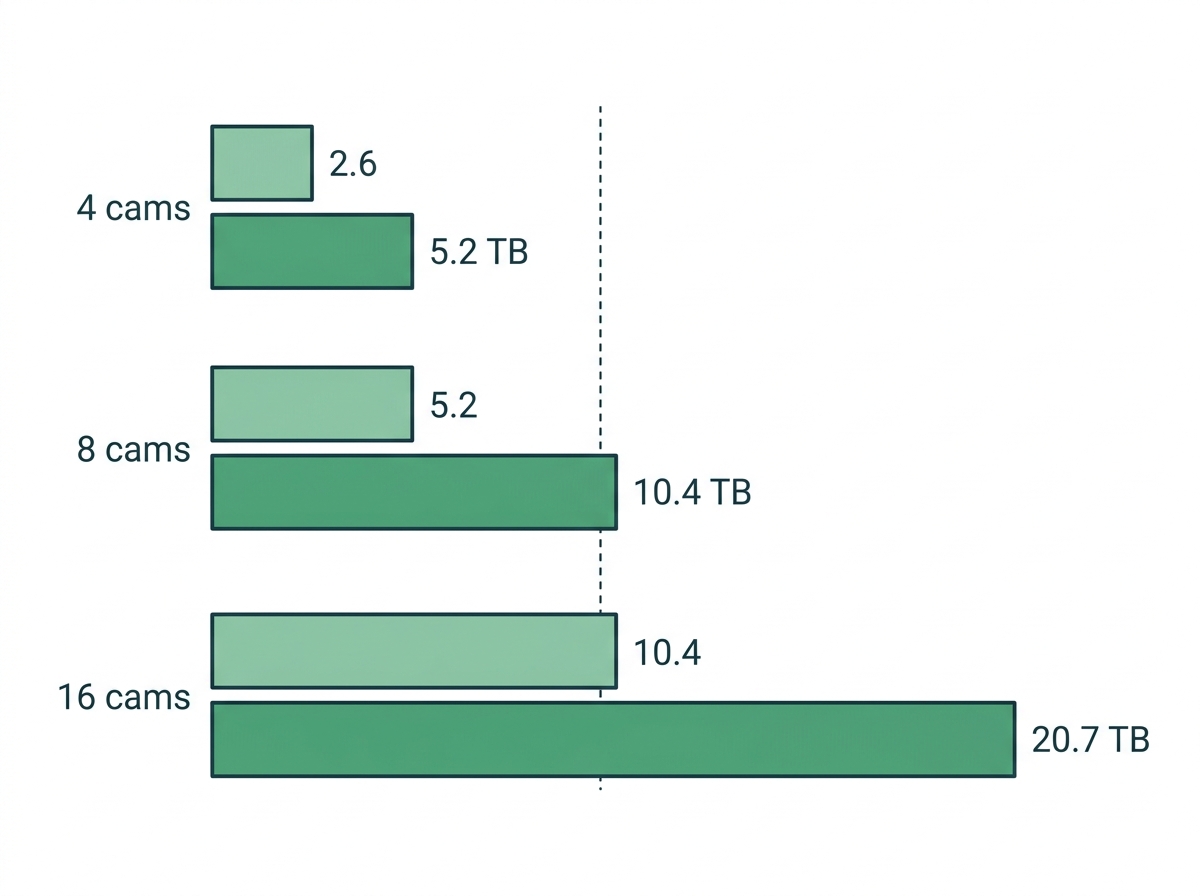
Between about 2.6 TB and 20.7 TB for 30 days, depending on camera count and scene. The examples assume 4MP cameras recording 24/7 on H.265. They use two planning bitrates: about 2 Mbps for quiet indoor scenes and about 4 Mbps for busy or outdoor scenes. Both sit well inside a typical 4MP camera's range. On the C340S, for example, the main stream runs from 256 Kbps to 6 Mbps.
|
Setup |
Cameras |
30 Days, Quiet Scenes (2 Mbps) |
30 Days, Busy Scenes (4 Mbps) |
VIGI Recorder Fit |
|
Small store or pharmacy |
4 |
2.6 TB |
5.2 TB |
VIGI NVR1008H-8MP with a 6 TB drive, room for 4 more cameras |
|
Restaurant or office |
8 |
5.2 TB |
10.4 TB |
NVR1008H-8MP with an 8 TB drive for quiet scenes. VIGI NVR2008H-8MP with two drives for busy scenes |
|
Warehouse or multi-floor site |
16 |
10.4 TB |
20.7 TB |
VIGI NVR2016H with two drives |
A few details behind those picks:
- The VIGI NVR1008H-8MP has eight PoE+ ports, 80 Mbps incoming bandwidth, H.265+, and one SATA bay. The Philippine spec sheet lists drives up to 10 TB, which is why eight busy cameras outgrow it.
- The NVR2008H-8MP keeps eight PoE+ ports but adds a second SATA bay, each rated for drives up to 16 TB.
- The VIGI NVR2016H has 16 channels, 80 Mbps incoming bandwidth, and two SATA bays, each rated for drives up to 16 TB.
- Check bandwidth as well as disk space. Eight cameras at 4 Mbps push 32 Mbps into the NVR, well under an 80 Mbps limit. Sixteen high-bitrate 8MP cameras can hit the ceiling on a smaller recorder.
One more math trap. Drive makers count a terabyte as 1,000 GB, while most software counts in steps of 1,024. A 4 TB drive shows up as roughly 3.6 TB once installed, so leave about 10% headroom on top of your total.
When you're comparing recorders on channels, bays, and PoE budgets, our guide on matching recorder channels, drive bays, and PoE budget to your cameras goes further. For IP cameras, an NVR records the camera's digital stream directly, which is why businesses recording IP cameras choose an NVR over a DVR.
How Long Should You Keep Footage?
As long as your stated purpose needs, written into your CCTV policy, and then size storage to match. The NPC's CCTV circular sets no single national number and says retention can't be decided by drive size alone. Our buyer's guide to CCTV compliance explains those rules in full.
There is also a useful local benchmark. The recommended specs that came with the DILG's push for no CCTV, no business permit rules include a hard drive that can hold 40 days of recording from four 1080p cameras. Your city or municipality may write its own version into a local ordinance, so check with your Business Permits and Licensing Office before you size the drive.
Many owners start from 30 days, then adjust for their LGU's rules and how long it usually takes them to notice and report an incident.
How Can You Cut Storage Without Losing Evidence?
Bigger drives aren't the only fix. These settings stretch the storage you already have.
- Turn on H.265+. It is often the single biggest saving, especially on quiet indoor cameras.
- Drop the frame rate where motion is slow. Hallways, stockrooms, and parking lots rarely need 30 fps. Keep higher rates for cash counters and entrances.
- Mix continuous and event recording. Record 24/7 on doors, registers, and perimeters. Switch low-risk cameras to event recording, so they save clips only when you record on events with smart detection rules.
- Use schedules. A camera covering an office locked from 7 p.m. to 7 a.m. can record on events overnight and continuously during business hours, or the reverse, depending on the risk.
- Match resolution to the job. Save your highest resolutions for spots where you need to identify faces or plates. When you're still deciding where those spots are, plan cameras by zone before you size the drives.
How Do You Protect the Footage You Keep?
Protect it from power, wear, and theft. Storage you can't trust isn't storage, and three risks show up again and again in the Philippines.
Brownouts. A power cut can corrupt a recording in progress and leave the NVR offline until someone resets it. Put the NVR, and any PoE switch powering cameras, on a UPS. Even 15 to 30 minutes of backup rides through most short interruptions.
Drive wear. Nonstop writing wears out desktop drives faster. Use surveillance-rated drives built for 24/7 recording, and check drive status in the NVR every month.
Theft and tampering. A thief who spots the NVR can walk off with the evidence. Keep the recorder in a locked cabinet or a separate room from the cameras it records. Our buyer's guide sets out the circular's encryption and access-log expectations.
For an off-site layer, see how cloud backup keeps footage safe even if the recorder is stolen.

Frequently Asked Questions
How many days of footage does a 1 TB drive hold?
About 46 days for one 4MP camera at 2 Mbps. That camera uses roughly 21.6 GB a day, so 1 TB fills in a little over six weeks. Four of those cameras fill the same drive in about 11 days. Busy outdoor cameras at 4 Mbps cut both figures in half, which is why a 1 TB drive rarely suits a business system.
Why is my real retention shorter than my calculation?
Real bitrates drift above planning figures. Night grain, rain, trees in the frame, and busy afternoons all push bitrate up, and the drive also loses about a tenth of its labeled size to unit conversion. Check each channel's live bitrate on the NVR during a busy hour and again at night, then redo the math with the higher figure.
Does recording at 15 fps weaken evidence?
Not for most business scenes. At 15 frames per second, you still see how someone entered, what they touched, and where they went, and you halve the storage compared with 30 fps. Keep 25 or 30 fps for cash counters, payment points, and fast-moving vehicle lanes, where a single frame can decide whether a hand movement or plate is readable.
Can I add more storage to a VIGI NVR later?
Yes, within limits. You can swap in a larger drive up to the recorder's rated maximum, and two-bay models like the NVR2008H-8MP and NVR2016H let you add a second drive. Replacing a drive means planning how to keep the footage already on it, so buying headroom at the start is cheaper than an early upgrade.
Does an 8MP camera need twice the storage of a 4MP camera?
Close to it. An 8MP image has about twice the pixels, and at the same frame rate and codec, its bitrate usually climbs in step. H.265+ narrows the gap on quiet scenes. Reserve 8MP cameras for wide views that genuinely need the extra detail, such as a parking lot entrance, and use 4MP elsewhere to keep drive costs in check.
Can I save a clip to a USB drive for the police or an insurer?
Yes. VIGI NVRs like the NVR1008H-8MP support video clip backup to a USB drive through their USB ports. Export only the incident window, note the camera name and time range, and keep a record of who received the copy. Pulling a short clip early also protects it from being overwritten while the request is being processed.
Does H.265+ work with every camera on a VIGI NVR?
Not always. VIGI cameras support H.265+ on the main stream, and VIGI NVRs record it. Third-party cameras added through ONVIF may only offer H.265 or H.264, which raises their share of storage. Check each camera's spec sheet for its compression options, and budget third-party channels at a higher bitrate when you calculate total drive space.
Final Thoughts
If you've ever gone looking for last week's footage and found it already overwritten, the drive was sized to the budget, not the need. Bitrate times 10.8 gives you gigabytes per camera per day. Multiply by cameras and days, add 10% headroom, and you have your drive size. Then protect the recorder from brownouts and theft so that footage is still there when you need it.
For how storage fits the rest of your recording setup, read Video Storage & Recording Systems for CCTV.
Sizing a system that has to hold a month of footage? Compare the one-bay VIGI NVR1008H-8MP with the two-bay VIGI NVR2008H-8MP and VIGI NVR2016H. Browse every VIGI NVR by channel count and drive bays, or have a VIGI reseller measure real bitrates on-site.