Tapo Smart Plug FAQ: Common Questions About Features, Setup, and Compatibility
Tapo smart plugs let you control and automate connected devices from the Tapo app or via voice commands through Alexa or Google Home. This page covers the most common questions about Tapo smart plug features, compatibility, setup, and troubleshooting. It is organized into two sections: Basic Information and Troubleshooting. Questions cover specifics related to the Tapo P100, P105, P110, and P115.
Key Takeaways
- Tapo smart plugs support 2.4 GHz Wi-Fi and are compatible with any router that supports 2.4 GHz frequency.
- The Tapo P110 and P115 support energy monitoring; the P100 and P105 do not. The P105 and P115 are mini-sized, while the P100 and P110 are standard-sized.
- Tapo smart plugs work with Alexa and Google Home for voice control, but the Tapo app must be used for initial configuration before linking to a third-party app.
- Tapo smart plugs can be controlled locally via the Tapo app without an Internet connection, but Smart Actions require a hub for local use.
- Up to 32 schedules can be set per Tapo smart plug.
- Tapo smart plugs are not suitable for outdoor use — they are neither waterproof nor dustproof.
Tapo Smart Plug FAQ Table of Contents
Basic Information
What Tapo Smart Plugs does TP-Link have? And what are their differences?
How do I tell if the Tapo Smart Plug is compatible with my router?
Where to check the energy usage of the energy monitoring-supported Tapo Plug?
Can Tapo Smart Plug work with third-party apps, like Smart Life, Apple Home Kit, etc.?
Can the Tapo Smart Plugs be controlled via voice commands?
Can the Tapo Smart Plug connect to a wireless network with captive portal authentication?
Can I remote-control the Tapo Smart Plug?
How can I use the Tapo Smart Plug once again if I switch to a new router?
Can I make use of the Tapo Smart Plug without an internet connection?
Is the Tapo Smart Plug outdoor compatible?
Can I check the status of the washing machine using the Tapo Smart Plug?
How many schedules can I set up for the Tapo Smart Plug?
Can I use multiple phones to control the Tapo Smart Plugs?
Can the energy monitor data of Tapo P110/P115 be exported?
Can I plug in a power strip to the Tapo Smart Plug?
What is Charge Guard Feature of the Tapo Smart Plug?
Troubleshooting: Common Issues and Fixes
What should I do if I fail to configure the Tapo Smart Plug?
What should I do if the Tapo Smart Plugs keep showing offline?
What should I do if my Alexa/Google Home fails to control my Tapo Smart Plug?
Common Questions About Tapo Smart Plugs
1. What Tapo Smart Plug does TP-Link have? And what are their differences?
You may refer to this page for available smart plugs: https://www.tp-link.com/home-networking/smart-plug/
To compare different models, use the comparison tool on our official website.
2. How do I tell if the Tapo Smart Plug is compatible with my router?
The Tapo smart plug is compatible with any wireless router that supports 2.4 GHz frequency.
3. Where to check the energy usage of the energy monitoring-supported Tapo Plug?
Please refer to where to check the energy usage of energy monitoring-supported Tapo plug for details.
4. Can Tapo Smart Plug work with third-party apps, like Smart Life, Apple Home Kit, etc.?
Tapo Smart Plugs work with Tapo, Alexa, and Google Home apps.
Note: To use the Tapo Smart Plug with Alexa and Google Home Apps, you must complete the configuration steps in the Tapo app first.
5. Can the Tapo Smart Plugs be controlled via voice commands?
Yes, you can control the Tapo Smart Plugs via voice commands through Alexa and Google Home.
6. If I only want to use the Alexa app to operate the Tapo Smart Plugs after configuration, can I delete the Tapo app?
Yes, you can delete the Tapo app and use the Plug with Alexa only after configuring it using the app and associating it with Alexa. You won't be able to use all of the Smart Plug's features, though.
7. Can the Tapo Smart Plug join a captive portal-secured wireless network?
No, the Tapo Smart Plug only supports WPA-PSK, WPA2-PSK, and WPA3 for wireless security.
8. Can I remote-control the Tapo Smart Plug?
Yes, as long as the Tapo Smart Plugs are connected to a working internet.
9. How can I use the Tapo Smart Plug once again if I switch to a new router?
There are two options:
- Press the button for 10 seconds to reset the device and start over, or for 5 seconds to enter configuration mode and connect to a new network.
- Set your wireless network to the same name and password as your old router. You don't need to set up the Tapo Smart Plug from scratch because the smart home device recognizes networks by their SSID, security type, and password.
10. Can I make use of the Tapo Smart Plug without an internet connection?
Yes, the Tapo smart plug can be controlled via the Tapo app on your local network. However, Smart Actions are not available without a hub — a hub is required to enable them.
11. Is the Tapo Smart Plug outdoor-compatible?
The Tapo smart plug is not suitable for outdoor use — it is neither waterproof nor dustproof.
12. Can I check the status of the washing machine using the Tapo Smart Plug?
For Tapo P110/P115, you may use the energy monitor data to determine whether the washing machine is still in use.
13. How many schedules can I set up for the Tapo Smart Plug?
You can set up to 32 schedules per Tapo smart plug. For more details, please refer to Common Questions about Schedule, Timer and Away mode of Smart Home Devices.
14. Can I set the Tapo Smart Plug to turn on and off at intervals of around 5/10/30/60 seconds for a full 24 hours?
No, the Tapo Smart Plug doesn’t work like that.
15. Can I use multiple phones to control the Tapo Smart Plugs?
Yes, you can share your devices with your family or log into the Tapo APP with the same TP-Link ID on multiple phones.
16. Can the energy monitor data of Tapo P110/P115 be exported?
Yes, the energy monitor data can be exported via Tapo app. Refer to feature 8 in Tapo Smart Plug Energy Monitoring: How to Use Every Feature for details.
17. Can I plug in a power strip to the Tapo Smart Plug?
Yes, you can plug a power strip into a Tapo smart plug and control it via the Tapo app, or voice commands through Amazon Alexa or Google Assistant. The total wattage of devices plugged into the power strip must not exceed the smart plug's rated amperage and wattage.
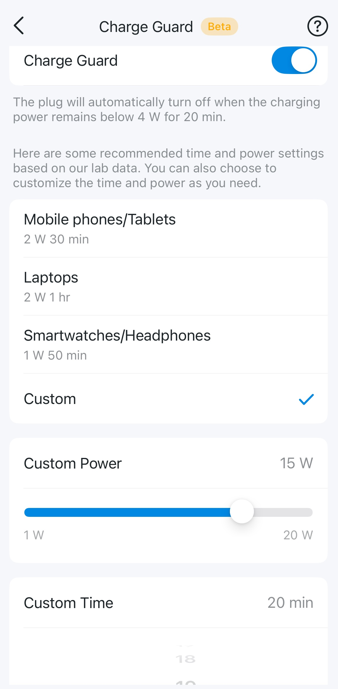
18. What is the Charge Guard Feature of the Tapo Smart Plug?
After estimating that the connected device is fully charged, Charge Guard will automatically cut off the smart plug's power output. It helps reduce battery aging and prolong the battery life of your electronics.
To enable it, go to the smart plug's Device Settings > Charge Guard, then select a preset mode or customize the power and time yourself.
Troubleshooting
1. What should I do if I fail to configure the Tapo Smart Plug?
Please refer to What if I fail to configure the Tapo Smart Plug to troubleshoot.
2. What should I do if the Tapo Smart Plug keeps showing offline?
Please refer to Troubleshooting Guide: Tapo Camera, Doorbell, or Smart Device Going Offline to troubleshoot.
3. What should I do if my Alexa/Google Home fails to control my Tapo Smart Plug?
Please refer to Cannot make TP-Link smart devices work with Google Home to troubleshoot.
Looking For More
Is this faq useful?
Your feedback helps improve this site.



TP-Link Community
Still need help? Search for answers, ask questions, and get help from TP-Link experts and other users around the world.