How to improve the signal strength of my 5GHz wireless connection
 436587
This Article Applies to:
Before getting to far with 5GHz deployment, please pay attention to your geographical location and confirm the local law or regulation for 5GHz Wireless LAN required.
Symptom:
- Weak wireless signal showed on client device;
- Cannot detect the 5GHz wireless radio
Cause:
Generally, the lower the frequency the farther a wireless signal can travel. Therefore, devices on a 5 GHz network will tend to have a shorter range than those using 2.4 GHz. This can be mitigated somewhat with sophisticated antenna technology, but if a given device is relatively far from the wireless access point, you may have better luck connecting via 2.4 GHz.
Also the higher frequency will be more sensitive to obstacle and more attenuation caused when passing through the walls, ceiling, etc due to the relatively poor diffraction.
Here we take two pictures as example:
.jpg)
.jpg)
SNR: Signal-to-noise ratio is a measure used in science and engineering that compares the level of a desired Signal to the level of background Noise. It is defined as the ratio of signal power to the noise power. A ratio higher than 1:1 (or 0dB) indicates more signal than noise.
Solution:
Since the intrinsic properties of 5GHz wireless radio, there are no true sense solutions to improve the performance immediately, here we recommend following steps to optimize the wireless connection.
- Please confirm your wireless router/access point or client can support 5GHz wireless radio;
- Deploy your wireless router/access point close enough to your wireless equipment vice versa;
- Avoid the physical barrier because they will absorb the wireless signal dramatically;
- Try to change another channel within the local regulation;
Here we take Archer C7 as an example. Please log into the management page refer to this link then select Advanced>Wireless> 5GHz, and choose another channel to deploy. You can take the following picture as reference.
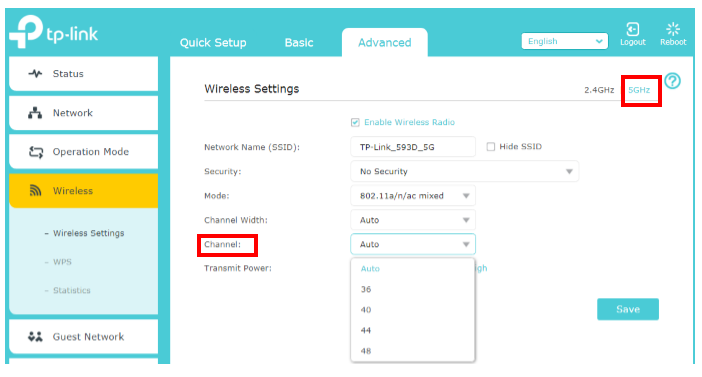
- If you really need better wireless coverage, however, the 5GHz frequency cannot meet your demand after following the suggestions above, please try to switch to 2.4GHz.
Is this faq useful?
Your feedback helps improve this site.

TP-Link Community
Still need help? Search for answers, ask questions, and get help from TP-Link experts and other users around the world.


