How to set up Port forwarding feature on my TP-Link Wireless Router for Xbox Live?
 414980
This Article Applies to:
If there is a router between your Xbox console and Internet, you may have to open ports for your Xbox console in order to play games with other players online. You may refer to the Xbox support for the requisite ports for your Xbox, we recommend the ports below must be opened for Xbox Live:
UDP 88
UDP 3074
TCP 3074
Step 1
Open the web browser and in the address bar type in: http://192.168.1.1 or http://192.168.0.1 or http://tplinkwifi.net. Then press Enter.

Note:
The default access address differs by model. Please find it on the bottom label of the product.
Step 2
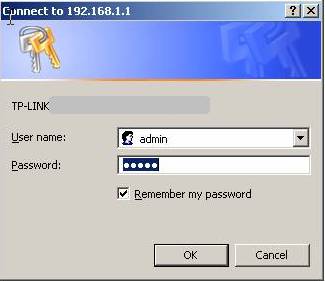
Type the username and password in the login page. They are both admin by default.
Step 3
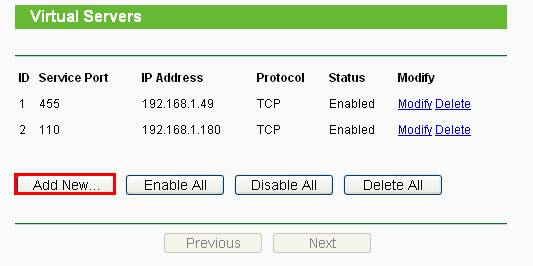
Click Forwarding->Virtual Servers on the left side, and then click Add New… button.
Step 4
Set up the entries.
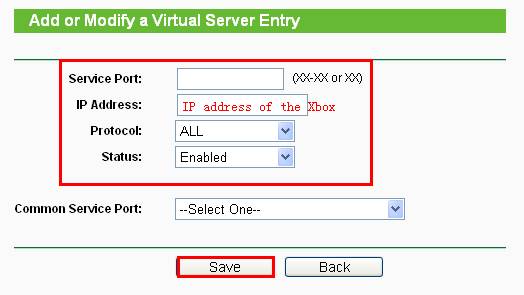
You need add two entries as below:
1. Open UDP port 88.
- Service Port: 88
- IP Address: the IP address of your Xbox.
- Protocol: UDP
- Status: Enable
And then click Save.
2. Open TCP/UDP port 3074:
- Service Port: 3074
- IP Address: the IP address of your Xbox.
- Protocol: ALL
- Status: Enable
And then click Save.
Note:
1. This article is for Xbox Live only.
2. You’d better assign a static IP address which is in the same subnet with the router for your Xbox, so that the entries will take effect every time you reboot the Xbox.
Get to know more details of each function and configuration please go to Download Center to download the manual of your product.
Is this faq useful?
Your feedback helps improve this site.


4.0-A_normal_1584497134650q.png)

TP-Link Community
Still need help? Search for answers, ask questions, and get help from TP-Link experts and other users around the world.


