Téléchargement pour InSight PTZ5425
- Product Overview
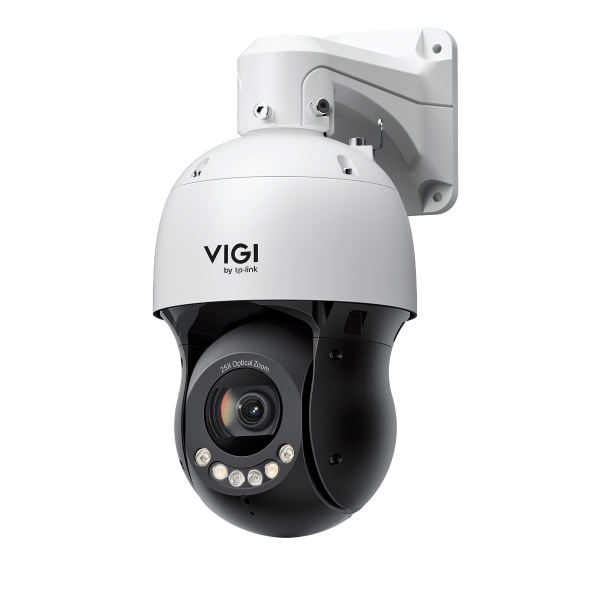 VIGI Dôme PTZ réseau Full-Color 5 pouces 4 MP avec zoom optique 25×
VIGI PC Client
|
VIGI PC Client_x64_2.1.37 |
Téléchargement | |
|---|---|---|
| Date de publication: 2026-07-15 | Langue: Multi-langues | Taille du fichier: 148.90 MB |
Système d'Exploitation: Windows 10/11 |
||
|
New Features and Enhancements: |
||
Setup Video
-
How to Set Up InSight Pan & Tilt Cameras via VIGI App
This video shows how to set up InSight PTZ cameras, covering both hardware installation and app configuration. For app configuration, you will see three methods: Method 1: Scan/Add Device Method 2: Auto Discover Method 3: Manually Add
Plus Pli -
How to Set Smart Detection on Speed Dome PTZ
The VIGI InSight PTZ5425 is a 4MP 25× Optical Zoom Full-Color Network Speed Dome camera with 3D Detection Regions, ensuring detection areas remain aligned with actual targets during PTZ movement. This video shows how to set smart detection on your speed dome PTZ camera.
Plus Pli
FAQs
- Comment puis-je trouver l'adresse IP de ma caméra VIGI ?
- Comment éviter le bruit lors de la surveillance du son de la caméra VIGI
- Comment imperméabiliser les caméras de sécurité extérieures VIGI
- Comment résoudre un problème d'image verte ou pixélisée sur la caméra VIGI
- Comment résoudre un problème de scintillement sur la vue en direct de la caméra VIGI
- Comment utiliser les caméras VIGI avec un NVR ou un NAS tiers
- Qu’est-ce que DORI ?
- How to Use Power Up Action Function
- Présentation de VIGI
- Comment réduire les détections de mouvements dus à la pluie, à la neige ou aux insectes, etc. sur les caméras VIGI
- Comment découvrir et gérer les appareils à l'aide de VIGI Config Tool
- Getting Started with the VIGI App
- How to Download Videos from Omada Guard on an Omada Fusion Pro Gateway
- How to Configure VIGI Cameras and NVRs for Sentinel ARC Integration
- VIGI Series Camera Installation Guide
- Comment utiliser les modes Préréglage, Patrouille et Balayage par motif
- How to Configure Smart Detection on Speed Dome PTZ
- How to Use Home Position Function
- Why Does the HTTPS Web Interface of VIGI IPC and NVR Show a “Not Secure” Warning in Some Browsers
- How to Use Smart Tracking
- How to Configure PTZ Limit on VIGI Cameras Using the Web UI
- How Do I Log In to the Web Management Page of VIGI IPC and NVR
- How to Set Privacy Mask on Speed Dome PTZ
- How to Use Manual Tracking
- How to Use Park Function
- How to Use RS-485 Controller for PTZ Control
- How to Configure PTZ Scheduled Task
- Comment configurer le serveur d'alarmes sur une caméra VIGI
- How to Configure TP-Link DDNS on VIGI Cameras
- How to Use VIGI Pan/Tilt/Zoom Function
Firmware / Micrologiciel
Une mise à jour du micrologiciel (Firmware) interne des produits peut résoudre les problèmes de la version précédente et améliorer les performances du produit.
Pout procéder
IMPORTANT: Pour éviter les échecs de mise à jour, veuillez lire ce qui suit avec attention, avant de procéder ; en cas de doute n’hésitez pas à contacter le support technique TP-Link.
- Il est recommandé de télécharger les micrologiciels uniquement depuis le site Web TP-Link.fr. Si votre matériel a été commercialisé par une autre succursale TP-Link cliquez ici.
- Déterminez la version matérielle de votre produit TP-Link avant de rechercher les micrologiciels conçu pour cette version.
Un micrologiciel non spécifiquement conçu pour la version matérielle de votre produit peut endommager ce dernier et en annuler la garantie.
(Sauf spécifications contraires, les sous-versions matérielles acceptent les micrologiciels de la version principale : V2 = V2.0, V2.1, V2.x…
en revanche V1 ne peut recevoir les micrologiciels de V2, V3, Vx et inversement) - Comment trouver la version matérielle d’un produit TP-Link ?
- Ne coupez PAS l'alimentation électrique du produit TP-Link pendant sa mise à jour, cela pourrait l’endommager de façon permanente.
- Ne procédez PAS à la mise à jour du micrologiciel via une connexion Wi-Fi (sauf bien entendu pour les produits dépourvus de connexion Ethernet).
- Il est très fortement recommandé de procéder à la mise à jour depuis un ordinateur non connecté à internet (uniquement durant le temps de cette mise à jour).
- Utilisez un logiciel (au cas où votre système d’exploitation n’intègre pas cette fonctionnalité) pour extraire le micrologiciel du fichier (.zip ou .rar) que vous aurez téléchargé depuis notre site.
- Aucun micrologiciel n’est exécutable directement il faut passer par l’interface du produit ou de l’utilitaire associé (cf. mode d’emploi du produit) pour procéder à la mise à jour.
|
InSight PTZ5425(UN)_V1_1.0.2 Build 260810 |
Téléchargement | |
|---|---|---|
| Date de publication: 2026-09-10 | Langue: Multi-langues | Taille du fichier: 29.30 MB |
|
New Features and Enhancements: |
||
|
InSight PTZ5425(UN)_V1_1.0.0 Build 260519 |
Téléchargement | |
|---|---|---|
| Date de publication: 2026-06-09 | Langue: Multi-langues | Taille du fichier: 29.31 MB |
|
First firmware released. |
||
Utiliser un firmware tiers non développé ni distribué par TP-Link dans les produits TP-Link
Certains firmwares officiels de produits TP-Link peuvent être remplacés par des firmwares tiers tels que : OpenWrt, DD-WRT, LEDE, Gargoyle etc.
TP-Link n'a aucune obligation de support concernant ces micrologiciels, et ne garantit en aucun cas performances et stabilité des produits qui seraient pourvus de ces firmwares.
L'altération fonctionnelle d’un produit consécutif à l’installation et/ou à l'utilisation d'un firmware tiers annulera de fait la garantie de ce produit.
Accès au code source soumis à licence GPL
Remarque : Les produits de TP-Link contiennent des portions de logiciel développées par des tiers, ce qui inclus du code soumis à la licence GNU (GPL), Version 1, Version 2, Version 3 ou GNU Lesser General Public License (" LGPL "). Vous pouvez utiliser le code concerné à condition de respecter les termes de la licence.
Vous pouvez consulter, imprimer et télécharger les conditions de la licence GPL ici. Vous trouverez les codes source GPL des logiciels respectifs utilisés dans les produits TP-Link pour le téléchargement direct et d'autres informations, y compris une liste des logiciels TP-Link contenant du code logiciel soumis à licence GPL dans le Centre de code GPL.
Les programmes respectifs sont distribués SANS AUCUNE GARANTIE ; sans même la garantie implicite de QUALITÉ MARCHANDE ou d'ADÉQUATION À UN USAGE PARTICULIER. Voir la licence publique générale GNU respective pour plus de détails.
GPL Code
Emulators
Version du firmware |
Mode de fonctionnement |
Langue |
|
|---|---|---|---|
260519(UN)_Emulator |
- |
Anglais |
Remarques:
1. L'émulateur est une interface graphique Web virtuelle où vous pouvez découvrir le panneau de gestion des produits TP-Link.
2. Les émulateurs répertoriés peuvent ne pas avoir le dernier firmware.
3. Les fonctionnalités affichées sont fournies à titre indicatif et leur disponibilité peut dépendre des réglementations locales. Pour plus d'informations, veuillez vous référer à la fiche technique ou à la page du produit.