TP-Link Router Internet Speed FAQs: Mbps, Link Speed, and Wi-Fi Explained
TP-Link router speed isn't one single number. Signal rate, link speed, and actual internet speed are distinct, and understanding the differences matters when troubleshooting or evaluating your connection. This page covers the most common questions about TP-Link router speed, including how signal rate and link speed work, what Mbps and MBps mean, how WAN port capabilities limit your internet speed, and what to expect from real-world speed test results.
Key Takeaways
- Signal rate (the Mbps figure advertised on the router) refers to the maximum wireless link speed between the router and a connected device — not the internet speed delivered by your ISP.
- Internet speed is limited by the slowest point in the network path, including the ISP connection, WAN port capability, and the type of cable or adapter used.
- A router with a 100Mbps WAN port cannot deliver more than 100Mbps of internet speed, regardless of its wireless signal rate.
- The difference between Mbps and MBps matters: 1 MBps = 8 Mbps. ISPs typically advertise speeds in Mbps (megabits), while download managers often show speeds in MBps (megabytes).
- Wireless link speed varies between devices based on wireless mode, distance from the router, and interference levels — not just the router's maximum capability.
- Fast Ethernet ports cap at 100Mbps; Gigabit Ethernet ports cap at 1000Mbps. A router with a Gigabit WAN port is recommended if your ISP plan exceeds 100Mbps.
How Do I Know My Actual Internet Speed?
There are various speed-test tools online. You can try one of the most popular sites: https://www.speedtest.net/ or use its app https://www.speedtest.net/apps to test the internet speed using your PC/smartphone.
* Due to network fluctuations and line disturbances in the actual speed measurement, we recommend performing multiple tests to obtain accurate results.
What Does Signal Rate Mean in the Device Specifications?
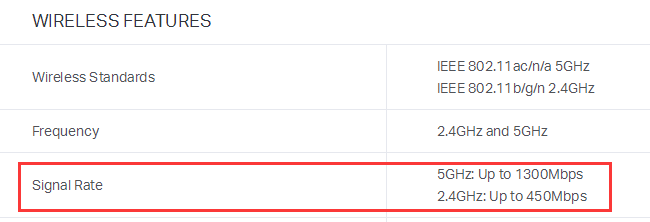
Signal Rate means the maximum wireless link speed the router can provide.
The wireless link speed is the internal WLAN connection speed between the computer/wireless client and the router. The signal link speed is different from the Internet speed.
Different connection methods have different factors that affect the link speed:
* Wired connection – Ethernet Port type on the router and the adapter, and the type of Ethernet cable used.
* Wireless connection – Physical or environmental interference, Hardware specifications of router and adapter, the number of antennas, etc.
To know how to check link speed, see How to check the associated/link speed on a wireless client
To know more about the 802.11 theoretical wireless speed, see *Tech Article* 802.11 Wireless Rate Calculation
Why Is My Wireless Link Speed Lower Than My Router's Maximum?
Different wireless clients negotiate different link speeds with the router based on wireless mode, distance, and noise level (interference from other wireless transmissions).
In this example, 325Mbps means actual link speed, 1300Mbps means maximum link speed on 5GHz supported by our router.
To know more details about the link speed, *Tech Article* Theoretical wireless rate and actual wireless rate.
Why Does My Wired Link Speed Show 100Mbps on a 300Mbps Router?
300Mbps refers to the maximum wireless link speed. The wired local network link speed is limited by the capability of the router’s LAN ports, the type of Ethernet cables, and the Ethernet Adapter of the computer.
If the router has 100Mbps LAN ports, normally the local network link speed will show 100Mbps if the Ethernet Adapter and cable support 100Mbps.
Why Do I Only Get 50Mbps on a Speed Test When My Router Is 300Mbps?
3300 Mbps refers to the internal wireless link speed between the router and the computer — this is different from your actual internet speed. The internet speed is mainly limited by the lowest speed in the network path.
There are many factors which will affect the network speed in the network path, such as ISP, interferences, server stability, surroundings, and more.
Why Can't I Get My Full Fiber Speed Through My TP-Link Router?
Actual internet speed depends on the following: the speed you pay for, service connection type, router capability, the current load on the provider's network, and the types of cables used. Different routers have different capabilities to handle internet data (NAT throughput of WAN to LAN), and the maximum bandwidth TL-WR841N can handle is about 90 Mbps.
*For NAT Throughput of WAN to LAN direction of TP-link routers please refer to:
https://www.tp-link.com/support/faq/465/
Why Can't My Wireless Clients Reach the Router's Advertised Speed?
Some customers report that after connecting to the Archer router, wireless clients cannot achieve high speeds even when the ISP provides high bandwidth.
Using Archer C60 as an example: The Archer C60 has a 100M WAN port, which means the maximum transmission speed is 100Mbps through this port. The WAN port is always connected with the ISP line, so even if you have a high-speed bandwidth from your ISP, you can only get a maximum of 100Mbps speed in total. This is why even though the negotiating speed between wireless clients and the router can get 450Mbps(2.4GHz) or 867Mbps(5GHz), the download or upload speed of the devices is still 100Mbps at most.
What Should I Do If I Need Higher Wireless Speeds?
If your bandwidth speed is higher than 100Mbps from your ISP, it’s recommended to consider a router that has a 1000Mbps WAN port, such as Archer C9/C8/C7/C5/C2, etc.
If your bandwidth speed is much lower than 100Mbps, it’s enough to choose a router that has a 100M WAN port. It does not waste your bandwidth speed, and it can still provide a better transmission speed in LAN.
Why Does My Speed Show 1MB/s When My ISP Provides 8M?
The 8M speed advertised by an ISP typically means 8Mbps. The following conversion relationships exist in network communication. 1MBps = 8Mbps
Mbps or Mb/s means megabits per second while MBps or MB/s means Megabytes per second, there are 8 bits in a Byte. It is important to clarify whether the number is in Mb or MB, since they differ by a factor of 8.
What Does 'Fast Ethernet Port' Mean?
Fast Ethernet Port means the maximum speed is 100Mbps; Gigabit Ethernet Port means the maximum speed is 1000Mbps.
Looking For More
¿Es útil esta pregunta frecuente?
Sus comentarios nos ayudan a mejorar este sitio.

TP-Link Community
Still need help? Search for answers, ask questions, and get help from TP-Link experts and other users around the world.