Why do I need to give Local Network permission to TP-Link apps in iOS devices?
Introduction
When iOS 14 was released, it included several features that apple believes provide extra protection for your privacy. These updates include an option to enable a MAC/local address spoofer, a network scan that flags anything below WPA2 w/AES as poor security, and a permission request to grant local access to apps that need to communicate with your local devices. The last one is especially impactful to TP-Link’s family of apps. apps such as Tapo, Kasa, Tether, and Deco are affected. These apps may need to communicate with local devices to control or manage them.
To be clear, this is not a requirement of TP-Link, but rather of Apple. You can view an official statement from Apple. This means that if you are trying to install a Kasa or Tapo device, such as a smart plug or bulb, you may encounter issues if you have not yet granted the app local access approval.
Configuration
Here we take the Kasa app as an example.
Scenario 1: Enable Local Network permission for newly installed apps
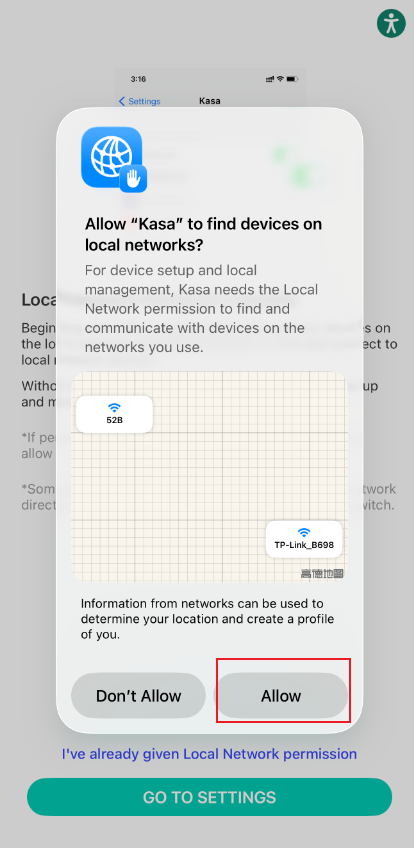
Step 1. If you are a first-time user, you may see the following screen after installing the Kasa app. Tap on Allow to clear the pop-up. This allows you to read the message behind it.
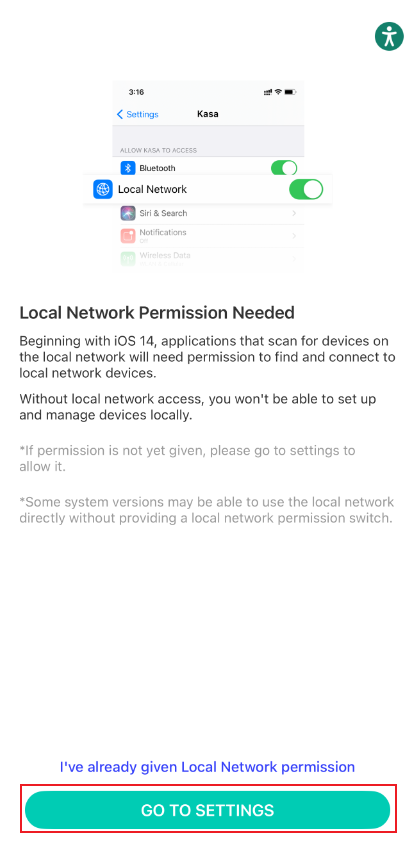
Step 2. Tap on GO TO SETTINGS, enable Local Network, and then go back to Kasa app.
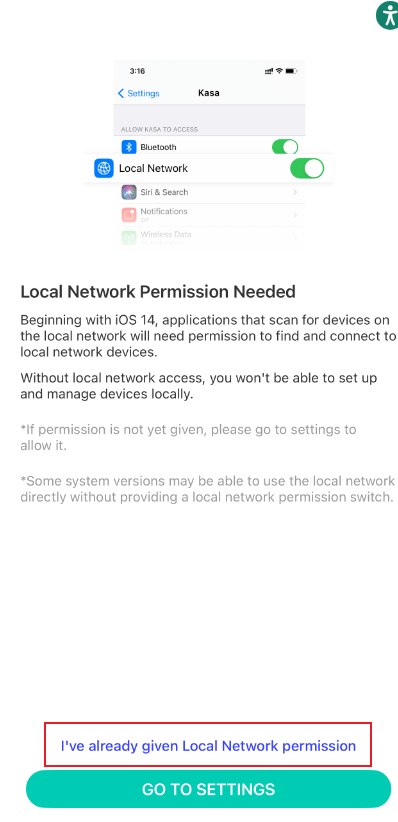
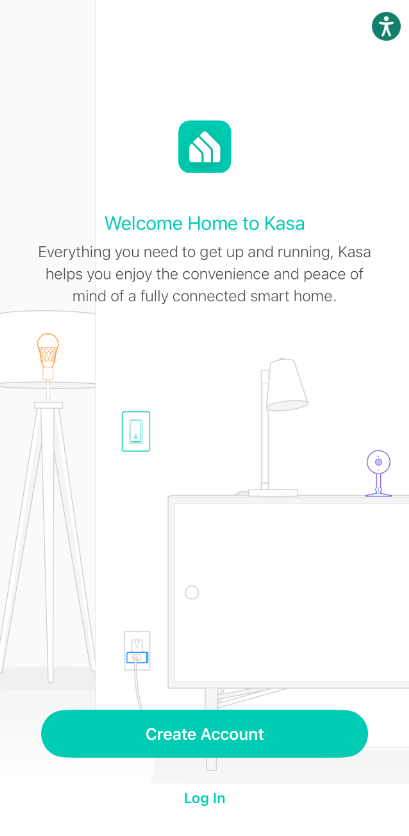
Step 3. Tap I’ve already given Local Network permission to be directed to the Create Account or Log In screen in the Kasa app.
Scenario 2: Enable Local Network Permission for existing apps
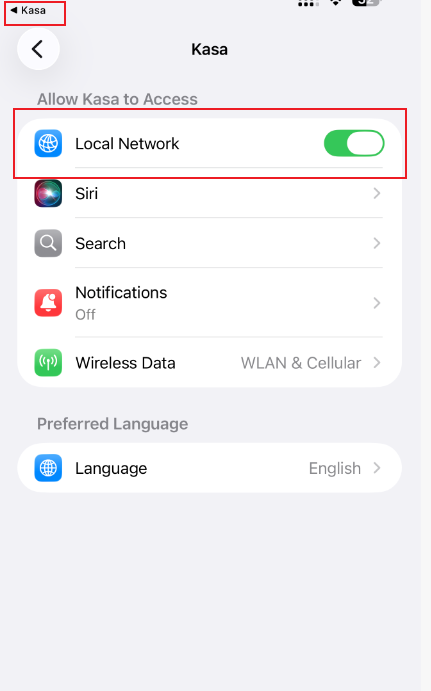
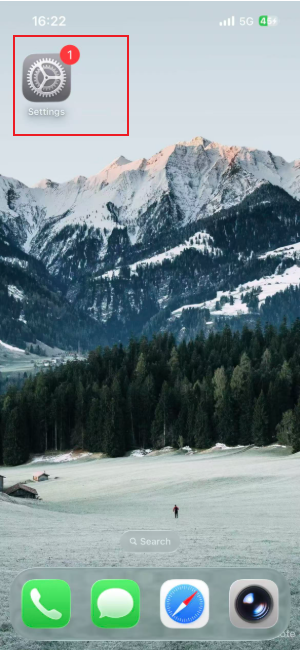
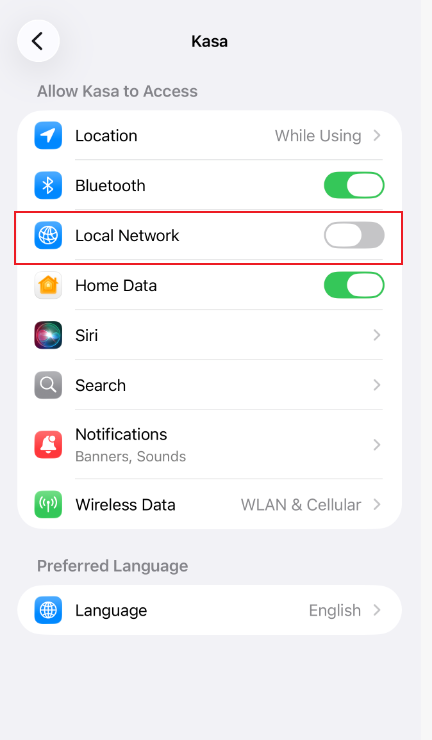
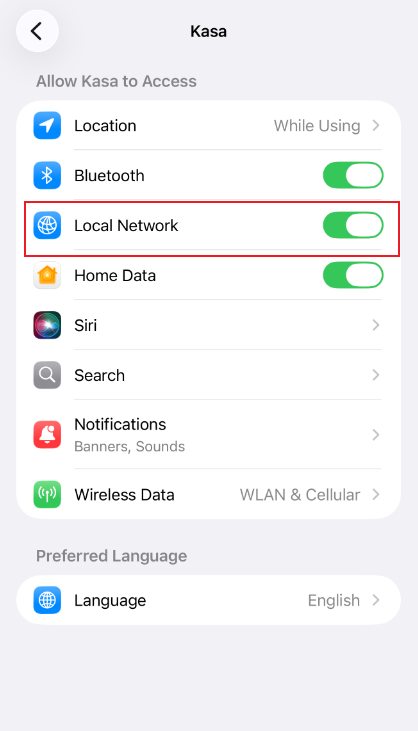
Step 1. If you already have the Kasa app installed on your phone and are having trouble installing a new Kasa smart device, you may need to grant the app local network permissions. To do this, open the Settings app on your iOS device.
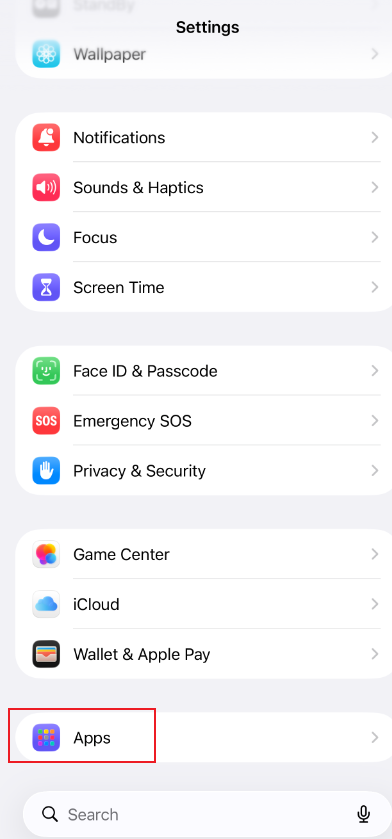
Step 2. Scroll down to the bottom in the apps section and look for the app in question.
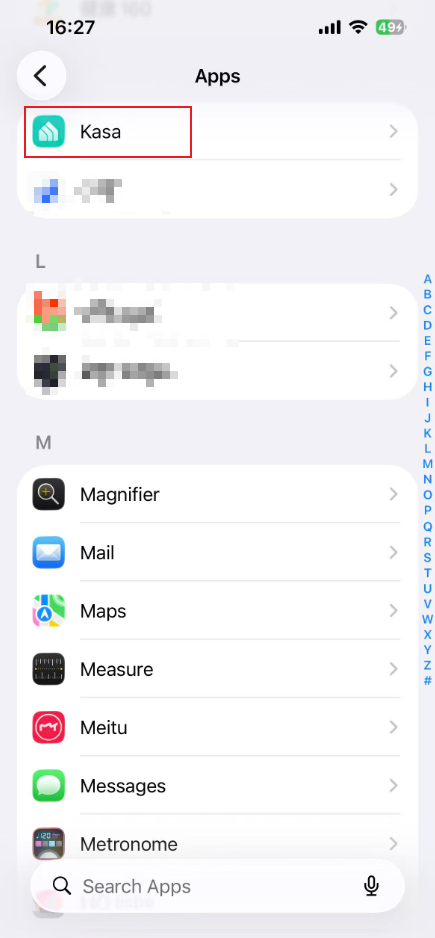
Step 3. Once you have found the app, tap on it to enter its settings menu and enable Local Network.
QA
Q1: What should I do if I cannot find the “Local Network” option?
A1: Try steps below if you cannot find the option to turn on Local Network for your app:
- Confirm there is an Internet connection on your iOS device. The device should be connected to a Wi-Fi network or use cellular data to access the internet.
- Reboot your iOS mobile device.
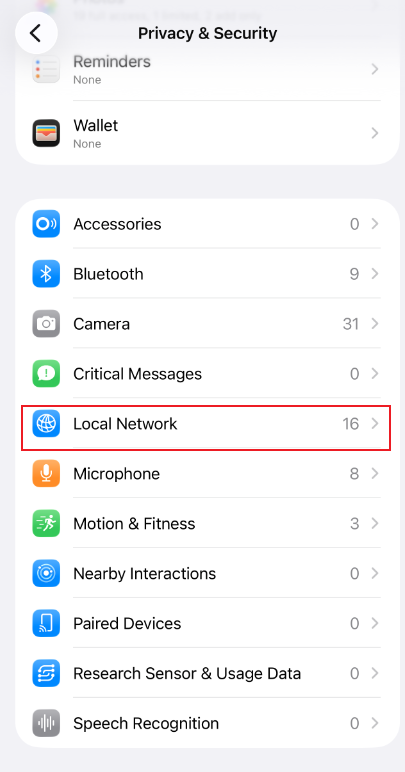
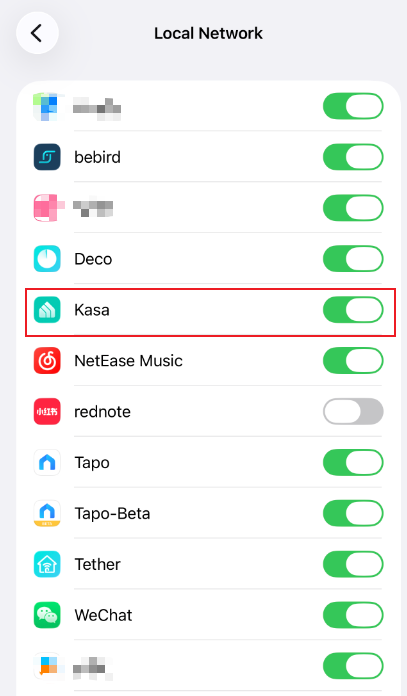
- Try other methods: Go to Settings on your iOS device > search for Kasa app > Toggle ON Local network permission. Or go to Settings on your iOS device > search for Privacy and open Privacy & Security > Local network > toggle on this option for Kasa app.
- Uninstall the reinstall the Kasa app on your phone. When you first open the Kasa app, select I've already given the local network permission at the bottom of the Kasa app to bypass that page. Then click the plus icon in the top-right corner to add a new Kasa device, and check whether iOS prompts the Local Network permission window.
- Turn off the VPN on your phone.
Is this faq useful?
Your feedback helps improve this site.
What’s your concern with this article?
- Dissatisfied with product
- Too Complicated
- Confusing Title
- Does not apply to me
- Too Vague
- Other
Thank you
We appreciate your feedback.
Click here to contact TP-Link technical support.
Recommend Products
This Article Applies to:
- TL-WA1201
- TL-WA3001
- TL-WA801N
- TL-WA801ND
- TL-WA901N
- TL-WA901ND
- Deco BE11000
- Deco BE16000
- Deco BE23
- Deco BE25
- Deco BE25-Outdoor
- Deco BE3600
- Deco BE5000
- Deco BE63
- Deco BE65
- Deco BE65 Pro
- Deco BE65-Outdoor
- Deco BE65-PoE
- Deco BE67
- Deco BE68
- Deco BE77
- Deco BE85
- Deco BE95
- Deco E3
- Deco M4
- Deco M5
- Deco P9
- Deco S4
- Deco W2400
- Deco W3000
- Deco W3600
- Deco W4500
- Deco W6000
- Deco W7200
- Deco W8100
- Deco WB10800
- Deco WB14400
- Deco WB22000
- Deco WB7200
- Deco WE10800
- Deco WM9000
- Deco X10
- Deco X15
- Deco X1500
- Deco X20
- Deco X20-Outdoor
- Deco X25
- Deco X3600
- Deco X4300 Pro
- Deco X50
- Deco X50-Outdoor
- Deco X50-PoE
- Deco X5000
- Deco X5400 Pro
- Deco X55
- Deco X55 Pro
- Deco X5700
- Deco X60
- Deco X68
- Deco X90
- Deco XE200
- Deco XE5300
- Deco XE70 Pro
- Deco XE75
- Deco XE75 Pro
- Deco XM73
- KL135
- KL400L5
- KL420L5
- KP405
- KS230 KIT
- TL-PA7010 KIT
- TL-PA7010P KIT
- TL-PA7017 KIT
- TL-PA7017P KIT
- TL-PA9020P KIT
- TL-WPA7510 KIT
- TL-WPA7617
- TL-WPA7617 KIT
- TL-WPA7817 KIT
- TL-WPA8630 KIT
- TL-WPA8631P KIT
- Archer Air E5
- RE105
- RE1500X
- RE1750X
- RE200
- RE205
- RE215
- RE220
- RE223BE
- RE230
- RE235BE
- RE2700X
- RE305
- RE315
- RE330
- RE403BE
- RE405BE
- RE450
- RE500X
- RE505X
- RE515X
- RE550
- RE600X
- RE603X
- RE605X
- RE615X
- RE650
- RE653BE
- RE655BE
- RE700X
- RE705X
- RE705X-Outdoor
- RE715X
- RE750C
- RE765X
- RE813XE
- RE815X
- RE815XE
- TL-WA850RE
- Tapo RV30 Max
- Tapo RV30 Max Plus
- Tapo RV50 Pro Omni
- EC60
- EC70
- KC400
- KC420WS
- Tapo A100
- Tapo A200
- Tapo A202
- Tapo C100
- Tapo C101
- Tapo C103
- Tapo C104
- Tapo C110
- Tapo C110P2
- Tapo C111
- Tapo C113
- Tapo C120
- Tapo C121
- Tapo C125
- Tapo C200
- Tapo C201
- Tapo C206
- Tapo C207
- Tapo C210
- Tapo C211
- Tapo C216
- Tapo C217
- Tapo C220
- Tapo C225
- Tapo C230
- Tapo C236
- Tapo C246D
- Tapo C260
- Tapo C310
- Tapo C320WS
- Tapo C325WB
- Tapo C400
- Tapo C400 KIT
- Tapo C401
- Tapo C402
- Tapo C402 KIT
- Tapo C403
- Tapo C403 KIT
- Tapo C425
- Tapo C425 + Tapo A200
- Tapo C425 KIT
- Tapo C460
- Tapo C460 KIT
- Tapo C465
- Tapo C500
- Tapo C510W
- Tapo C520WS
- Tapo C530WS
- Tapo C560WS
- Tapo C575D
- Tapo C610 KIT
- Tapo C615F KIT
- Tapo C645D KIT
- Tapo C660 KIT
- Tapo C675D KIT
- Tapo C710
- Tapo C720
- TC53
- TC82
- TC82 KIT
- TC85
- TC85 KIT
- TCB72
- TCH50 KIT
- TCW30
- TCW61
- TCW90 KIT
- DLW10
- Tapo DL100
- Tapo DL105
- Tapo DL110
- Tapo DL130
- KD110
- Tapo D130
- Tapo D205
- Tapo D210
- TD20
- TD21
- TD25
- TDH20
- KL110
- KL110P4
- KL125
- KL130
- KL130P4
- KL135
- KL135P2
- KL400L10
- KL400L5
- KL420L5
- Tapo L510E
- Tapo L520E
- Tapo L530E
- Tapo L531E
- Tapo L535E
- Tapo L730-4 KIT
- Tapo L730-6 KIT
- Tapo L930-5
- TLB61-20
- EP10
- EP25P2
- EP40
- EP40A
- EP40M
- HS103P2
- HS103P3
- HS103P4
- HS300
- KP115
- KP125MP2
- KP125MP4
- KP303
- KP401
- KP405
- Tapo P105
- Tapo P110
- Tapo P110M
- Tapo P115
- Tapo P125
- Tapo P125M
- Tapo P135 KIT
- Tapo P210M
- Tapo P306
- Tapo P316M
- Tapo P400M
- TP15
- TP25
- Tapo T100
- Tapo T110
- Tapo T300
- Tapo T31 KIT
- Tapo T310
- Tapo T315
- ES20M
- ES20MP2
- HS200
- HS200-2
- HS200-BL
- HS200-LA
- HS200P3
- HS210
- HS210 KIT
- HS220
- HS220-2
- HS220-LA
- HS220P3
- KS200
- KS200MP2
- KS200P3
- KS205
- KS205P3
- KS220
- KS225
- KS225P3
- KS230 KIT
- KS240
- Tapo S200D
- Tapo S500
- Tapo S500D
- Tapo S505
- Tapo S505D
- Tapo S515
- Tapo S515D KIT
- TS15
- TS25
- Deco X50
- Archer A20
- Archer A54
- Archer A6
- Archer A8
- Archer A9
- Archer AC1900
- Archer Air R5
- Archer AX10
- Archer AX10000
- Archer AX1450
- Archer AX1500
- Archer AX1800
- Archer AX20
- Archer AX21
- Archer AX3000
- Archer AX3000 Pro
- Archer AX3200
- Archer AX4400
- Archer AX50
- Archer AX5400 Pro
- Archer AX55
- Archer AX55 Pro
- Archer AX72 Pro
- Archer AX73
- Archer AX80
- Archer AXE300
- Archer AXE5400
- Archer AXE75
- Archer BE260
- Archer BE3200
- Archer BE3500
- Archer BE3600
- Archer BE3600 Pro
- Archer BE400
- Archer BE4800
- Archer BE5000
- Archer BE550
- Archer BE550 Pro
- Archer BE600
- Archer BE6100
- Archer BE6500
- Archer BE670
- Archer BE700
- Archer BE800
- Archer BE805
- Archer BE900
- Archer BE9300
- Archer BE9500
- Archer BE9700
- Archer C20
- Archer C50
- Archer C54
- Archer C5400X
- Archer C6
- Archer C8
- Archer C80
- Archer GE400
- Archer GE650
- Archer GE800
- Archer GX90
- Archer GXE75
- M8550
- TL-WR1502X
- TL-WR1512X
- TL-WR3002X
- TL-WR3602BE
- TL-WR802N
- TL-WR841N
- TL-WR902AC
- TL-WR940N
TP-Link Community
Still need help? Search for answers, ask questions, and get help from TP-Link experts and other users around the world.
As explained further in our website Privacy Policy, we allow certain advertising partners to collect information from our website through cookies and similar technologies to deliver ads which are more relevant to you, and assist us with advertising-related analytics (e.g., measuring ad performance, optimizing our ad campaigns). This may be considered "selling" or "sharing"/disclosure of personal data for "targeted advertising" as defined by certain U.S. state laws. To opt out of these activities, press "Opt Out" below. If the toggle below for "Targeted Advertising and 'Sale' Cookies" is to the left, you are already opted out and you can close these preferences.
Please note that your choice will apply only to your current device/browser. You must indicate your choice on each device and browser you use to access our website. If you clear your cookies or your browser is set to do so, you must opt out again.
Your Privacy Choices
As explained further in our website Privacy Policy, we allow certain advertising partners to collect information from our website through cookies and similar technologies to deliver ads which are more relevant to you, and assist us with advertising-related analytics (e.g., measuring ad performance, optimizing our ad campaigns). This may be considered "selling" or "sharing"/disclosure of personal data for "targeted advertising" as defined by certain U.S. state laws. To opt out of these activities, press "Opt Out" below. If the toggle below for "Targeted Advertising and 'Sale' Cookies" is to the left, you are already opted out and you can close these preferences.
Please note that your choice will apply only to your current device/browser. You must indicate your choice on each device and browser you use to access our website. If you clear your cookies or your browser is set to do so, you must opt out again.
These cookies are necessary for the website to function and cannot be switched off.
TP-Link
accepted_local_switcher, tp_privacy_banner, tp_privacy_base, tp_privacy_marketing, tp_top-banner, tp_popup-bottom, tp_popup-center, tp_popup-right-middle, tp_popup-right-bottom, tp_productCategoryType
Youtube
id, VISITOR_INFO1_LIVE, LOGIN_INFO, SIDCC, SAPISID, APISID, SSID, SID, YSC, __Secure-1PSID, __Secure-1PAPISID, __Secure-1PSIDCC, __Secure-3PSID, __Secure-3PAPISID, __Secure-3PSIDCC, 1P_JAR, AEC, NID, OTZ
These cookies allow targeted ads or the "sale" of personal data (toggle to the left to opt out).
Analytics cookies enable us to analyze your activities on our and other websites in order to improve and adapt the functionality of our website and our ad campaigns.
Advertising cookies can be set through our website by our advertising partners in order to create a profile of your interests and to show you relevant advertisements on other websites.
Google Analytics & Google Tag Manager
_gid, _ga_<container-id>, _ga, _gat_gtag_<container-id>
Google Ads & DoubleClick
test_cookie, _gcl_au
Meta Pixel
_fbp
Crazy Egg
cebsp_, _ce.s, _ce.clock_data, _ce.clock_event, cebs
lidc, AnalyticsSyncHistory, UserMatchHistory, bcookie, li_sugr, ln_or
Welcome to Our Website! If you stay on our site, we and our third-party partners use cookies, pixels, and other tracking technologies to better understand how you use our site, provide and improve our services, and personalize your experience and ads based on your interests. Learn more in your privacy choices.