如何安裝支援太陽能板的攝影機 4K(雙鏡頭套組)

當您設定時
更新六月 2, 2026

Solar Cam 2K Dual(雙攝影機套組)包含一台 CentralHubTM 與兩台太陽能攝影機,這是一套能為您家提供電力、防護與連線的系統。本文提供逐步說明,協助您根據需求進行安裝。


安裝您的攝影機


為電池充電

電池出廠時已部分充電。我們建議在安裝前將電池完全充飽電。完全充飽電最多可能需要 6 小時。
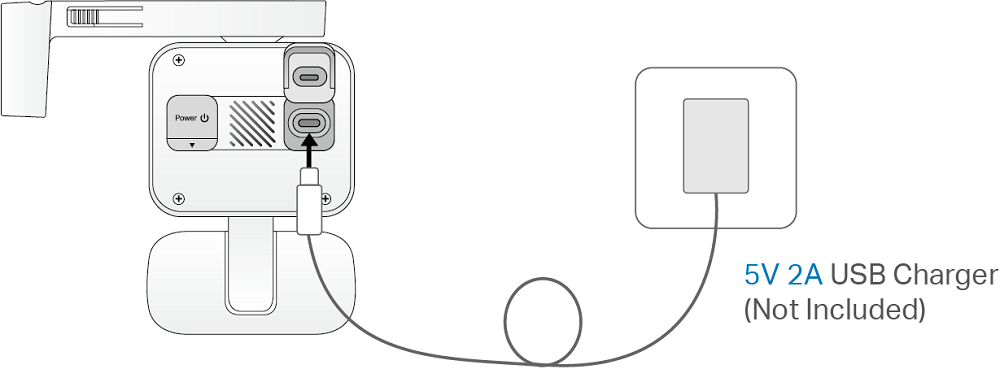
Plug in the USB charger (5V 2A, not included) to fully charge your camera.

註:

1. 使用前請撕下攝影機上的保護膜。

2. 設定完成後,請在 Tapo App 上檢查電池狀態。

3. 攝影機掉落後可能無法開機。請插入 USB 充電器以再次開機。

4. 不使用時,請將連接埠緊密蓋好,以確保防水防塵效能。

5. 請勿用力撕下矽膠部分,否則可能會影響防水防塵效能。

6. 請使用隨附的 USB 纜線為電池充電。某些第三方纜線可能會導致充電緩慢或失敗。

7. 當您插入 USB 充電器時,LED 指示燈應會快速閃爍橘燈 3 秒鐘。如果沒有,請確認電源已開啟並檢查您的連線。


太陽能板安裝提示

太陽能板的位置和傾斜角度會大大影響太陽能效率。

  1. 選擇一個讓太陽能板全年都能接收最多陽光的位置。定期擦拭面板以清除灰塵和碎屑。
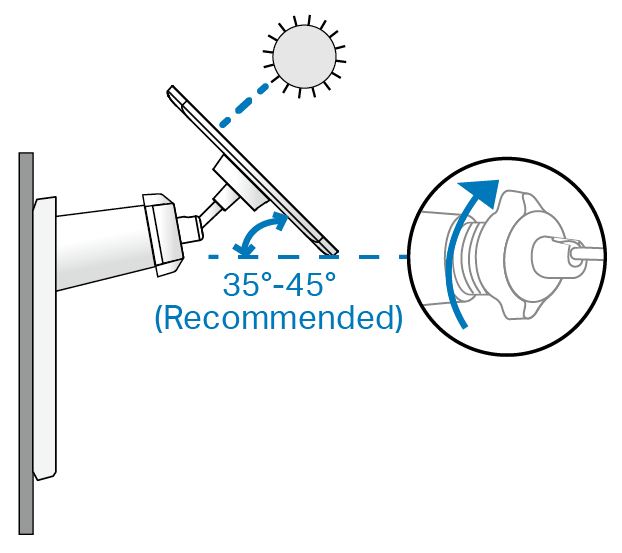
  2. 在北半球將面板朝南放置,在南半球則朝北放置。面板與水平地面之間的建議傾斜角度為 35° ~ 45°。


攝影機安裝提示

  1. 避免放置在窗戶或玻璃後方。窗戶和玻璃都會阻擋攝影機的移動感測器,導致無法進行移動偵測。
  2. 選擇您的安裝位置。正確安裝攝影機將可避免頻繁的錯誤警報等問題。
  • 避免將攝影機直接對準搖晃的樹木。
  • 避免將攝影機對準高流量區域,除非那是您想要監控的位置。
  • 避免將攝影機直接對準路燈或陽光。
  1. 請勿將攝影機倒置。
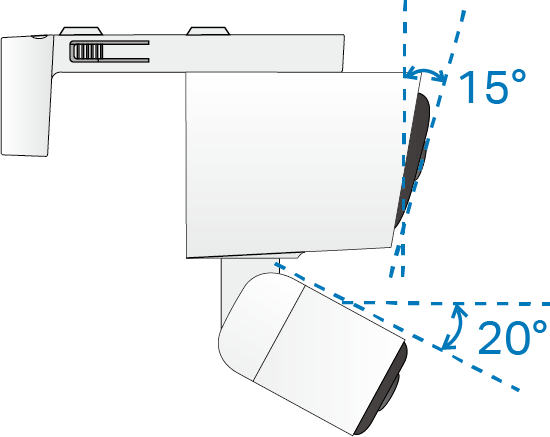
  2. 為了獲得最佳效果,請保持移動感測器水平,將攝影機的廣角鏡頭向下傾斜約 15°,並將長焦鏡頭向下傾斜約 20°。
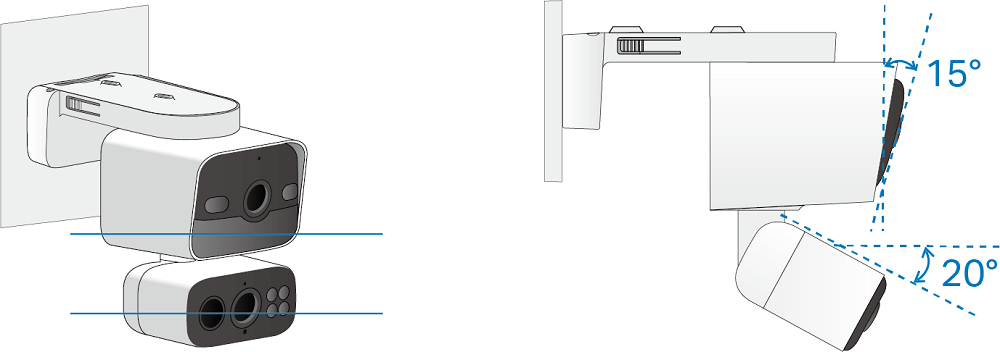
An illustration shows keeping the motion sensor level, tilting the camera’s wide-angle lens down to about 15°, and tilting the telephoto lens down to about 20°.

  1. 將攝影機以特定角度安裝,讓移動物體橫跨鏡頭的視野,將可提供更準確的移動和 AI 偵測。

註:請勿正對著物體移動的方向安裝。
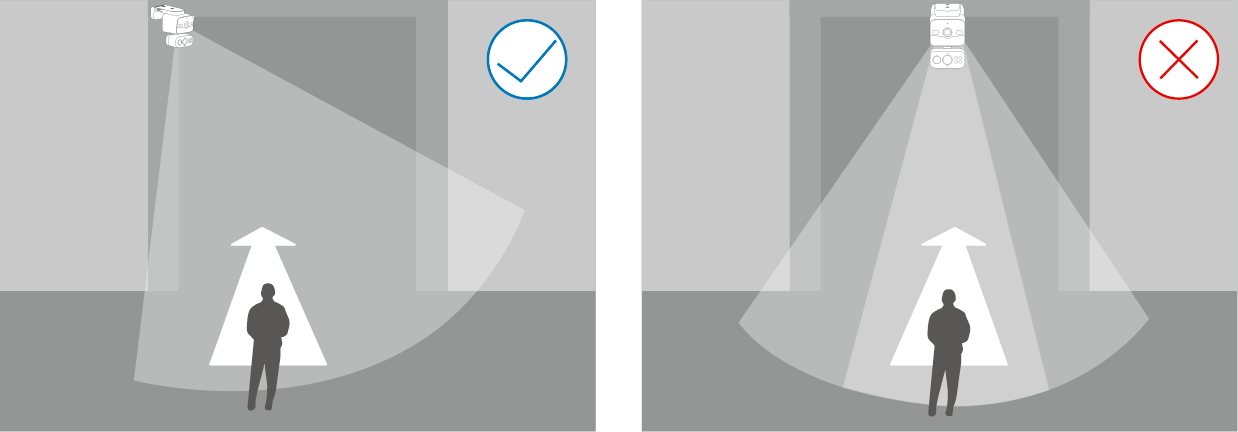
Examples of correct and wrong camera mounting angles.

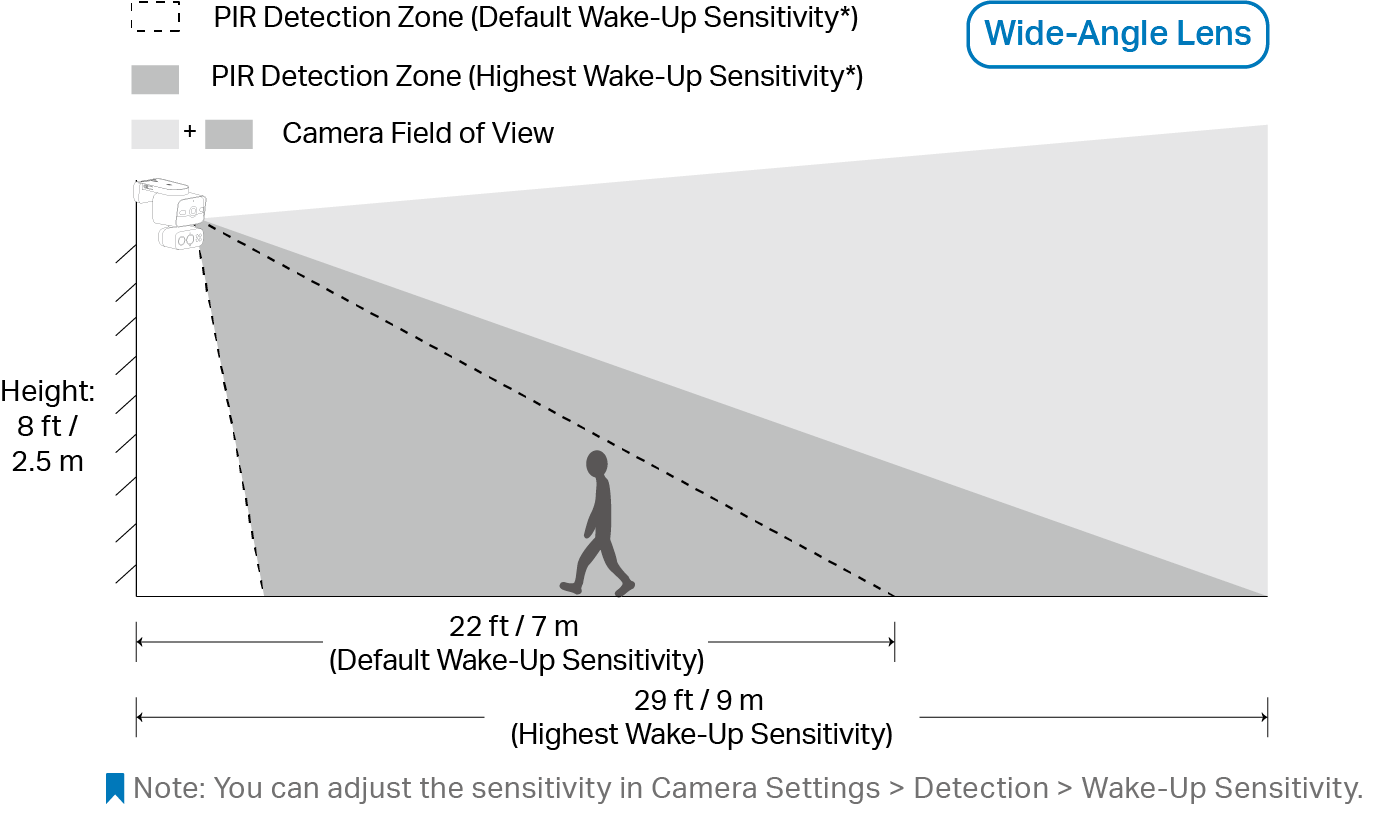
  1. 為了獲得最佳偵測效能,請將攝影機安裝在距離地面 8 英尺(2.5 公尺)的高處。

註:您可以在「攝影機設定 (Camera Settings) > 偵測 (Detection) > 喚醒靈敏度 (Wake-Up Sensitivity)」中調整靈敏度。
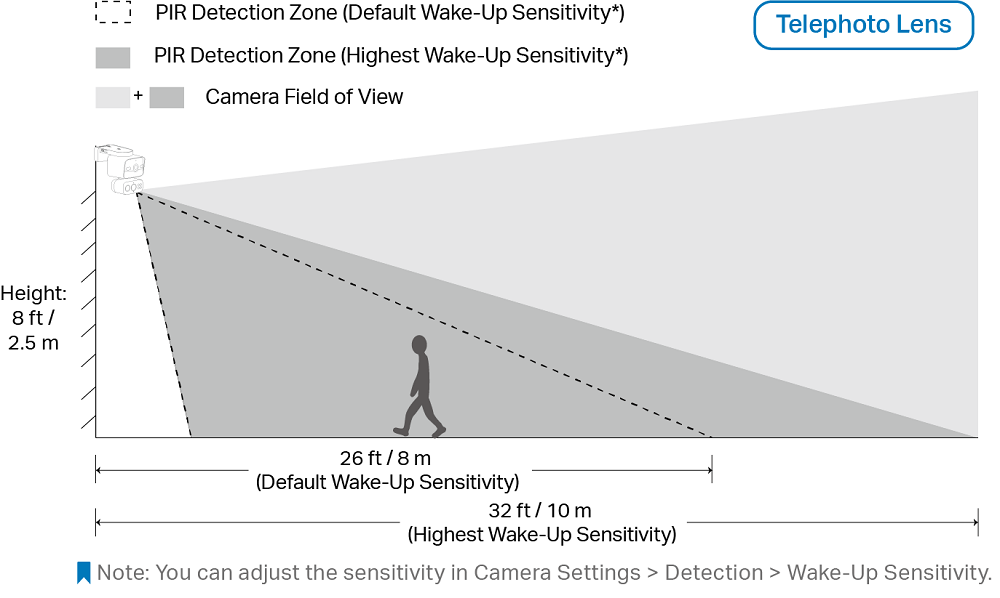
A diagram illustrating how the detection range of the telephoto lens changes at different sensitivity settings when the camera is mounted at a height of 8 feet/2.5 m, the motion detection range increases from 26 feet/ 8 m to 32 feet / 10 m when switching from default to the highest wake-up sensitivity.

A diagram illustrating how the detection range of the wide-angle lens changes at different sensitivity settings when the camera is mounted at a height of 8 feet/2.5 m, the motion detection range increases from 22 feet/ 7 m to 29 feet / 9 m when switching from default to the highest wake-up sensitivity.


選項 1:整合式安裝

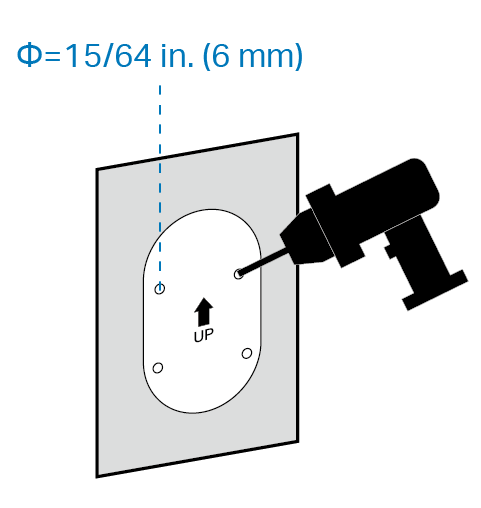
  1. 將安裝定位貼紙貼在堅固且平整的牆面上。根據定位貼紙鑽出四個孔。

An illustration shows drilling 4 holes according to the template, each 6 mm or 15/64 inch in diameter.

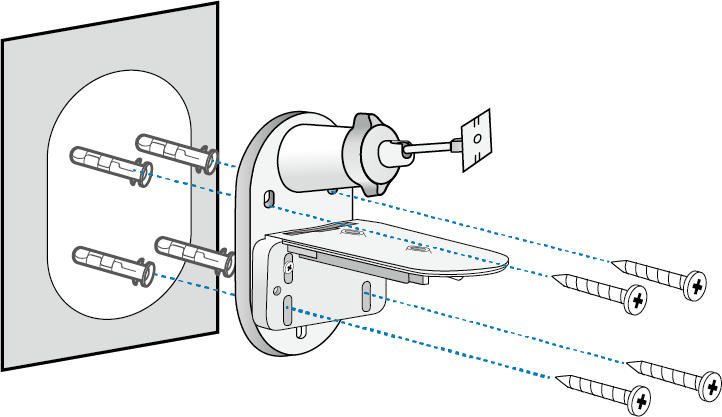
  1. 將壁錨插入孔中,並使用螺絲將支架固定在壁錨上。

An illustration shows how to secure the bracket to the wall.

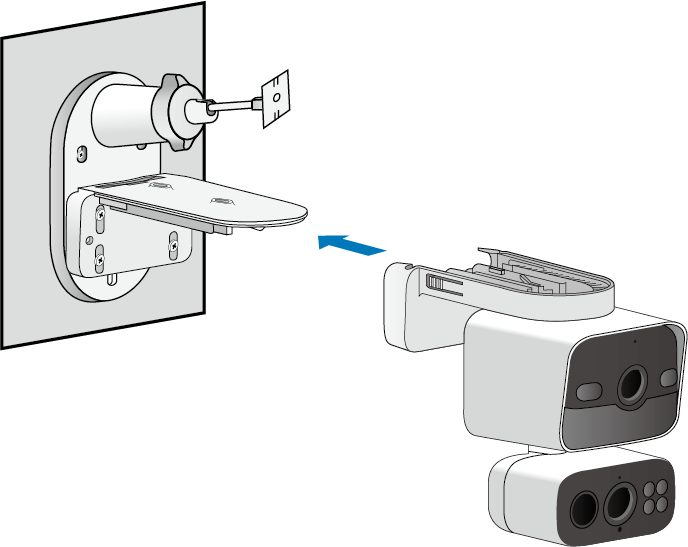
  1. 將攝影機滑入攝影機支架,直到發出「喀」一聲卡入定位。

An illustration shows how to align and slide the camera onto the camera bracket.

  1. 將太陽能板滑入太陽能板支架,直到發出「喀」一聲卡入定位。

An illustration shows how to align and slide the solar panel onto its bracket.

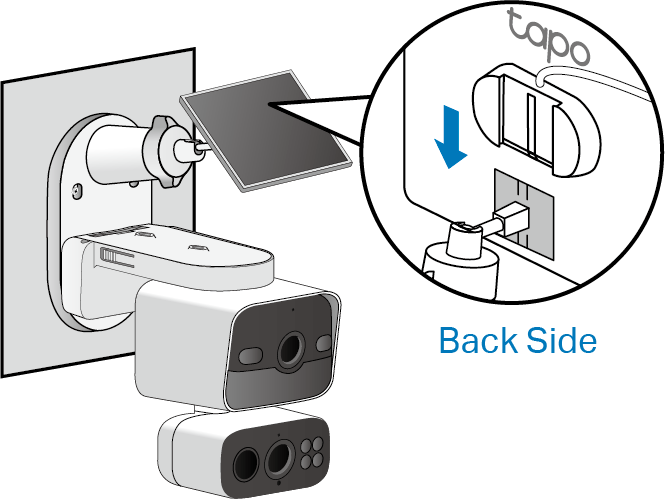
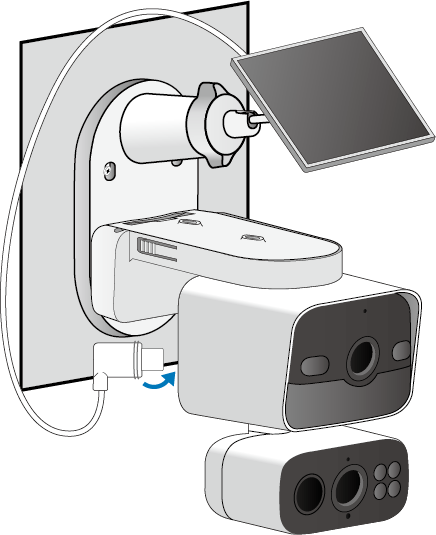
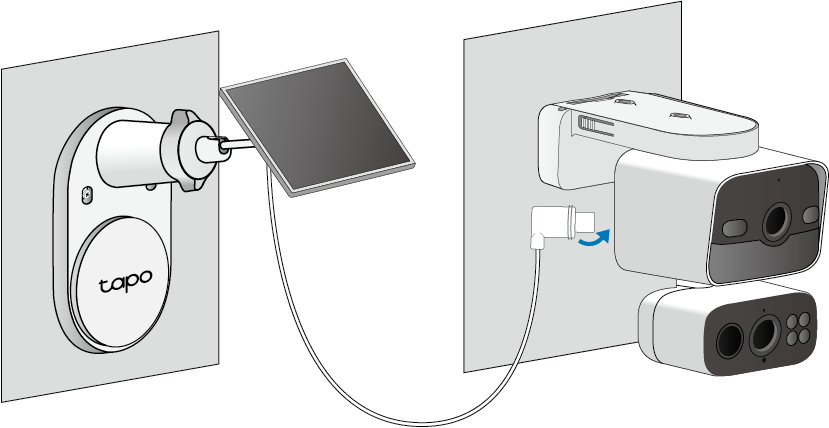
  1. 將接頭插入攝影機的充電埠直到緊密貼合,即可開始充電。

The illustration shows the solar panel connector being inserted into the camera's charging port to charge the camera.

  1. (1) 鬆開可調式螺絲,將太陽能板傾斜至所需角度,然後重新鎖緊螺絲。

(2) 將廣角鏡頭向下傾斜約 15°,並將長焦鏡頭向下傾斜約 20°。
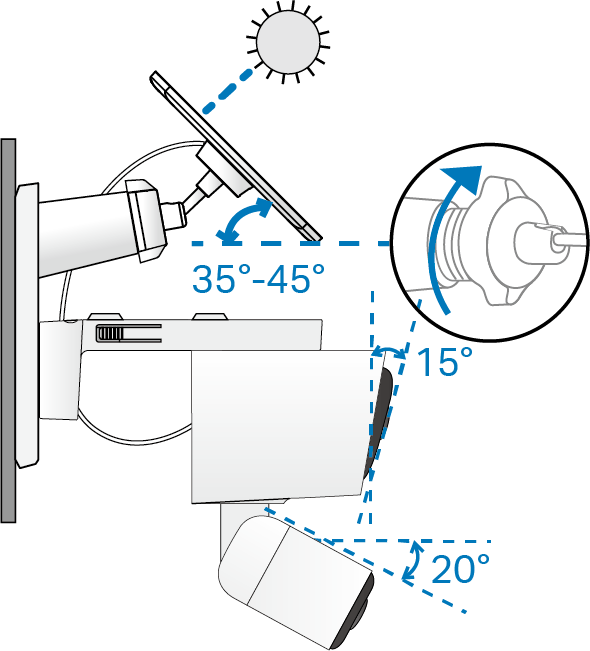
The illustration shows how to adjust the solar panel and camera angle for best performance.


選項 2:獨立安裝

在開始之前,請轉下兩顆支架螺絲,將攝影機支架和太陽能板支架分開。
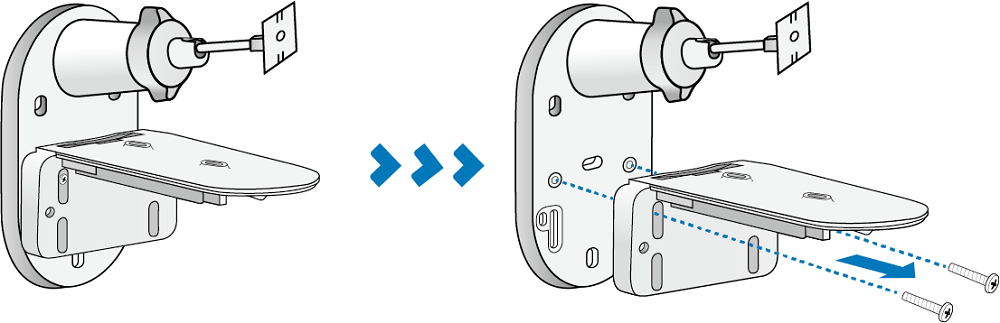
The illustration shows removing two screws to separate the camera bracket from the solar panel bracket.


安裝攝影機(牆面 / 屋簷)

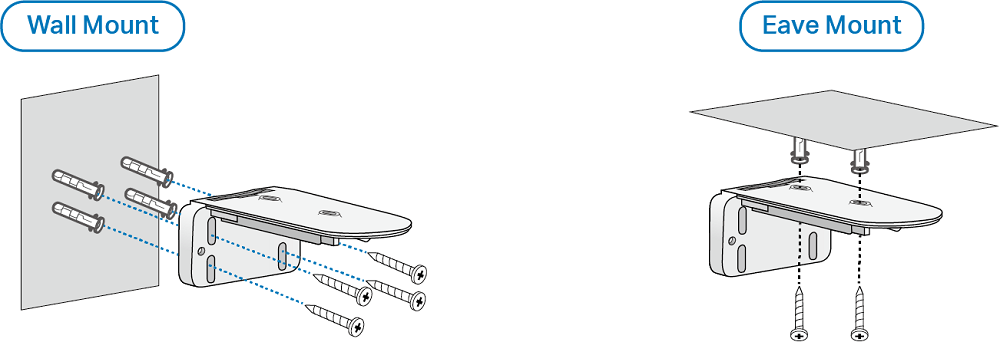
  1. 將安裝定位貼紙貼在堅固且平整的牆面上。根據定位貼紙鑽出四個孔(牆面安裝)或兩個孔(屋簷安裝)。
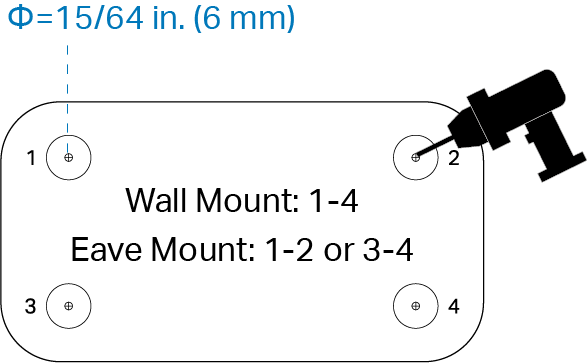
An illustration shows drilling 4 holes for wall mount or 2 holes for eave mount according to the template, each 6 mm or 15/64 inch in diameter.

  1. 將壁錨插入孔中,並使用螺絲將攝影機支架固定在壁錨上。

An illustration shows how to secure the camera bracket to the wall or eave.

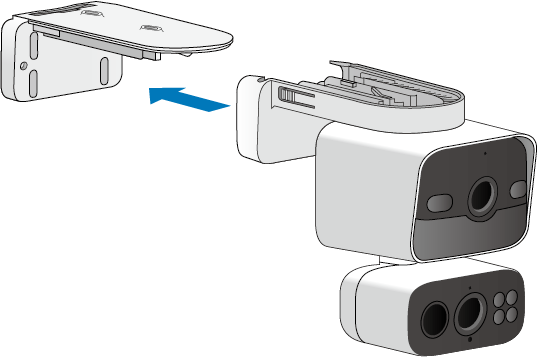
  1. 將攝影機滑入攝影機支架,直到發出「喀」一聲卡入定位。

An illustration shows how to align and slide the camera onto the camera bracket.

  1. 將廣角鏡頭向下傾斜約 15°,並將長焦鏡頭向下傾斜約 20°。

An illustration shows tilting the wide-angle lens down to about 15° and the telephoto lens down to about 20°.


安裝攝影機(柱子)

  1. 使用兩個柱子安裝環(環寬 ≤ 0.47 英吋/12 公釐)將支架安裝在柱子上。
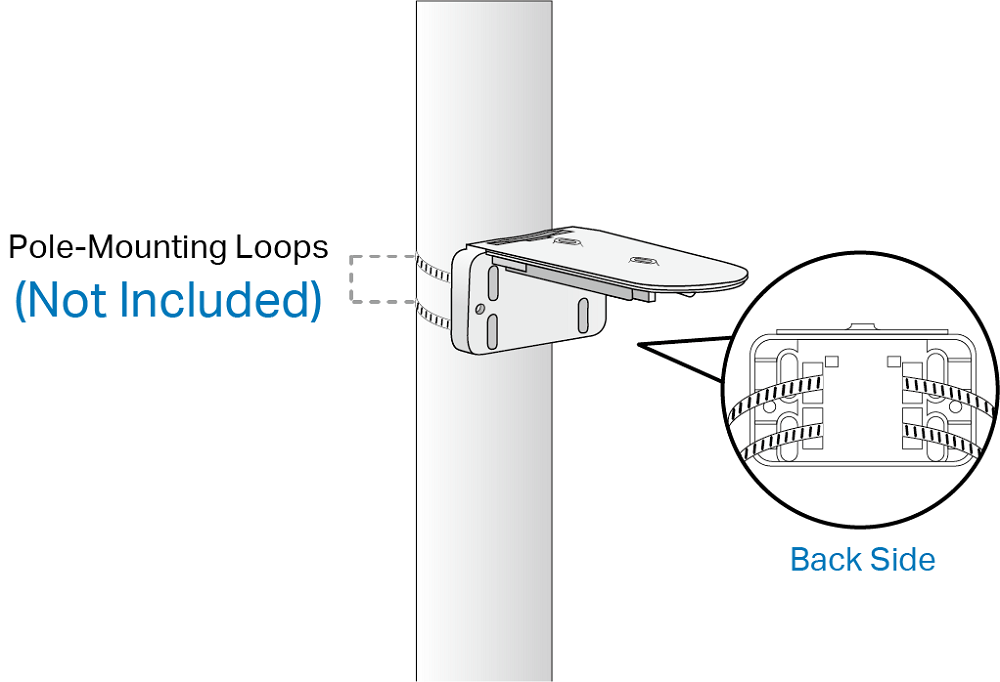
An illustration shows tying the camera bracket to the pole using two pole-mounting (not provided).

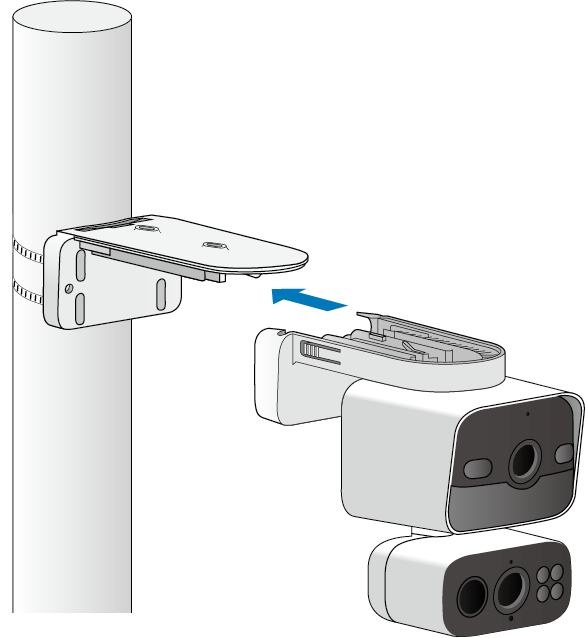
  1. 將攝影機滑入攝影機支架,直到發出「喀」一聲卡入定位。

An illustration shows how to align and slide the camera onto the camera bracket.

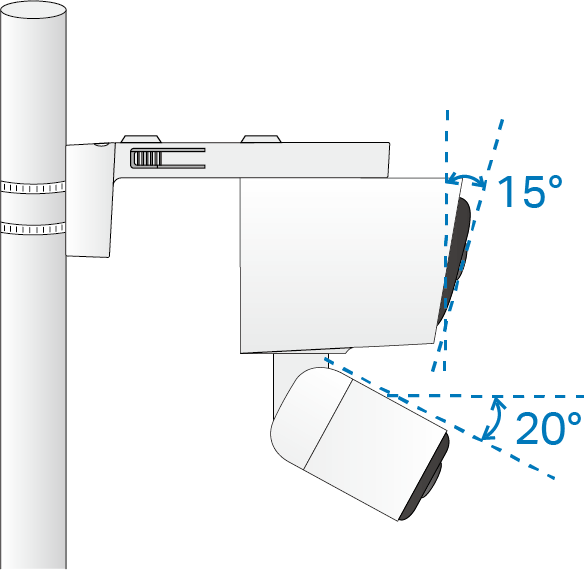
  1. 將廣角鏡頭向下傾斜約 15°,並將長焦鏡頭向下傾斜約 20°。

An illustration shows tilting the wide-angle lens down to about 15° and the telephoto lens down to about 20°.


安裝太陽能板

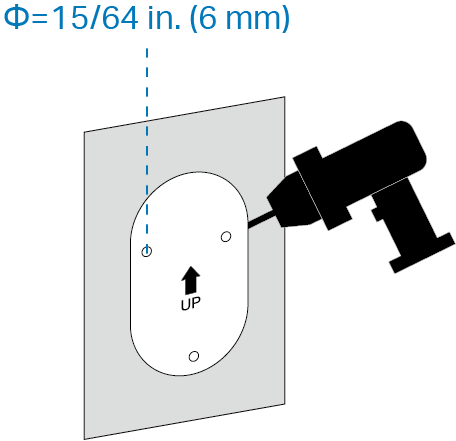
  1. 將安裝定位貼紙貼在堅固且平整的牆面上。根據定位貼紙鑽出三個孔。

An illustration shows drilling the 3 holes according to the template, each 6 mm or 15/64 inch in diameter.

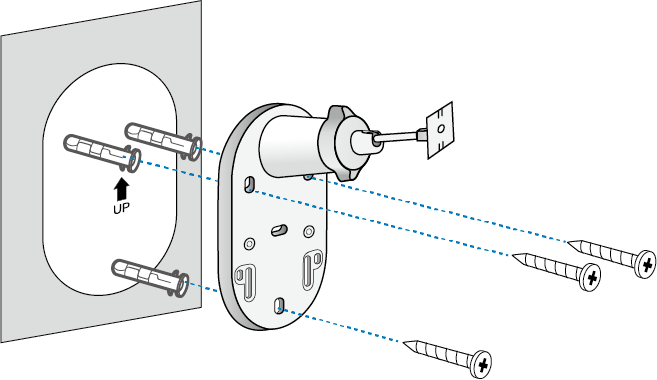
  1. 將壁錨插入孔中,並使用螺絲將太陽能板支架固定在壁錨上。

An illustration shows how to secure the solar panel bracket to the wall.

  1. 將太陽能板滑入太陽能板支架,直到發出「喀」一聲卡入定位。

An illustration shows how to align and slide the solar panel onto its bracket.

  1. 鬆開可調式螺絲,將太陽能板傾斜至所需角度,然後重新鎖緊螺絲。

The illustration shows how to adjust the solar panel angle for best performance (recommended angle is 35°-45°).

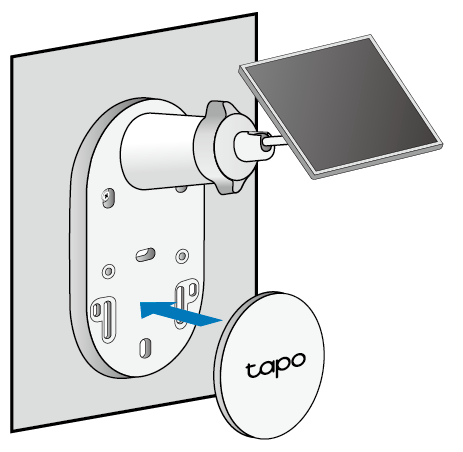
  1. 將裝飾底蓋安裝到太陽能板支架上。

The illustration shows how to attach the decorative base cover to the solar panel bracket.

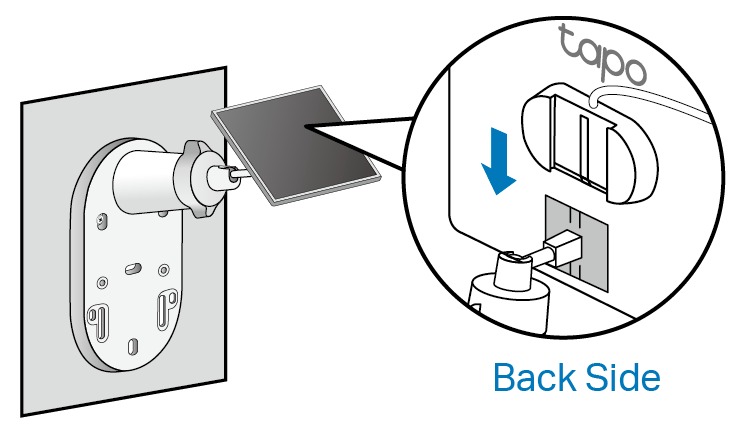
  1. 將接頭插入攝影機的充電埠直到緊密貼合,即可開始充電。

The illustration shows inserting the solar panel connector into the camera's charging port to charge the camera.


如果電源線太短...

請使用隨附的延長線。將接頭插入延長線直到緊密貼合,然後連接至您的攝影機。
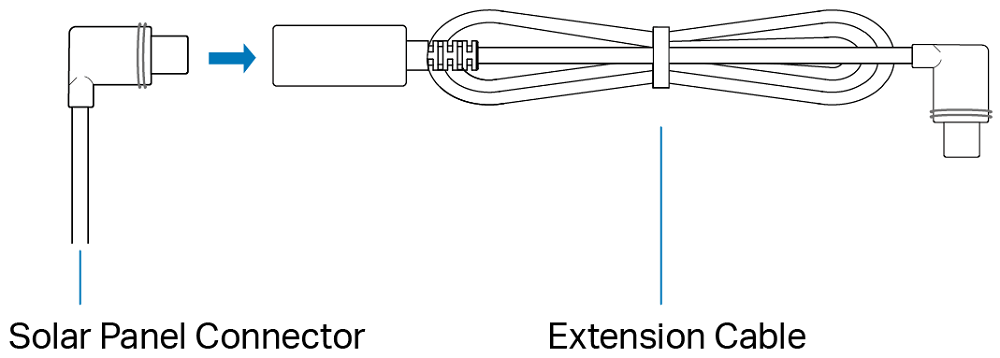
The illustration shows how to use the extension cable if the power cable it too short.


如果電源線太長

使用隨附的束線帶將多餘的線材綑綁起來。束線帶一旦拉緊,就不易調整。若要鬆開束線帶,您必須將其剪斷。

The provided cable zip tie.


(選用)擴充您的 CentralHubTM 本地儲存空間

智慧 CentralHubTM 內建 16 GB 的本地儲存空間,您也可以安裝額外的 HDD/SSD 硬碟(2.5 吋)來擴充本地儲存空間。


開始之前

  1. 安裝前請備份硬碟上的所有資料,因為 Tapo 可能需要格式化您的硬碟。
  2. 當您安裝或移除硬碟時,必須關閉 CentralHubTM 的電源。


安裝您的硬碟

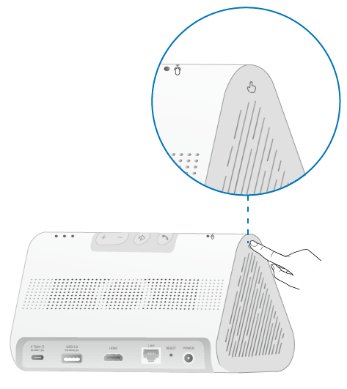
  1. 向下推動外蓋將其取下。The icon of the press symbol on the CentralHub. 符號標示了您應該按壓的位置。


An illustration shows pressing the symbol to remove the left side lid of the CentralHub

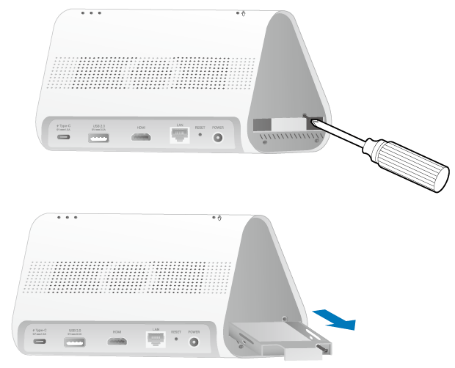
  1. 鬆開螺絲並拉出硬碟支架。

An illustration shows how to take out the hard drive bracket.

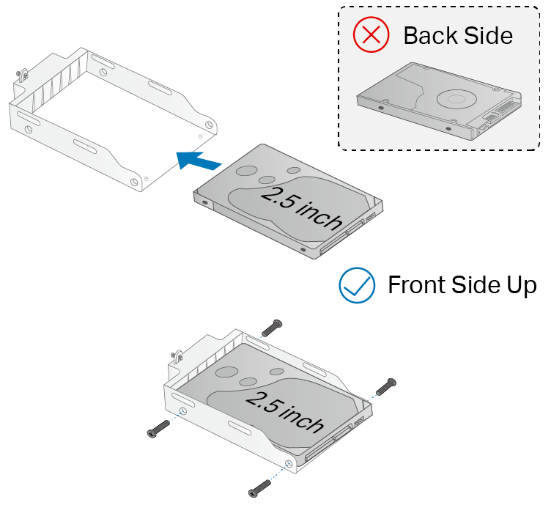
  1. 將硬碟正面朝上放入支架中。使用螺絲將其固定到位。

An illustration shows placing the hard drive into the bracket with front side up.

  1. 將支架插回 CentralHubTM。用螺絲固定,然後裝回外蓋。

註:請在 Tapo App 中將硬碟初始化。
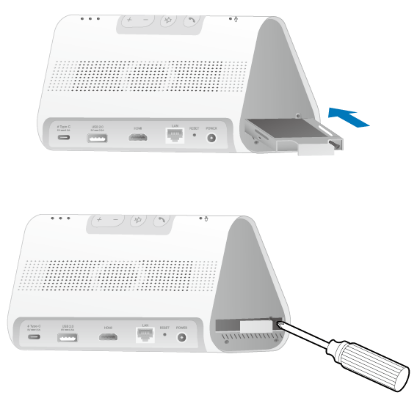
An illustration shows how to replace the hard drive bracket and secure it with screws.

相關 FAQ

更多相關文章

這篇faq是否有用?

您的反饋將幫助我們改善網站

推薦產品

Community

TP-Link Community

Still need help? Search for answers, ask questions, and get help from TP-Link experts and other users around the world.

Visit the Community >