Tapo Care: Frequently Asked Questions
This page answers common questions about Tapo Care, covering available plans, feature differences, free trial details, subscription and cancellation guide, and post-subscription management. Whether you're exploring Tapo Care for the first time or managing an existing subscription, this guide will help you understand its capabilities and get the most value from your smart home security system.
Note: Cloud/Cloud Advanced/Advanced AI Tapo Care powered by Aireal is still being rolled out gradually. Available plans may vary by region or account. Please refer to the plan shown in your app for the most accurate information.
Key Takeaways
- Tapo Care offers Cloud (30 days), Cloud Advanced (180 days), and Cloud Advanced AI (180 days + AI features) to suit different cloud storage needs.
- Plans range from supporting 1–2 devices to unlimited devices under a single subscription.
- Advanced AI plan includes Intelligent Summaries, AI Video Search, Facial Recognition (region-dependent), and AI Chat (Aireal) for deeper insights.
- 30-day free trial automatically converts to paid subscriptions unless canceled in advance.
- Each TP-Link ID can have only one active Tapo Care plan at a time, but it can cover multiple devices.
- Features (especially AI and facial recognition) may vary depending on location and regulations.
Part 1: Tapo Care Overview
Q1: What's Tapo Care?
Tapo Care is a subscription service that unlocks cloud storage and more intelligent security features for your Tapo cameras and video doorbells.
With Tapo Care, motion events are securely saved to the cloud so you can review, download, and share important moments anytime—even if your camera is offline, damaged, or stolen. You’ll also receive Snapshot Alerts, allowing you to quickly see what happened without opening the app.
Tapo Care is available in three subscription tiers, so you can choose the level that fits your needs:
- Tapo Cloud: Includes up to 30 days of cloud video storage for event clips, rich notifications with snapshots, and smart event organization for up to two cameras.
- Tapo Cloud Advanced: Includes up to 180 days of cloud video storage, support for unlimited cameras, improved playback controls, smart filters, and enhanced event organization.
- Tapo Cloud Advanced AI: Includes everything in Cloud Advanced, plus powerful AI features such as Intelligent Summaries, AI Video Search, Risk Level Assessment, facial recognition (where available), and AI Chat (Aireal) to help you quickly understand what’s happening around your home.
Tapo Care is designed to grow with your needs—starting simple and becoming more intelligent as your home security requirements evolve.
Q2: What is included in each subscription?
|
Feature |
Cloud |
Cloud Advanced |
Cloud Advanced AI |
|
Cloud Storage Duration |
30 days |
180 days |
180 days |
|
Device Coverage |
Up to 2 devices |
Unlimited devices |
Unlimited devices |
|
Video Quality Storage |
Standard HD |
Up to 4K |
Up to 4K |
|
Smart Filters |
Yes |
Yes |
Yes |
|
Weekly Report |
Yes |
Yes |
Yes |
|
Snapshot Notifications |
Yes |
Yes |
Yes |
|
Intelligent Summaries |
No |
No |
Yes |
|
Video Recap |
No |
No |
Yes |
|
AI Video Search |
No |
No |
Yes |
|
AI Chat |
No |
No |
Yes |
|
AI Facial Recognition |
No |
No |
Yes |
|
Intelligent Notifications |
No |
No |
Yes |
|
Daily Summary |
No |
No |
Yes |
|
Explore Aireal |
No |
No |
Yes |
|
Smart Preferences |
No |
No |
Yes |
Part 2: Before subscribing to Tapo Care
Q1: How do I subscribe to Tapo Care?
You can subscribe to a Tapo Care plan directly from the Tapo app. To get started:
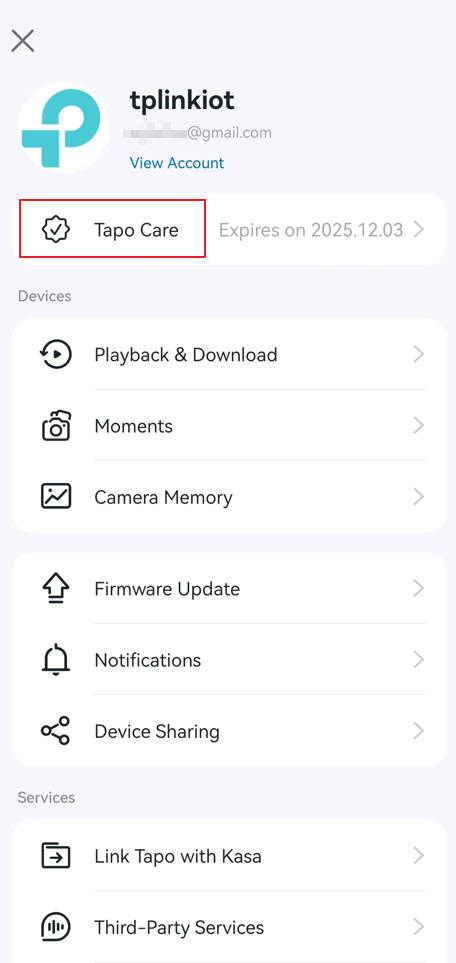
- Open the Tapo app
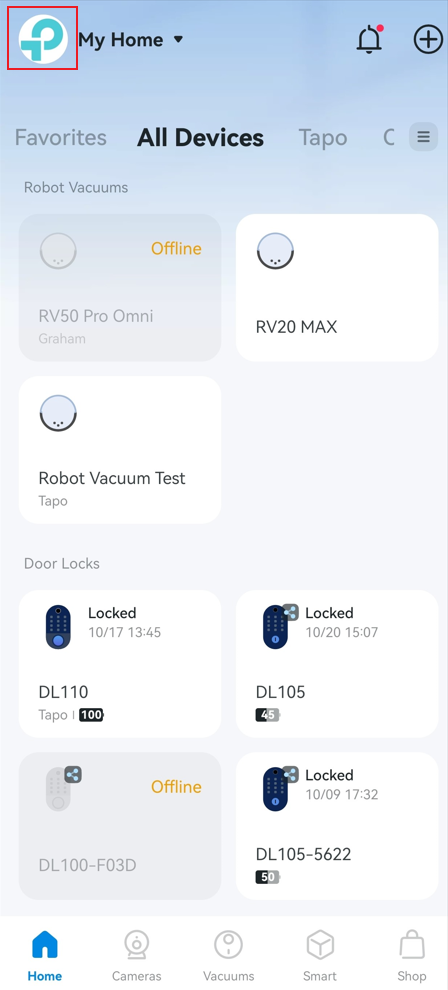
- Go to the Me tab
- Select Tapo Care
- Review the available plans and follow the on-screen steps to subscribe
For detailed steps, refer to this article: https://www.tapo.com/faq/135/
Q2: What happens when my Tapo Care free trial ends? Will I be charged automatically?
Yes. When you start a Tapo Care free trial, you receive 30 days of full access to the selected subscription plan. After the 30-day trial ends, your subscription will automatically convert to a paid plan unless you cancel before the trial period expires.
Billing will occur automatically using the payment method you selected during checkout. Tapo Care subscriptions can be purchased and managed through the following checkout methods:
- Apple App Store (iOS)
- Google Play Store (Android)
- Bank Card
- PayPal
You can cancel your trial at any time before it ends to avoid being charged. If you cancel during the trial period, you will retain access to Tapo Care features until the trial expires.
Q3: Can I cancel the Tapo Care free trial?
Yes. You can cancel your Tapo Care free trial at any time during the trial period. Once canceled, the trial will end and cannot be resumed.
How you cancel depends on where you originally subscribed:
- Apple App Store (iOS): Manage and cancel your trial through your Apple ID subscription settings.
- Google Play Store (Android): Manage and cancel your trial through the Google Play Store subscription settings.
- Bank Card or PayPal: Log in to the Tapo web portal to manage or cancel your subscription.
If you cancel before the trial ends, you will not be charged and will retain access until the end of the trial period.
Q4: Can I get a refund after purchasing Tapo Care?
Tapo Care subscriptions are billed in advance and do not offer refunds for unused time.
- If you cancel your subscription: You will continue to have access to Tapo Care features until the end of your current billing period. Your subscription will not renew, and no refund will be issued.
- If you downgrade to a lower plan: The downgrade takes effect at the next billing cycle. You keep your current plan’s features until then, and no refund is provided.
- If you upgrade to a higher plan: The upgrade takes effect immediately. Any unused portion of your previous plan may be prorated in accordance with the billing platform’s rules.
Q5: If I have more than one Tapo camera, do I need a separate Tapo Care subscription for each camera?
No. You do not need a separate subscription for each camera. Tapo Care subscriptions can cover multiple cameras under a single plan, depending on the option you choose.
Tapo Cloud (30-day storage)
You can choose between two options:
- Device Plan – Covers one camera
- Device Plan – Covers up to two cameras
Tapo Cloud Advanced (180-day storage)
- Covers unlimited cameras under one subscription
Tapo Cloud Advanced AI (180-day storage + AI features)
- Covers unlimited cameras
- Includes advanced AI features such as Intelligent Summaries, AI Video Search, and facial recognition (where available)
All supported cameras linked to the same TP-Link ID can be managed and assigned within the Tapo app.
Q6: Can an Apple ID or Google account subscribe to more than one Tapo Care plan for a device?
No. Each Tapo Care trial or subscription is tied to your TP-Link account, not to a specific device.
The Apple App Store and Google Play do not allow duplicate subscriptions for the same service within a single account. To support different setups, Tapo Care offers one-device, two-device, and unlimited-device plans, so there is no need to maintain multiple subscriptions simultaneously.
You can upgrade, downgrade, or change your plan at any time based on your needs, but only one active Tapo Care subscription can exist per TP-Link account.
Q7: Can I subscribe to more than one Tapo Care plan under the same account?
No. Each TP-Link ID can have only one active Tapo Care subscription at a time.
- Tapo Cloud supports up to two cameras.
- Tapo Cloud Advanced and Tapo Cloud Advanced AI support unlimited cameras within one home.
If your needs change, you can upgrade or switch plans within the Tapo app.
Q8: If I already have a Tapo Care plan that hasn’t expired, can I purchase another service? When does the new plan start?
You can have only one active Tapo Care subscription per TP-Link ID. If you want to make changes, you’ll need to upgrade, downgrade, or cancel your existing plan rather than add a second subscription. Refer to How to upgrade or downgrade my Tapo Care subscription for instructions and upgrade/downgrade rules.
Q9: Is an SD card required to use Tapo Care?
No. An SD card is not required to use Tapo Care. Tapo Care is a cloud-based subscription that securely stores your video clips in the cloud, allowing you to access recordings anytime—even if your camera is damaged, stolen, or offline. If your Tapo camera supports an SD card, you may still choose to use local storage, but it is optional and not required for Tapo Care to function.
Part 3: After subscribing to Tapo Care
Q1: How do I confirm that my Tapo Care subscription was successful, and where can I check its validity period?
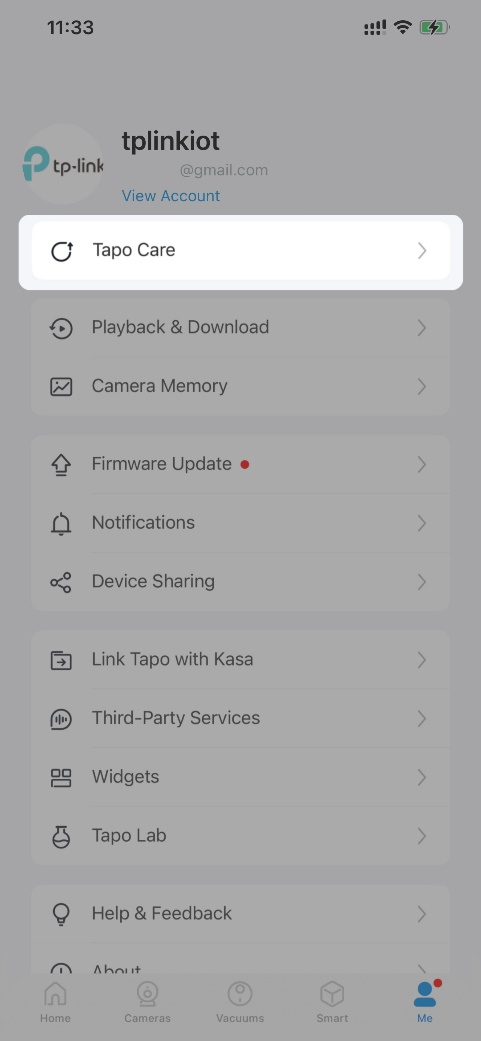
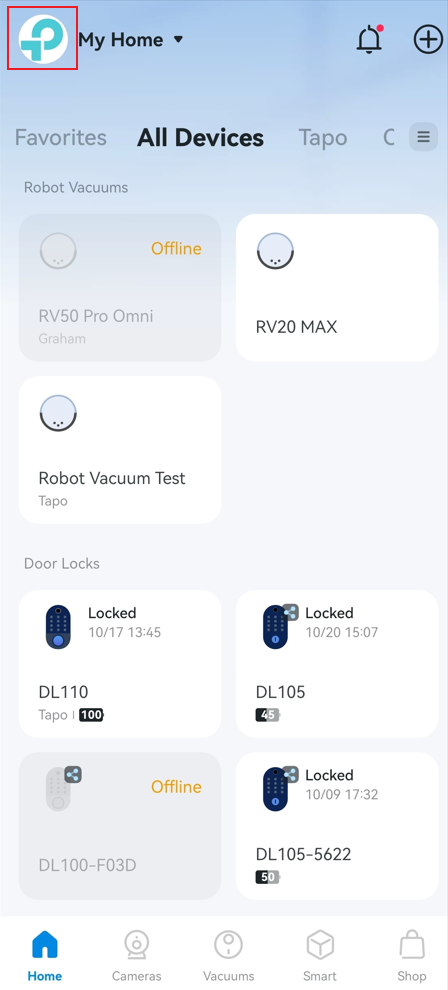
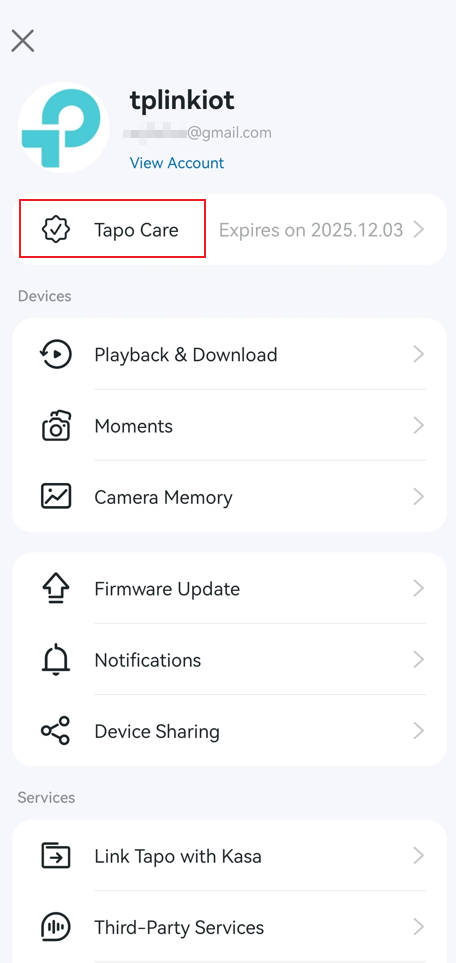
After completing your purchase, open the TP-Link Tapo app and go to Me > Tapo Care. You will see your active plan details and subscription validity there.
The location of the Me button may vary by app version. It is located either in the bottom-right corner or the top-left corner of the app.
Q2: Why is the facial recognition feature unavailable even though I subscribed to Cloud Advanced AI?
Facial recognition features are currently available only in supported regions and may not be offered in certain locations due to local regulations. At this time, facial recognition is not available in Illinois or Texas. Availability may vary by region and device model, and features may change over time.
Q3: Why does the app show “Devices in Different Locations” or “Multiple Homes”?
“Home” refers to one primary residence where your devices are typically used. Unlimited-device plans are designed for a single household network. If devices are spread across multiple physical locations or networks, the app may prompt you to review your setup.
Q4: Can I transfer my Tapo Care subscription to another Tapo device?
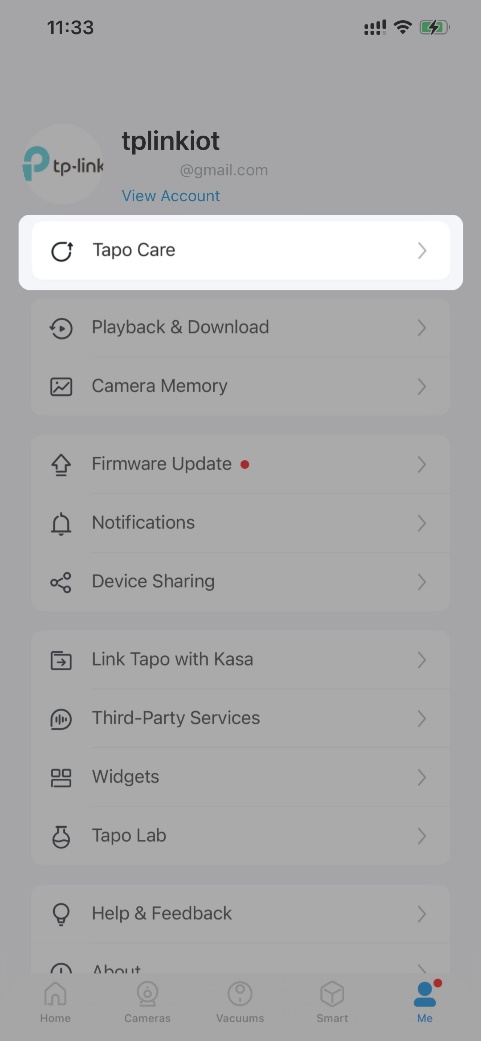
Yes, open the TP-Link Tapo app, go to Me > Tapo Care, and tap on Select Camera on the subscription card to switch to another device. The location of the Me button may vary by app version. It is located either in the bottom-right corner or the top-left corner of the app.

Q5: Can I transfer the Tapo Care subscription to another TP-Link ID?
No, since Tapo Care is simultaneously bound to your TP-Link ID and cameras, if you unbind and rebind your cameras to a different TP-Link ID, the Tapo Care service and cloud videos will not transfer. You'll have to subscribe to Tapo Care again with the new account.
Q6: How can I turn off auto-renewal for Tapo Care?
How you turn off auto-renewal depends on where you originally subscribed:
- Apple App Store (iOS): Cancel the subscription through your Apple ID subscription settings.
- Google Play Store (Android): Cancel the subscription through the Google Play Store subscription settings.
- Bank Card or PayPal: Log in to the Tapo web portal to cancel your subscription.
Note: If you use a credit/debit card for payment, your card issuer may charge a foreign transaction fee when the transaction currency differs from your card's billing currency. TP-Link is not responsible for these additional fees.
Q7: Can I still access my cloud videos after my Tapo Care plan expires?
Yes. After your Tapo Care subscription expires or is canceled, you will have a 14-day grace period during which you can continue to view and download your cloud-stored videos in the Tapo app.
During this 14-day grace period, you may download up to 200 video clips that were captured within your cloud storage period. Once this download limit is reached, downloads will no longer be available, but video playback may still be accessible during the grace period.
After the 14-day grace period ends, all cloud videos and related data are permanently deleted and cannot be recovered.
Please note that the 200-clip download limit is subject to change in accordance with our Terms of Use and Subscription & Billing Terms.
Q8: If my camera is broken or stolen, can I still access my cloud videos?
Yes. As long as your subscription is active—or within the 14-day grace period—you can still access your cloud-stored videos.
Log in to the Tapo app using your TP-Link ID and go to Me > Playback & Download > Cloud Video to view or download your recordings.
Q9: How can I download or delete recorded videos from the cloud?
You can download or delete cloud-stored videos directly in the Tapo app.
Log in with your TP-Link ID, then go to Me > Playback & Download > Cloud Video to manage your recordings.
Q10: Does Tapo Care support 24-hour continuous recording?
Currently, Tapo Care does not support 24-hour continuous recording, but you can enable 24-hour continuous recording with an SD card or Tapo Hub.
Q11: How long will the camera record when using Tapo Care?
The maximum length of each clip is 3 minutes. The length of the video clips depends on how long the objects in the video move. If no moving object is detected, the camera will stop recording.
Q12: What can I do if the Tapo camera doesn't upload videos to the cloud after Tapo Care is activated?
Check the settings below if your camera has no cloud recordings:
- Ensure motion detection setting of the camera is activated.
- Ensure the camera has been added to the Tapo Care subscription.
- Confirm that the signal strength of the camera is strong enough.
Q13: When the Tapo APP is not running, can the Tapo camera continue to save recordings to the cloud server?
Yes, the settings are saved to the camera itself, and it can still detect and record according to your settings as long as it has a stable internet connection.
To learn more about each function and configuration, please visit the Download Center to download the manual for your product.
Looking For More
Is this faq useful?
Your feedback helps improve this site.
_normal_20260904215315z.png)

TP-Link Community
Still need help? Search for answers, ask questions, and get help from TP-Link experts and other users around the world.