How to Find the Hardware Version on Your TP-Link Device
Knowing your TP-Link hardware version is important before downloading firmware, drivers, or contacting support. It tells you exactly which version of the product you have, so you can make sure you're getting the right files. There are three ways to find the TP-Link hardware version: checking the product label, reading the engraved text on the device body, or looking it up in the web management interface.
Key Takeaways
- The hardware version is printed on the product label, typically on the bottom or back of the device, shown as "Ver: X.X" or "VX."
- USB adapters that do not have a label have the hardware version engraved directly on the device body.
- You can also find the hardware version in the device's web management interface, usually under a Status or System Info section.
- You need the correct hardware version to download matching firmware or drivers from the TP-Link Download Center.
- The hardware version is not the same as the firmware version. Hardware version refers to the physical revision of the product itself.
Method 1: Check the Product Label
For most TP-Link devices, including routers, range extenders, Deco units, and adapters, the hardware version is printed on a label on the bottom or back of the device. Look for text that reads "Ver:" or simply "V" followed by a number, such as "Ver: 2.0" or "V2." This information is typically located near the model number and serial number on the same label.
You may also find the product’s firmware region and serial number on the label.
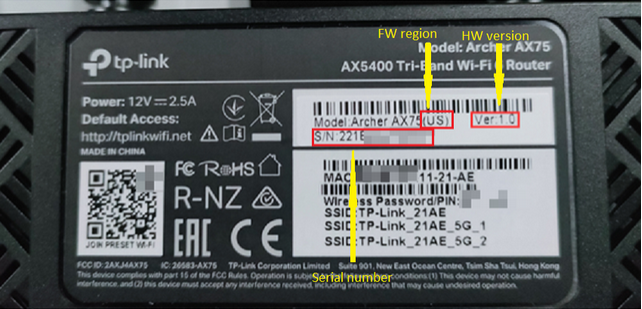
If you need help locating your model number on the label, see how to find the model number of your TP-Link device.
Method 2: Read the Engraved Text (USB Adapters)
Some TP-Link USB adapters do not have a printed label. For these products, the hardware version is engraved directly on the adapter body. Check the surface of the adapter for "Ver:" or "V" followed by a version number.
Method 3: Use the Web Management Interface
If you have a TP-Link device with an admin panel, you can look up the hardware version without physically checking the device. Log in to your device's web management page and navigate to a section such as Status or System Info. The hardware version will be listed there alongside other device details.
If you prefer using your phone, the TP-Link Tether app and the Deco app both offer a way to view device information without opening a browser. Check the device details section within the relevant app.
Why the Hardware Version Matters
TP-Link products can go through multiple hardware revisions over time. For example, a model may have a V1, V2, and V3 version, each with different firmware requirements. Downloading firmware or drivers meant for a different hardware version can cause compatibility issues. Always confirm your TP-Link hardware version before visiting the Download Center to find the right files for your device.
If you need to upgrade your router firmware after confirming your hardware version, see how to upgrade the firmware on TP-Link Wi-Fi Routers. For range extenders, see how to upgrade firmware on a TP-Link range extender.
Related FAQs
- How to Find the Hardware and Firmware Version of My TP-Link Device
- How to Find the Serial Number (S/N) on Your TP-Link Device
- How to find the correct product category for your model
- How to verify whether there is a hardware issue of TP-Link Range Extender
- How to verify whether there is a hardware issue of TP-Link Powerline Adapters
- How to verify whether there is a hardware issue of TP-Link DSL Modem Router
Looking For More
Is this faq useful?
Your feedback helps improve this site.
What’s your concern with this article?
- Dissatisfied with product
- Too Complicated
- Confusing Title
- Does not apply to me
- Too Vague
- Other
Thank you
We appreciate your feedback.
Click here to contact TP-Link technical support.
Recommend Products
This Article Applies to:
- Archer MR200
- Archer MR202
- Archer MR400
- Archer MR402
- Archer MR402-Outdoor
- Archer MR500
- Archer MR505
- Archer MR600
- Archer MX700
- Archer NX200
- Archer NX205
- Archer NX500
- Archer NX500-Outdoor
- Archer NX505
- Archer NX600
- NE200-Outdoor
- TL-MR100
- TL-MR100-Outdoor
- TL-MR105
- TL-MR108
- TL-MR3420
- TL-MR6400
- TL-WA1201
- TL-WA1801
- TL-WA3001
- TL-WA801N
- Tapo A201
- Tapo A202
- Deco BE22
- Deco BE25
- Deco BE25-Outdoor
- Deco BE65
- Deco BE65-5G
- Deco BE68
- Deco BE85
- Deco E4
- Deco M4
- Deco M5
- Deco P9
- Deco PX10
- Deco PX50
- Deco S7
- Deco X10
- Deco X10-4G
- Deco X20
- Deco X50
- Deco X50-5G
- Deco X50-DSL
- Deco X50-Outdoor
- Deco X50-PoE
- Deco X55
- Deco XE75
- Deco XE75 Pro
- Archer A6
- Archer Air R5
- Archer AX10
- Archer AX12
- Archer AX23
- Archer AX53
- Archer AX55
- Archer AX55 Pro
- Archer AX56
- Archer AX72
- Archer AX73
- Archer AXE75
- Archer BE220
- Archer BE220W
- Archer BE400
- Archer BE550
- Archer BE700
- Archer BE800
- Archer BE805
- Archer BE900
- Archer C20
- Archer C24
- Archer C50
- Archer C54
- Archer C6
- Archer C64
- Archer C80
- Archer C86
- Archer GE230
- Archer GE400
- Archer GE550
- Archer GE800
- Archer GXE75
- TL-WR1502X
- TL-WR3002X
- TL-WR3602BE
- TL-WR820N
- TL-WR840N
- TL-WR841N
- TL-WR844N
- TL-WR845N
- TL-WR902AC
- TL-ANT2424MD
- EH210
- EH310
- UA430C
- UA430D
- UA440C
- UA520C
- UC400
- UB500
- UB500 Plus
- UB600
- TL-PS110U
- Archer VR300
- Archer VR400
- Archer VR600
- Archer VX1800v
- TD-W8961N
- TD-W9950
- TD-W9960
- HA100
- Archer TBE400UH
- Archer TX20U Plus
- Archer TX20UH
- Archer TX30U Plus
- Archer TX35U Plus
- Archer TX50U
- Archer TX50UH
- Archer TXE50UH
- Archer TXE70UH
- Archer T2UHP
- Archer T4UHP
- Tapo A100
- Tapo A200
- Tapo C100
- Tapo C110
- Tapo C120
- Tapo C125
- Tapo C200
- Tapo C200C
- Tapo C200P2
- Tapo C202
- Tapo C206
- Tapo C210
- Tapo C211
- Tapo C212
- Tapo C216
- Tapo C220
- Tapo C222
- Tapo C225
- Tapo C230
- Tapo C232
- Tapo C236
- Tapo C245D
- Tapo C246D
- Tapo C250
- Tapo C260
- Tapo C310
- Tapo C320WS
- Tapo C325WB
- Tapo C400
- Tapo C400 KIT
- Tapo C400S2
- Tapo C401 KIT
- Tapo C410
- Tapo C410 KIT
- Tapo C420S2
- Tapo C425
- Tapo C425 KIT
- Tapo C460
- Tapo C460 KIT
- Tapo C465
- Tapo C500
- Tapo C501GW
- Tapo C510W
- Tapo C520WS
- Tapo C530WS
- Tapo C545D
- Tapo C560WS
- Tapo C566WB
- Tapo C575D
- Tapo C610 KIT
- Tapo C615F KIT
- Tapo C615G KIT
- Tapo C630 KIT
- Tapo C645D KIT
- Tapo C660 KIT
- Tapo C665G KIT
- Tapo C675D KIT
- Tapo C710
- Tapo C720
- Tapo C840
- Tapo D130
- Tapo D205
- Tapo D210
- Tapo D230S1
- Tapo D235
- Tapo DL110
- Tapo H500
- TC34
- TC40
- TC41
- TC43
- TC46
- TC47
- TC50 KIT
- TC53
- TC55
- TC60
- TC65
- TC70
- TC71
- TC72
- TC74
- TC82
- TC82 KIT
- TC85
- TC85 KIT
- TC90 KIT
- LS1005
- LS1005G
- LS1008
- LS1008G
- LS105G
- LS108G
- M7000
- M7005
- M7200
- M7350
- M7352
- M7400
- M7450
- M7650
- M7750
- M8550
- Archer T2E
- Archer T4E
- Archer TBE400E
- Archer TBE550E
- Archer TX20E
- Archer TX3000E
- Archer TX50E
- Archer TX55E
- Archer TXE72E
- Archer TXE75E
- TG-3468
- TL-WN781ND
- TL-WN881ND
- TX201
- TX401
- PGW2440 KIT
- TL-PA4010 KIT
- TL-PA4010P KIT
- TL-PA7017 KIT
- TL-PA7017P KIT
- TL-WPA4220
- TL-WPA4220 KIT
- TL-WPA7517 KIT
- TL-WPA7817 KIT
- RE200
- RE205
- RE220
- RE225BE
- RE235BE
- RE305
- RE315
- RE405BE
- RE450
- RE500X
- RE505X
- RE605X
- RE650
- RE655BE
- RE700X
- RE705X
- RE715X
- RE815XE
- TL-WA850RE
- TL-WA854RE
- TL-WA855RE
- TL-WA860RE
- Tapo RVA101
- Tapo RVA105
- Tapo RVA110
- Tapo RVA202
- Tapo RVA210
- Tapo RVA301
- Tapo RVA310
- Tapo RVA450
- Tapo RVA500
- Tapo RVA520
- Tapo RVB102
- Tapo RV20 Max
- Tapo RV20 Max Plus
- Tapo RV30 Max
- Tapo RV30 Max Plus
- Tapo RV50 Pro Omni
- LS1005
- LS1005G
- LS1008
- LS1008G
- LS105G
- LS108G
- TL-SF1005D
- TL-SF1008D
- TL-SG1005D
- TL-SG105
- TL-SG105-M2
- TL-SG108
- TL-SG108-M2
- TL-SG116
- TL-SX1008
- TL-SX105
- Tapo L430C
- Tapo L510E
- Tapo L520E
- Tapo L530E
- Tapo L535E
- Tapo L610
- Tapo L630
- Tapo L900-10
- Tapo L900-5
- Tapo L920-5
- Tapo L930-10
- Tapo L930-5
- Tapo P100
- Tapo P110M
- Tapo P115
- Tapo P300
- Tapo P304M
- Tapo P410M
- Tapo H100
- Tapo H110
- Tapo H200
- Tapo T100
- Tapo T110
- Tapo T300
- Tapo T310
- Tapo T315
- Tapo S110E
- Tapo S112
- Tapo S200B
- Tapo S200D
- Tapo S210
- Tapo S220
- KE100
- KE100 KIT
- UE200
- UE300
- UE300C
- UE302C
- UE306
- UE310C
- UE330
- UE330C
- UH400
- UH700
- UH720
- UH3020C
- UH5020C
- UH6120C
- UH7020C
- UH7021C
- UH9120C
- LS1005
- LS1005G
- LS1008
- LS1008G
- LS105G
- LS108G
- TL-SF1005D
- TL-SF1008D
- TL-SG1005D
- TL-SG1008D
- TL-SG105
- TL-SG105-M2
- TL-SG108
- TL-SG116
- TL-SX1008
- TL-SX105
- TL-SF1005D
- TL-SF1008D
- TL-SG1005D
- TL-SG1008D
- TL-SG105
- TL-SG108
- TL-SG116
- Archer T2U
- Archer T2U Nano
- Archer T2U Plus
- Archer T2UB Nano
- Archer T3U
- Archer T3U Nano
- Archer T3U Plus
- Archer T4U
- Archer TBE230U
- Archer TBE400U
- Archer TX10UB Nano
- Archer TX1U Nano
- Archer TX20U
- Archer TX20U Nano
- TL-WN722N
- TL-WN725N
- TL-WN727N
- TL-WN8200ND
- TL-WN821N
- TL-WN822N
- TL-WN823N
- UB400
- TX-VG1530
- TD-W8961N
- TX-6610
TP-Link Community
Still need help? Search for answers, ask questions, and get help from TP-Link experts and other users around the world.
This website uses cookies to improve website navigation, analyze online activities and have the best possible user experience on our website. You can object to the use of cookies at any time. You can find more information in our privacy policy . Don’t show again
Your Privacy Choices
This website uses cookies to improve website navigation, analyze online activities and have the best possible user experience on our website. You can object to the use of cookies at any time. You can find more information in our privacy policy . Don’t show again
These cookies are necessary for the website to function and cannot be deactivated in your systems.
TP-Link
accepted_local_switcher, tp_privacy_banner, tp_privacy_base, tp_privacy_marketing, tp_top-banner, tp_popup-bottom, tp_popup-center, tp_popup-right-middle, tp_popup-right-bottom, tp_productCategoryType
Youtube
id, VISITOR_INFO1_LIVE, LOGIN_INFO, SIDCC, SAPISID, APISID, SSID, SID, YSC, __Secure-1PSID, __Secure-1PAPISID, __Secure-1PSIDCC, __Secure-3PSID, __Secure-3PAPISID, __Secure-3PSIDCC, 1P_JAR, AEC, NID, OTZ
Analysis cookies enable us to analyze your activities on our website in order to improve and adapt the functionality of our website.
The marketing cookies can be set through our website by our advertising partners in order to create a profile of your interests and to show you relevant advertisements on other websites.
Google Analytics & Google Tag Manager
_gid, _ga_<container-id>, _ga, _gat_gtag_<container-id>
Google Ads & DoubleClick
test_cookie, _gcl_au
Meta Pixel
_fbp
Crazy Egg
cebsp_, _ce.s, _ce.clock_data, _ce.clock_event, cebs
lidc, AnalyticsSyncHistory, UserMatchHistory, bcookie, li_sugr, ln_or
