Table of Contents
TX301 1.0_Datasheet
Overview
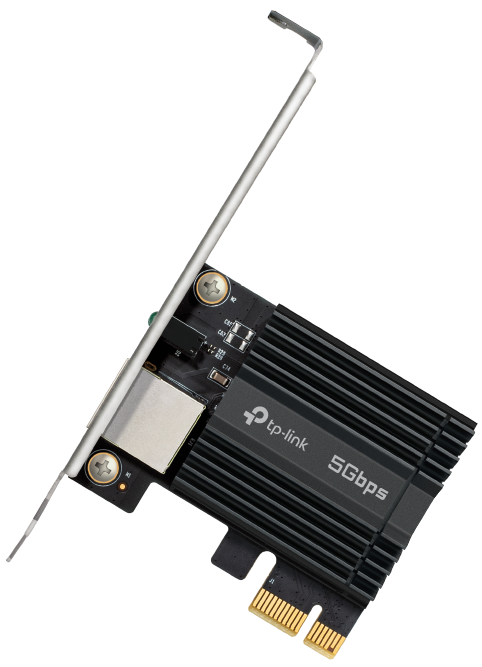
5 Gigabit PCIe Network Adapter
Highlights
|
Blazing-Fast 5 Gbps Networking Experience smoother streaming, faster downloads, and instant transfers with 5 Gbps speeds—up to 5× faster than typical Gigabit adapters. TX301 delivers next-level performance to every high-bandwidth task with the latest 5GBase-T technology.† |
|
|
|
|
|
Smarter Network for Your PC, Optimized by AIFlow AIFlow Internet Accelerator optimizes bandwidth, prioritizes your apps, and keeps every connection running smooth. |
|
|
|
|
|
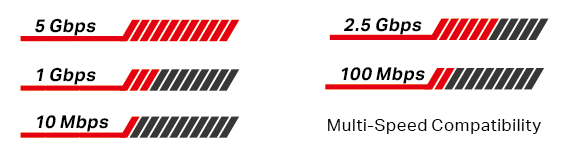
Versatile Compatibility With extreme speed and ultra-low latency, 5GBase-T is backwards compatible with Fast Ethernet and Gigabit Ethernet, automatically negotiating between higher and lower speed connections. |
|
 |
|
|
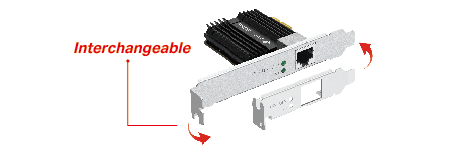
Low-Profile Bracket In addition to the full-height bracket, a low-profile bracket is also provided for mini tower computer cases. These customized options give you the flexibility to find a bracket that fits your board design perfectly. |
|
 |


Specification
| WLAN Features | |
|---|---|
| Hardware | |
| Standards | IEEE802.3, IEEE802.3bz, IEEE802.3ab, IEEE802.3u, IEEE802.3x |
| Interface | 1× PCI Express 3.1 x1, 1× RJ45 Ethernet Port |
| Network Media | 5GBASE-T/2.5GBASE-T/1000BASE-T/100BASE-TX/10BASE-Te |
| Data Rates | 5 Gbps, 2.5 Gbps, 1 Gbps, 100 Mbps, 10 Mbps |
| Flow Control | 802.3x |
| LEDs | 5G ×1, 2.5G-and-below ×1 |
|
Dimensions |
120.8 × 78.5 × 21.5 mm (4.8 × 3.1 × 0.8 in) |
| Others | |
| Package Contents | 5 Gigabit PCIe Network Adapter (TX301) Standard/Low-Profile Brackets Quick Installation Guide 1.5m CAT6A Ethernet Cable |
| Certification | FCC/CE/IC/NCC/JRF/VCCI/BSMI |
| System Requirements | Windows 11/10, Windows Server 2016/2019/2022/2025, Linux‡ |
| Environment | |
| Operating Temperature | 0℃~40℃ (32℉~104℉) |
| Operating Humidity | 10%~90% non-condensing |
| Storage Humidity | 5%~90% non-condensing |
Disclaimers
†Maximum wired data throughput rates are the physical rates derived from IEEE Standard 802.3 specifications. Actual wired data throughput is not guaranteed and will vary as a result of environmental factors, Ethernet cable class, and computer performance.
‡To ensure compatibility, you may need to update the adapter’s drivers after an OS update. You can check the full list of OS support in the download center at tp-link.com/download-center.