Tapo C410 V2.30_Setup Guide
Tapo C410 Version 2.30: Battery-Powered Outdoor Security Camera
Welcome to the setup guide.
To ensure equal access for all users, we offer this accessible setup guide. This guide is designed to meet accessibility needs, enabling a successful setup. It will introduce the appearance of your camera and solar panel, including its ports, buttons and labels, and then guide you through connecting the setup process.
Step 1. Know about your camera
In this section, we will describe the camera's appearance, including its ports, buttons, and labels.
1. You can find your camera in the package.
2. Next, place your camera on a horizontal surface, such as on a shelf or desktop. To ensure the camera is placed correctly, you should position it with the camera lens facing forward.
3. After positioning your camera correctly, we will introduce the ports, buttons and labels on your device in a certain order.
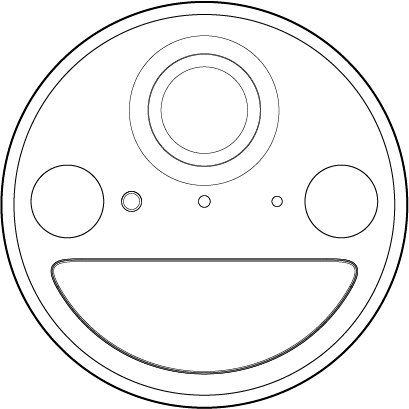
Lens: Located at the top front center for capturing things within its view.
Status LED: Directly below the lens. It shows your camera status. You can check the camera status in the Tapo app.
Light Sensor: It is on the left of the Status LED. For detecting if the environment is dark or bright.
Microphone: It is on the right of the Status LED. For capturing your voice.
Spotlights: On the far left and far right below the lens. Turns on in darkness for night vision to offer color images.
With the lens facing forward, rotate it 180 degrees horizontally so that the rear end of the camera faces you.
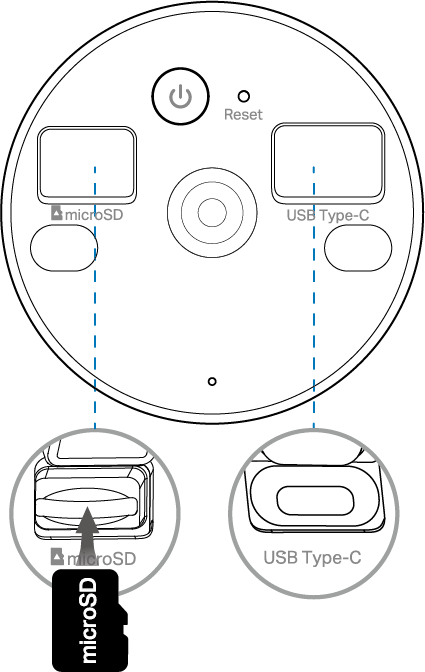
Mounting Hole: Located at the center for securing your camera onto the mounting bracket.
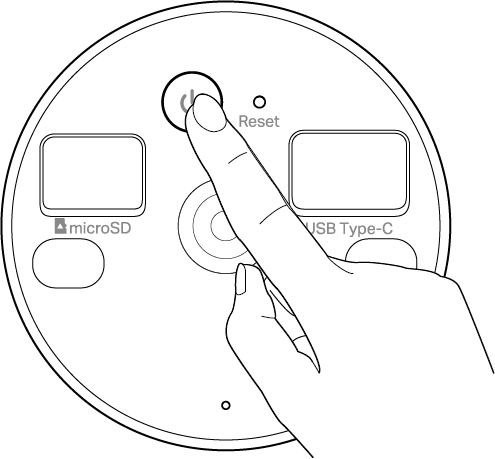
Power Button: Above the mounting hole. Press and hold the button for about 3 seconds to turn on/off the camera. You will hear a sound when turning on/off.
Reset: It is a tiny hole on the right of the Power Button. Use a pin to press and hold for 5s to reset Wi-Fi while keep other settings; press and hold for 10s to reset to factory settings. You will hear voice prompts when reset successfully.
microSD Card Slot: On the upper left next to the mounting hole. Open the cover, face the slot, and insert a microSD card with the notch on the right side.
USB Type-C Charging Port: On the upper right next to the mounting hole. Open the cover for USB charging.
Battery Compartment Screw Hole Covers: Each of the two covers is located directly below the microSD card slot and the USB Type-C charging port, respectively. Open the covers to see the screws; loosen them if you need to replace the battery.
Then, turn to the side of your camera. You can find the speaker and a mounting hole. The product info is through laser engraving.
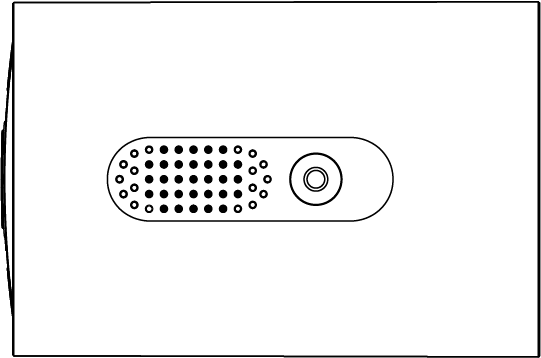
Speaker: Small perforated area, feels like tiny holes. For two-way audio and camera voice prompts.
Mounting Hole: Next to the speaker. For securing your camera onto the mounting bracket.
Product Label: Below the speaker. The product label is through laser engraving.
Step 2. Set Up
1. Get the Tapo app from the App Store or Google Play, then log in.

2. Press and hold the Power button for about 3 seconds to turn on the camera. You will hear a sound when turning on.
3. Tap the + button in the app and select your camera model. Follow app instructions to complete setup.
If you need help, please visit https://www.tapo.com/support/ for technical support, the user guide, FAQs, warranty & more.
For details on Tapo app accessibility, please check Accessibility Support.
How to Replace the Camera Batteries
Before You Start
1. To ensure safety and weatherproofing, replace the batteries only when necessary. Once replaced, ensure the cover is fully secured to restore dust and water resistance.
2. To ensure compatibility and safety, please contact our technical support or authorized subsidiaries to obtain genuine replacement batteries prior to installation.
3. DO NOT remove the battery to charge it with an external charger. The manufacturer assumes no liability for any issues or damage resulting from external charging.
4. Charge the batteries only via the camera's USB Type-C charging port or a Tapo solar panel.
5. To extend battery life, please avoid overcharging or over-discharging.
Battery Specifications
| Model | ICR-18650-26V |
|---|---|
| Voltage | 2.5 V-4.2 V(Nominal Voltage: 3.65 V) |
| Capacity | 2550 mAh ×2 |
| Battery Type | 18650 Rechargeable Lithium-ion Battery |
| Standard | IEC 62133-2 |
| Key Battery Materials | Used In |
|---|---|
| NCA/NCM | Positive Terminal |
| Graphite | Negative Terminal |
Caution: Use only the tools specified in the user manual during operation. Do not forcibly pry or scrape with metal tools to avoid short circuiting the battery or damaging the internal circuits.
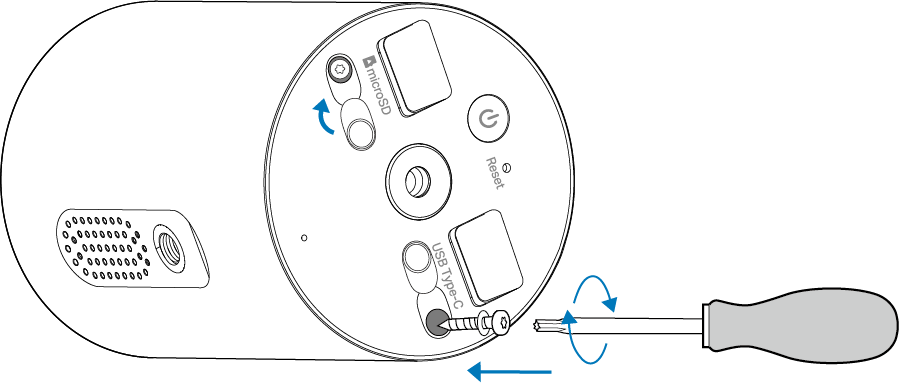
1. Power off the camera. Open the cover and use a T6 Torx/star screwdriver (not included) to remove the two screws to expose the holes.
Note: To maintain the weatherproofing performance, make sure the O-ring rubber seals on the screws are not misaligned or damaged.
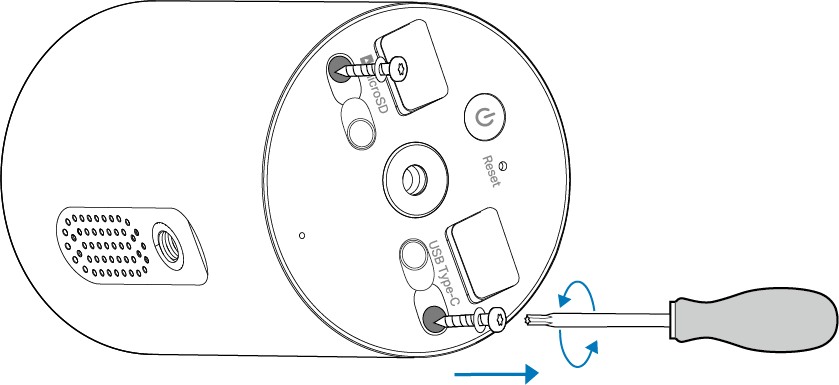
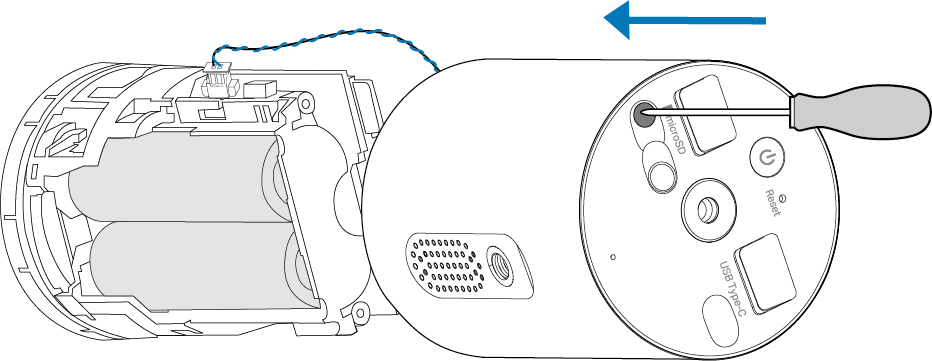
2. Gently push a round rod or pin punch (not included, Φ < 2.2 mm, L > 25 mm) into either hole to pop out the battery compartment, then carefully pull it out.
Note: Do not pull hard, as this may break the wire.
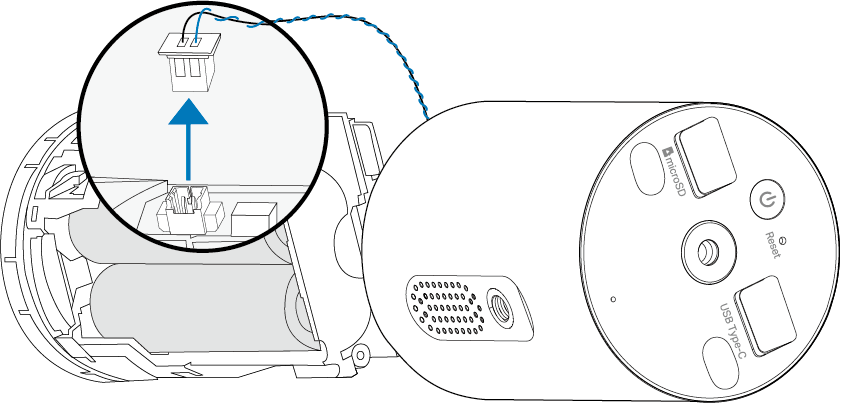
3. Pinch the plastic housing of the connector to unplug the speaker wire. Do not pull hard on the wire, as this may break it.
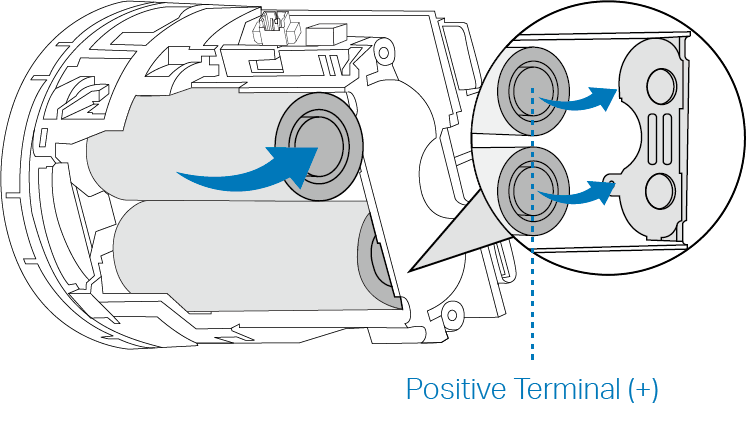
4. Take out the old batteries. Insert the new ones with the positive (+) terminals facing toward the metal contacts inside the compartment.
For Tapo batteries, you can feel that the positive end has a raised button with gaps around it, while the negative (-) end is completely flat and smooth.
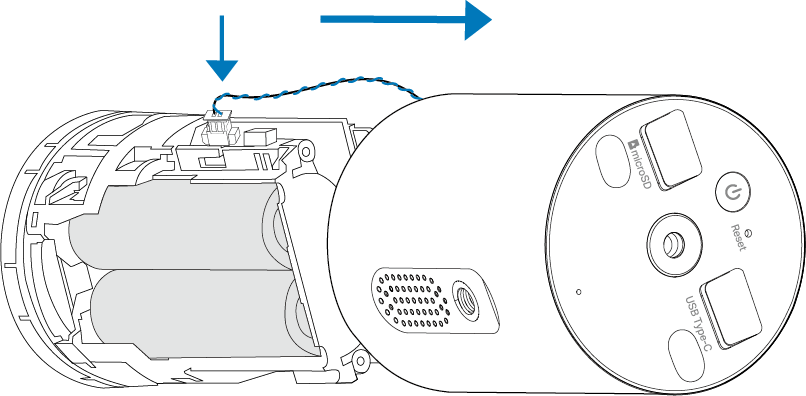
5. Pinch the plastic housing of the connector to plug the speaker wire back in. Align and slide the battery compartment back into the camera housing.
6. Gently press down on the front of the camera until the battery compartment is fully in place.
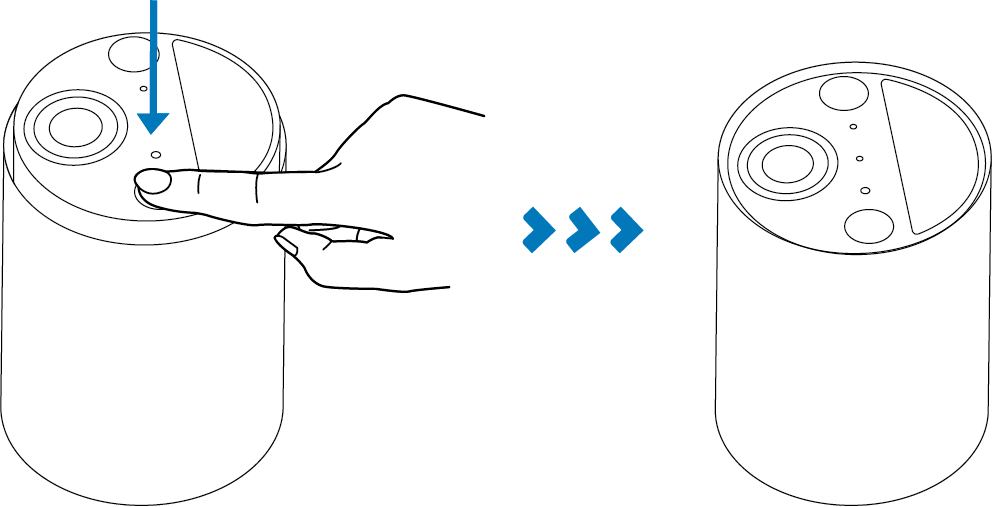
7. Retighten the screws with the O-ring rubber seals to secure the camera. Replace the covers and press them firmly into place.
Note: To maintain the weatherproofing performance, make sure the O-ring rubber seals on the screws are not misaligned or damaged.
8. Press and hold the power button on your camera for about 3 seconds to turn it on.
In compliance with EU regulations, waste batteries must be collected separately. They contain hazardous substances, and improper disposal can pollute the environment and harm human health and safety. Do not dispose of them with household waste. Please take them to designated battery collection points.
Procedure for Disposal of Spent Batteries:
Step 1 (Separation): After removing the old battery from the device, do not dispose of it with other waste, especially household trash.
Step 2 (Treatment): Cover the battery terminals with insulating tape to prevent accidental short circuits.
Step 3 (Storage & Transport): Place the battery in its original packaging or a non-metallic container. Avoid storing it with metal objects such as keys or coins. Keep it in a cool, dry place out of reach of children and pets, and promptly deliver it to a designated nearby collection point.
You can check local government's website for nearby collection points.
Safety Information
• Do not use damaged charger or USB cable to charge the device.
• Do not use the device where wireless devices are not allowed.
• When using a USB charger, make sure the charger is easily accessible.
• Keep the device away from fire or hot environments. DO NOT immerse in water or any other liquid.
• Do not disassemble, repair, or modify the product.
• Do not place near automatically controlled devices such as fire alarms. Radio waves emitted from this product may cause such devices to malfunction, resulting in an accident.
• Observe restrictions on using wireless products in fuel depots, chemical plants or when blasting operations are in progress.
• Do not use liquid to clean the product. Only use a dry cloth.
• Never put metal objects inside the product. If a metal object enters the product, turn off the circuit breaker and contact an authorised electrician.
• This product is not intended to be used when providing medical care. Consult the manufacturer of any personal medical devices, such as pacemakers or hearing aids to determine if they are adequately shielded from external RF (radio frequency) energy.
• Do not use this product in health care facilities. Hospitals or health care facilities may be using equipment that could be sensitive to external RF energy.
• Do not place heavy objects on top of the product.
• When you leave the product unused for a long time, unplug the product from the power outlet.
• This product may interfere with other electronic products such as TV, radios, personal computers, phones, or other wireless devices.
• Operating Temperature: -20°C ~ 45°C (-4°F ~ 113°F)
• This equipment can be powered only by equipment that complies with Power Source Class 2 (PS2) or Limited Power Source (LPS) defined in the standard of IEC 62368-1.
| CAUTION! Avoid replacement of a battery with an incorrect type that can defeat a safeguard. Avoid disposal of a battery into fire or a hot oven, or mechanically crushing or cutting of a battery, that can result in an explosion. Do not leave a battery in an extremely high temperature surrounding environment that can result in an explosion or the leakage of flammable liquid or gas. Do not leave a battery subjected to extremely low air pressure that may result in an explosion or the leakage of flammable liquid or gas. Risk of fire or explosion if the battery is replaced by an incorrect type. Use only manufacturer-specified compatible batteries. Always install batteries according to the correct polarity markings. Installing batteries in reverse polarity can cause severe overheating, fire, or explosion. |
Please read and follow the above safety information when operating the device. We cannot guarantee that no accidents or damage will occur due to improper use of the device. Please use this product with care and operate at your own risk.