What Should I Do if My VIGI Camera Displays Halos, Glare, or Ghosting Effects
Contents
Introduction
If your VIGI camera displays large halos, glare, ghosting effects, or other abnormal light artifacts, especially at night or in humid environments, image quality may be affected. These issues are commonly caused by lens contamination, condensation, strong light sources, or internal light reflections. This article provides troubleshooting steps to help improve image quality and reduce unwanted light artifacts.
Requirements
- VIGI Camera
Troubleshooting
Follow these steps if halos, glare, or ghosting effects appear in the camera image.
Step 1. Inspect the lens and camera housing
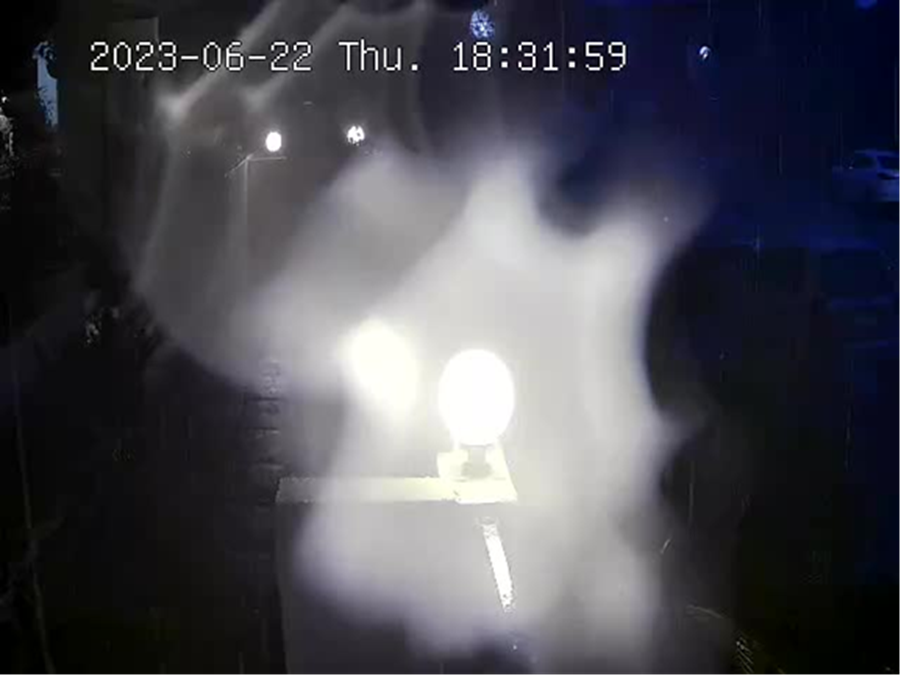
Large irregular halos are commonly caused by contamination on the lens or camera housing.
Common causes include:
- Fingerprints
- Dust and dirt
- Water stains
- Condensation
These contaminants may cause light to scatter or reflect irregularly, resulting in visible halos on the image.
Step 2. Clean the lens surface
To improve image clarity:
- Clean the lens using a soft, dry cloth
- Remove fingerprints, dust, and oily residue
- Ensure the protective cover is clean and free from water spots
Regular maintenance can help reduce light scattering and unwanted reflections.
Step 3. Identify glare and ghosting effects
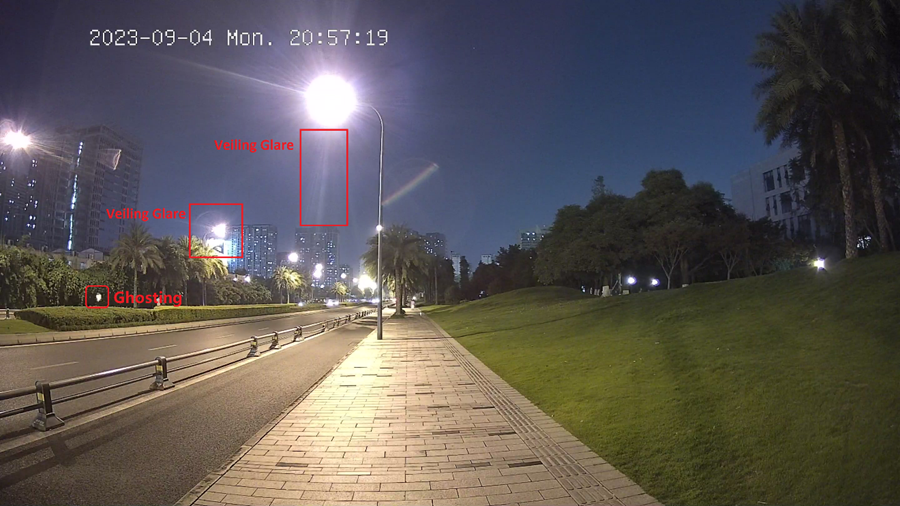
If strong light sources appear in the camera view, you may notice glare or ghosting effects.
Glare:
Glare appears around a bright light source and may include visible halos or streaks of light.
Ghosting:
Ghosting appears as a secondary light artifact located away from the original light source.
Both effects may reduce image contrast and obscure image details.
Step 4. Check for strong direct light sources
Glare and ghosting typically occur when light from a strong source repeatedly reflects between lens surfaces.
Common examples include:
- Vehicle headlights
- Spotlights
- Streetlamps
- Direct sunlight
- Other high-intensity lighting sources
These reflections may create halos, glare, or ghosting effects in the image.
Step 5. Optimize the installation environment
To reduce halos, glare, and ghosting:
- Adjust the camera angle
- Change the lighting position when possible
- Avoid pointing the camera directly at strong light sources
- Consider using a lens hood if supported by the installation environment
Optimizing the installation location can significantly improve image quality.
Conclusion
You have now completed the recommended troubleshooting procedures for halos, glare, and ghosting effects on a VIGI camera. By cleaning the lens, reducing reflections, and optimizing the installation environment, most image quality issues caused by unwanted light artifacts can be identified and minimized.
To learn more about each function and configuration, please visit Support Home to download or check the manual for your product.
QA
Q1: Why are halos more noticeable after rain or in humid weather?
A1: Moisture, condensation, water droplets, or dirt on the lens surface may increase light scattering and make halo effects more noticeable.
Looking For More
Is this faq useful?
Your feedback helps improve this site.


TP-Link Community
Still need help? Search for answers, ask questions, and get help from TP-Link experts and other users around the world.