다운로드 함 InSight PTZ5425
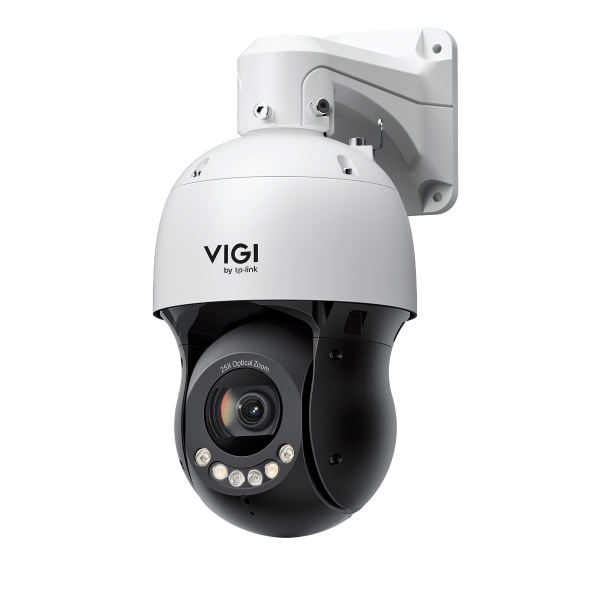 VIGI 5인치 4MP 25배 풀 컬러 네트워크 스피드 돔
VIGI PC Client
|
VIGI PC Client_x64_2.1.40 |
다운로드 | |
|---|---|---|
| 출시일: 2026-10-16 | 언어: 다중언어 | 파일 크기: 148.93 MB |
운영체제: Windows 10/11 |
||
|
신규 기능 및 개선사항: |
||
|
VIGI PC Client_x64_2.1.37 |
다운로드 | |
|---|---|---|
| 출시일: 2026-07-15 | 언어: 다중언어 | 파일 크기: 148.90 MB |
운영체제: Windows 10/11 |
||
|
새로운 기능 및 개선 사항: |
||
설정 동영상
-
How to Set Up InSight Pan & Tilt Cameras via VIGI App
This video shows how to set up InSight PTZ cameras, covering both hardware installation and app configuration. For app configuration, you will see three methods: Method 1: Scan/Add Device Method 2: Auto Discover Method 3: Manually Add
More Fold -
How to Set Smart Detection on Speed Dome PTZ
The VIGI InSight PTZ5425 is a 4MP 25× Optical Zoom Full-Color Network Speed Dome camera with 3D Detection Regions, ensuring detection areas remain aligned with actual targets during PTZ movement. This video shows how to set smart detection on your speed dome PTZ camera.
More Fold
자주 묻는 질문
- VIGI 로컬 VMS에 VIGI 장치를 추가하는 방법
- VMS는 어느 포트를 사용하나요?
- How to Use ANR on Omada Fusion Pro to Back up Recordings from a Camera SD Card
- VIGI 실외용 보안 카메라에 방수 액세서리를 설치하는 방법
- VIGI 장치의 IP 주소를 확인하는 방법
- VIGI 카메라에 소음이나 오디오 피드백이 발생할 때 해결 방법
- VIGI 앱에서 녹색 화면이나 픽셀화된 썸네일이 나올 때 해결 방법
- VIGI 카메라의 라이브 뷰에 플리커 현상이 생기는 문제의 해결 방법
- DORI 표준에 따라 VIGI 카메라 화질 성능을 가늠하는 방법
- VIGI 카메라에 비, 눈, 곤충, 또는 기타 불필요한 동작이 감지될 때 해결 방법
- VIGI 보안 시스템 완벽 가이드
- 타사 NVR, NAS, 또는 소프트웨어와 함께 VIGI 카메라를 사용하는 방법
- Omada Fusion Pro 라우터에서 Omada Guard 동영상 다운로드 방법
- Power Up Action 기능 사용 방법
- How to Discover and Manage Devices Using VIGI Config Tool
- VIGI 앱 시작 가이드
- How to Configure VIGI Cameras and NVRs for Sentinel ARC Integration
- VIGI 시리즈 카메라 설치 가이드
- How to Use Preset, Patrol, and Pattern Scan
- How to Configure Smart Detection on Speed Dome PTZ
- How to Use Home Position Function
- 일부 브라우저에서 VIGI IPC 및 NVR의 HTTPS 웹 인터페이스가 ‘안전하지 않음'으로 표시되는 이유는 무엇인가요?
- 스마트 트래킹 사용 방법
- 웹 UI를 사용하여 VIGI 카메라의 PTZ 제한을 설정하는 방법
- VIGI IPC 및 NVR의 웹 관리 페이지에 로그인하는 방법
- How to Set Privacy Mask on Speed Dome PTZ
- How to Use Manual Tracking
- 대기 기능 사용 방법
- PTZ 제어를 위한 RS-485 컨트롤러 사용 방법
- PTZ 예약 작업 설정 방법
- VIGI 카메라에 알람 서버를 설정하는 방법
- IPC에서 TP-Link DDNS 설정 방법
- VIGI 팬/틸트/줌 기능 사용 방법
펌웨어
펌웨어 업데이트를 통해 이전 펌웨어 버전의 문제를 해결하고 현재 성능을 향상시킬 수 있습니다.
업그레이드 방법
중요사항: 업그레이드 실패를 방지하기 위하여 업그레이드 프로세스를 진행하기 전에 다음 사항을 읽으십시오.
- TP-Link 장치를 구매한 지역의 로컬 공식 웹사이트에서 펌웨어를 업그레이드하십시오. 그렇지 않으면 보증에 위배됩니다. 여기를 클릭하여 사이트를 변경할 수 있습니다.
- 펌웨어 버전에 대한 장치의 하드웨어 버전을 확인하십시오. 잘못된 펌웨어로 인해 장치가 손상되고 보증을 무효화시킬 수 있습니다. (일반적인 경우 Vx.0=Vx.6/Vx.8 (예:V1.0=V1.6/V1.8); Vx.x0=Vx.x6/Vx.x8 (예:V1.20=V1.26/V1.28)
TP-Link 장치의 하드웨어 버전을 확인하는 방법 - 업그레이드를 하는 동안 전원을 끄지 마십시오. 이는 제품에 영구적인 손상을 일으킬 수 있습니다.
- 펌웨어 업그레이드를 하는 동안 무선 연결 끊김 문제를 방지하려면TP-Link 장치에 LAN/이더넷 포트가 없는 경우를 제외하고 유선 연결로 펌웨어를 업데이트하는 것이 좋습니다.
- 업그레이드를 하기 전에 컴퓨터의 모든 인터넷 응용 프로그램을 중단하거나 간단히 인터넷 선 연결을 끊는 것이 좋습니다.
- WinZIP 또는 WinRAR와 같은 압축 해제 소프트웨어를 사용하여 업그레이드를 하기 전에 다운로드한 파일의 압축을 해제합니다.
|
InSight PTZ5425(UN)_V1_1.0.2 Build 260810 |
다운로드 | |
|---|---|---|
| 출시일: 2026-09-10 | 언어: 다중언어 | 파일 크기: 29.30 MB |
|
새로운 기능 및 개선 사항: |
||
|
InSight PTZ5425(UN)_V1_1.0.0 Build 260519 |
다운로드 | |
|---|---|---|
| 출시일: 2026-06-09 | 언어: 다중언어 | 파일 크기: 29.31 MB |
|
최초 펌웨어 릴리스입니다. |
||
TP-Link 제품에서 타사 펌웨어를 사용하려면
TP-Link 제품의 일부 공식 펌웨어는 DD-WRT와 같은 타사 펌웨어로 대체 될 수 있습니다. TP-Link는 타사 펌웨어의 성능 및 안정성을 보장하지 않으며 유지 보수 또는 지원을 제공 할 의무가 없습니다. 타사 펌웨어를 사용하여 제품이 손상되면 제품 무상보증이 무효화됩니다.
프로그래머용 오픈 소스 코드(GPL)
참고: TP-Link 제품에는 GNU 일반 공중 사용 허가서 (“GPL“), 버전 1/버전 2/버전 3 또는 GNU 약소 일반 공중 사용 허가서 ("LGPL")의 적용을 받는 소프트웨어 코드를 포함하여 타사가 개발한 소프트웨어 코드가 부분적으로 포함되어 있습니다. 다음 GPL 라이선스 조건에 각 소프트웨어 조건을 사용할 수 있습니다.
여기에서 각 GPL 라이선스 조건을 검토, 인쇄 및 다운로드할 수 있습니다. GPL 코드 센터에서 GPL 소프트웨어 코드가 포함된 TP-Link 소프트웨어 목록을 포함하여 TP-Link 제품에 대한 직접 다운로드 및 세부사항에 사용되는 각 소프트웨어의 GPL 소스 코드를 받습니다.
각 프로그램은 상품성 또는 특정 목적의 적합성에 대한 묵시적 보증도 없이 그대로 배포됩니다. 자세한 내용은해당 GNU 일반 공중 사용 허가서를 참조하십시오.
앱

- VIGI App
TP-Link VIGI 앱을 사용하면 VIGI 장치를 간편하게 추가하고, 설정하며, 모니터링하고 제어할 수 있습니다.



GPL 코드
에뮬레이터
펌웨어 버전 |
작동 모드 |
언어 |
|
|---|---|---|---|
260519(UN)_Emulator |
- |
영어 |
참고 :
1. 에뮬레이터는 TP-Link 제품 관리 패널을 경험할 수 있는 가상 웹 GUI입니다.
2. 최신 펌웨어가 에뮬레이터 목록에 표시되지 않을 수도 있습니다.
3. 표시된 기능은 참고용이며 사용 가능 여부는 현지 규정에 따라 다를 수 있습니다. 자세한 내용은 데이터 시트 또는 제품 페이지를 참조하십시오.